Up next in 10


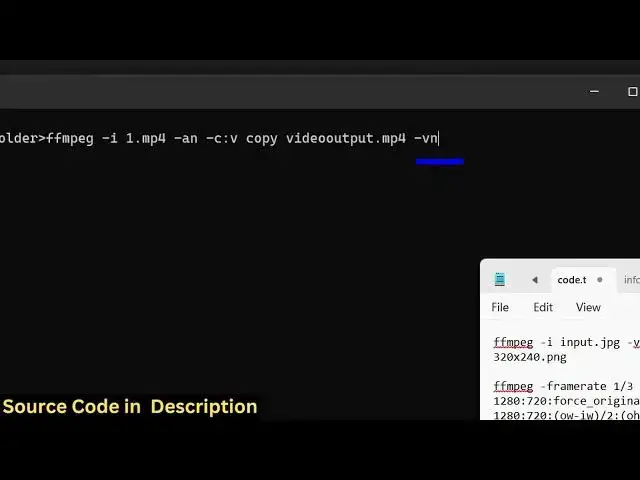
ffmpeg -i infile.mp4 -an -c:v copy videoout.mp4 -vn -c:a copy audioout.mp4
Show More Show Less View Video Transcript
0:00
uh hello guys welcome to this video So
0:02
in this video I will show you a ffmppg
0:05
command which will be able to split a
0:08
particular video into a video and audio
0:12
into different files So if you want to
0:15
split your video and audio into
0:16
different files you can use this very
0:19
simple fmpp command So we'll be taking
0:21
this uh video for example which is a 30
0:24
secondond video which contain both guys
0:28
video and audio So you can see it also
0:30
contains audio as well So what I will do
0:33
right here we will write a simple ffmpg
0:35
command which will split both the audio
0:38
and the video into different files So I
0:41
have given this command in the
0:42
description of this video So let me just
0:46
now write this command step by step and
0:48
explain to you
0:52
So just open a simple command line
0:55
window and uh just write here ffmppg
0:59
dash i and then you need to give the
1:01
input file name which in this case is
1:04
1.mpp4 So we are just providing it as
1:07
input file After that we just need to
1:09
say
1:10
dash which specifies we want to remove
1:14
the v video audio and then we are
1:16
copying the encoding settings and uh
1:19
this will be the video file without the
1:22
audio video output.mpp4 So we actually
1:26
remove the audio by using this flag
1:29
After that we also need
1:31
the audio file which doesn't contain
1:34
video So we for this we will use this
1:37
flag which is
1:39
VN For removing the audio we use this
1:41
flag -ash am for getting only the audio
1:44
we are using this flag And then we just
1:47
need
1:48
to copy the encoding settings of the
1:51
audio as well and then we simply say
1:55
audio
1:57
output.mpp4 So now this will create two
1:59
files First of all the file for video
2:02
and the second file for the audio So now
2:04
just if I just enter it you will see it
2:08
will create two
2:10
files You will see this is your video
2:13
file and this is your audio file So it
2:16
has split the video into two files One
2:20
for the video one for the audio So if I
2:22
play the video right here you will see
2:24
the video will play and it will not
2:26
contain the audio at all So the audio is
2:29
not
2:30
containing And uh now for the audio file
2:34
it will just be containing the audio
2:36
Hello guys welcome to this video right
2:38
here Right
2:39
here Then we So this is a very useful
2:42
command guys if you want to split your
2:45
uh video and audio into two different
2:47
files I've given this command in the
2:50
description of this video And also check
2:52
out my website
2:54
freemediattools.com which contains
2:56
thousands of tools
#Music Videos
#Software
#Multimedia Software