Up next in 10


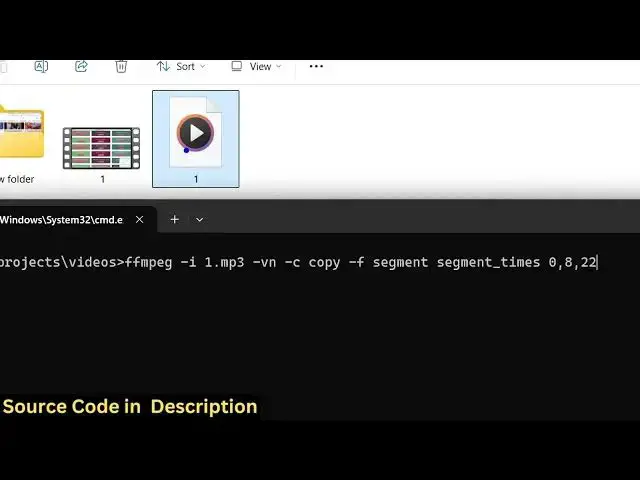
ffmpeg -i input.mp3 -vn -c copy -f segment -segment_times 0,8,22 output%d.mp3
Show More Show Less View Video Transcript
0:00
uh hello guys uh welcome to this video
0:02
so in this video I will show you how to
0:04
split your audio MP3 audio file into
0:07
multiple
0:08
files using you can provide time
0:11
intervals so that fmpg will
0:14
automatically split that audio file into
0:16
different segments so we are taking a
0:18
very simple example we have this mp3
0:20
file present in the directory if I open
0:23
this file you will see it's 2 minute 10
0:25
second long
0:27
if it So now I'll be showing you a ffmpg
0:31
command which will automatically split
0:33
this audio file into multiple files so I
0:37
have given this command in the
0:38
description of this video so we simply
0:40
write here ffmppg- i and then we will
0:43
just provide the file name right here so
0:46
1.mpp3 this is actually the file name
0:49
and then we apply this
0:52
-vn c we are copying the encoding
0:55
settings right here here you would see
0:57
that then we say -ashf and then we just
1:01
write segment and here we need to
1:03
provide the time intervals inside your
1:05
segment underscore times so I will say 0
1:10
to 8 just create one audio file and then
1:14
8 to 22 create another audio file so
1:17
what this command is doing it is
1:19
actually splitting this entire audio
1:21
file from 0 to 8 it will create one
1:24
audio file from 8 second to 22 second it
1:26
will create the second audio file and uh
1:29
then we will simply need to give the
1:31
output file name so we simply write here
1:34
output percentage sign
1:38
dmpp3 so this is actually the overall
1:41
command here and uh once I press the
1:45
enter key you will see it will actually
1:50
made so you just need to make sure that
1:52
you provide the full path
1:55
here so
1:59
segment just make sure that you put this
2:01
dash sign
2:03
here right here dash segment times so
2:06
just make this correction and once you
2:09
press enter here you will see it will
2:12
create these three audio files here it
2:15
will split your MP3 file this long file
2:18
into short files here so it has created
2:21
these four files automatically so the
2:24
first file will be around 8 secondond
2:29
long so you can see it has uh hello uh
2:34
hello so this length is 8 seconds and
2:36
then from 8 to 22 it
2:39
has created another file which is 15
2:42
second long and now this is actually the
2:44
third file so in this way with this
2:47
simple FMPG assuming that you have you
2:50
can simply split a long audio file into
2:53
multiple chunks or segments so that you
2:56
can create highlights of a specific
2:58
audio file so this is actually the
2:59
command uh I have given this command in
3:02
the description of this video so you can
3:04
hit this command and just provide the
3:07
time intervals where you need to split
3:09
the audio file and then it will create
3:11
automatically those files here so and
3:14
also check out my website here which is
3:16
freemediatools.com uh which contains
3:19
thousands of tools
#Music Videos
#Software
#Multimedia Software
#Podcasts