Up next in 10


Buy the full source code of application here:
Show More Show Less View Video Transcript
0:00
uh hello guys uh welcome to this video
0:02
So in this video I will show you a
0:04
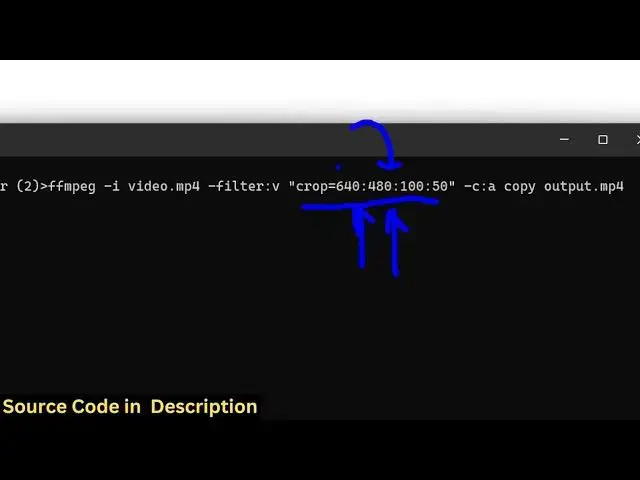
fmpfmpg command which will actually crop
0:06
your video You can even zoom on a
0:09
particular section in the video as well
0:12
So for this I have this video available
0:15
in the directory uh
0:17
video.mpp4 It's a 30-cond video and uh
0:21
so what this command allows you to do it
0:24
actually allows you to zoom at a
0:25
particular location and crop that
0:27
section So it can crop any part of the
0:32
video It can zoom on a particular
0:34
section that you want to and it can even
0:37
pan So it does all these three
0:39
operations So let me just ex execute
0:41
this command here I've also given this
0:43
command in the description of this video
0:45
So this command actually looks like this
0:47
We simply say ffmppg- i Then we provide
0:51
the input file name So here you just
0:53
need to replace uh whichever file you're
0:56
working here So we are working with this
0:58
video.mpp4 file So we provide this file
1:00
as an input right here And after that we
1:03
apply this video filter by using this
1:06
option dash
1:08
filter_v Uh this applies uh inside this
1:11
double quotes option you specify which
1:13
section of the video you need to crop
1:15
here So crop is equal to and then you
1:18
you need to provide the width of the
1:21
video and the height So we are saying
1:23
640 by 480 and this is your x coordinate
1:27
and the y-coordinate So this will cut
1:30
that specific part of the video and save
1:33
this inside output.mpp4 So as I press
1:36
the enter key you will see the a new
1:38
video will be created It will process
1:41
the entire video and once it finishes
1:44
you will see now it has actually cropped
1:47
that specific portion from the video and
1:49
created this video right here So you can
1:51
see it has specifically cropped that
1:54
specific portion that we told it inside
1:57
the command here And you can see so this
2:01
is actually a very useful command
2:03
because
2:04
uh if you need to crop a particular
2:06
section from the video you can execute
2:09
this command and
2:12
uh if you right click see the properties
2:15
of this video you will see it has been
2:17
resized to this is the 640 width 480
2:20
height So in this way you can uh crop
2:24
the video can even zoom on a particular
2:27
section So you provide this input then
2:30
you just apply this filter in double
2:33
quotes provide the crop
2:36
filter So if I change this here to x
2:40
coordinate let's suppose 200 and the
2:43
y-coordinate to be also 200 So it will
2:47
actually modify this and
2:51
uh the video will be resized to 200 by
2:55
200 and you will see it will
2:58
specifically zoom and crop that
3:00
particular portion of the video So so
3:03
this is the command here and you can
3:06
actually use to crop scale and zoom on a
3:09
particular location
3:11
So also check out my website here which
3:14
is freemediattools.com
3:15
uh which contains thousands of tools
3:17
regarding audio
#Software
#Multimedia Software
#Video Sharing