Up next in 10

FFMPEG Command to Create MP4 Video or Slideshow From Multiple Images in Terminal
Jun 3, 2025

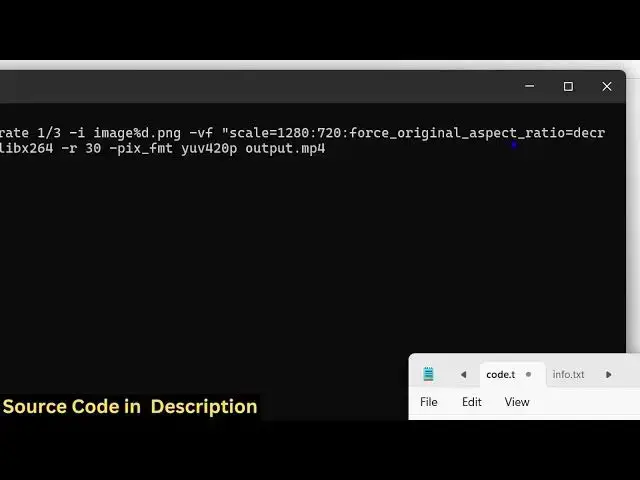
ffmpeg -framerate 1/3 -i image%d.png -vf "scale=1280:720:force_original_aspect_ratio=decrease,pad=1280:720:(ow-iw)/2:(oh-ih)/2" -c:v libx264 -r 30 -pix_fmt yuv420p output.mp4
Show More Show Less View Video Transcript
0:00
uh hello guys uh welcome to this video
0:02
So in this video I will show you how to
0:04
create MP4 video or slideshow from
0:07
multiple images inside ffmppg right in
0:10
the terminal
0:11
itself So you can see we have a series
0:13
of images uh PNG images if you see in my
0:18
directory So image one image 2 image
0:21
three image four image five image 6
0:23
image 7 image 8 So eight images are
0:25
there So you just need to make sure that
0:27
you rename all the images in this format
0:30
which is image one image two image three
0:33
So now I will show you how
0:35
to execute this command which is a very
0:38
simple command which will actually
0:40
convert all these images into a
0:43
slideshow where each image will appear
0:45
for a certain amount of time or 3
0:48
seconds namely and uh I have given this
0:51
command in the description of this video
0:53
So it's a simple f ofmppg
0:56
command So if I execute this command
0:59
here you will see f ofmppg frame rate 1
1:02
by3 So it each image will appear for 3
1:05
seconds And here we are providing this
1:08
pattern right here image and this is
1:10
your dynamic variable So 1 2 3 4 5 This
1:13
is your PNG images And there you we are
1:16
just applying this video filter We are
1:18
scaling this images into a fixed width
1:21
and height And we are maintaining the
1:23
aspect ratio And after that you can see
1:27
this is a little bit complex command And
1:29
then we are encoding the video using
1:30
this encoder lib
1:32
x264 And this is your output file So now
1:36
what happens as I press the enter key
1:38
you will
1:39
see this command will execute for each
1:42
image And now this output file has been
1:45
created This is your output video file
1:47
If I try
1:50
to just see the output file you will see
1:54
each image will appear for 3 seconds and
1:56
after that the next image will come You
1:58
will see it actually this is actually a
2:01
slideshow video which is made from a
2:04
series of multiple PNG images So you can
2:07
easily do this with any sort of image It
2:09
can be JPG PNG image You can see the
2:12
slideshow Each image is appear appearing
2:15
for 3 seconds So this is actually the
2:18
fMPPG command here You can easily create
2:20
a video from a series of images And uh
2:24
now we can even modify this command
2:26
right
2:28
here
2:30
So let me just show you So what we can
2:35
do we can change how much time it
2:38
appears each image appears So we can
2:42
change this 1x3 So you just need to
2:45
change if you want each image to appear
2:47
for 5 seconds So you will change it from
2:49
1x3 to 1x 5 So now what happens each
2:53
image will appear for 5 seconds and then
2:55
it will create this video file for you
2:58
So it's a slideshow file So now what
3:00
happens if you see each image is
3:02
appearing for 5 seconds So now the total
3:05
length of the video is 40 seconds
3:07
because eight images are there So 5 by 8
3:11
is 40 So you will see each image is
3:13
appearing for 5 seconds So this is
3:16
actual FMPG command guys uh the link uh
3:20
I've given the command in the
3:21
description of the video and also check
3:23
out my website
3:25
freemediattools.com which contains
3:27
thousands of tools regarding audio video
#Software
#Multimedia Software