Up next in 10

FFMPEG Command to Create Instagram Reels Vertical Sized Video With Blurred Background in Terminal
Jun 3, 2025

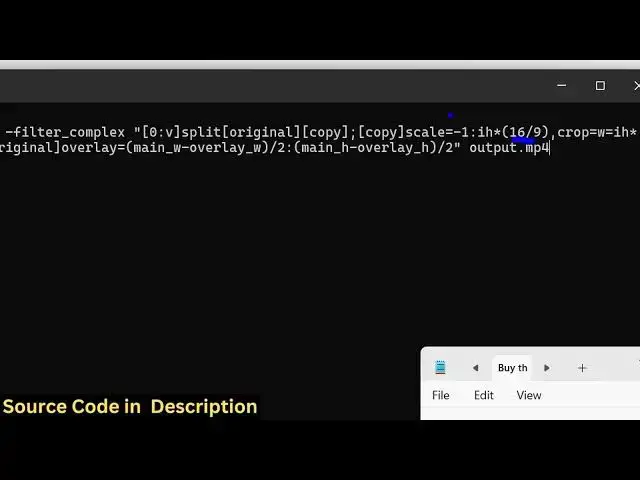
ffmpeg -i input.mp4 -filter_complex "[0:v]split[original][copy];[copy]scale=-1:ih*(16/9),crop=w=ih*9/16,gblur=sigma=20[blurred];[blurred][original]overlay=(main_w-overlay_w)/2:(main_h-overlay_h)/2" output.mp4
Show More Show Less View Video Transcript
0:00
uh hello guys welcome to this video So
0:02
in this video I will show you how to
0:04
convert your uh video file into a
0:07
vertical video such as Instagram reel
0:11
with a blurred background So you have
0:13
seen vertical videos on social media
0:16
which actually have blurred background
0:19
uh which is essentially goes viral as
0:21
well So we can easily create this inside
0:23
ffmpg
0:26
uh using ffmpg So you can take any
0:29
horizontal video as well So this is a
0:32
simple horizontal video 1280 by 720 size
0:37
here So it's a very normal video You can
0:40
even create convert this into a vertical
0:43
video So there is a simple command in
0:45
ffmppg So just open your command line
0:48
and just execute this command that I
0:51
have also given this in the description
0:54
as well So it's a little bit complicated
0:56
command We are using some complex
0:58
filters for this So you can just go to
1:02
the description and copy this command So
1:04
let's let me paste this command here and
1:07
uh let me just explain you what is
1:09
happening right here So first of all we
1:11
are providing
1:13
fmpp i and then we are providing the
1:15
input file here
1:17
input.mpp4 and then we are applying this
1:20
uh advanced filter which is uh dash
1:22
filter complex So in ffmpg you can apply
1:28
one or more filters using dash filter
1:31
complex So right here after that we say
1:34
in double quotes So this is
1:37
your splitting filter here Right we are
1:40
splitting the video and then we are
1:42
scaling this
1:43
video by providing this uh 16x9 aspect
1:49
ratio So this is this is some complex
1:53
math here So you can see that then we
1:56
are c cropping the video as well by
1:58
providing this
2:00
width and this is the more most
2:02
important thing right here So we are
2:04
taking this 16x9 video and converting it
2:07
to 9x6 which is your vertical video
2:11
which Instagram or ver this res videos
2:16
uses 9 by6 aspect ratios We are
2:19
converting this and adding a simple blur
2:22
background as well So here we are also
2:24
adding blur background to the video
2:27
using this gshian blur sigma is equal to
2:32
20 and then we
2:35
are centering the video by providing
2:38
some kind of shadow overlay as well You
2:41
will see
2:42
that So as I execute this command here
2:45
let me enter it So you just need to make
2:48
sure the input file is there So the name
2:52
of the file is 1.MPP4 Let me replace
2:57
it So now the command is running and
3:01
just as soon as the command finishes you
3:04
will see the output video will be
3:05
converted to a vertical video with the
3:09
blurred background
3:14
So so this will this command will save
3:17
you a lot of time because if you have a
3:19
horizontal video and if you don't want
3:21
to create another video you can change
3:24
your horizontal video to vertical video
3:28
So now the command has successfully
3:30
finished and you will see this output
3:32
video file has been created If I try to
3:35
open
3:39
this Oh hello guys So you can see
3:42
exactly it has converted this horizontal
3:45
video into a vertical video something
3:48
like Instagram real video You can see
3:51
that it also added this uh blurred
3:54
background as
3:56
well It's it also centered the video as
4:00
well So it's compatible The video can be
4:03
seen in mobile devices You will see it's
4:06
completely responsive as well
4:09
So this is a very useful command Uh I
4:13
personally use this command a lot So
4:16
I've given this command in the
4:18
description of this video So you can def
4:20
apply this to any kind of
4:22
video You can see
4:25
that So thank you very much for watching
4:28
this video and also check out my website
4:32
freemediatools.com which contains
4:34
thousands of tools
#Online Media
#Online Video
#Multimedia Software
#Photo & Video Sharing
#Video Sharing