Up next in 10


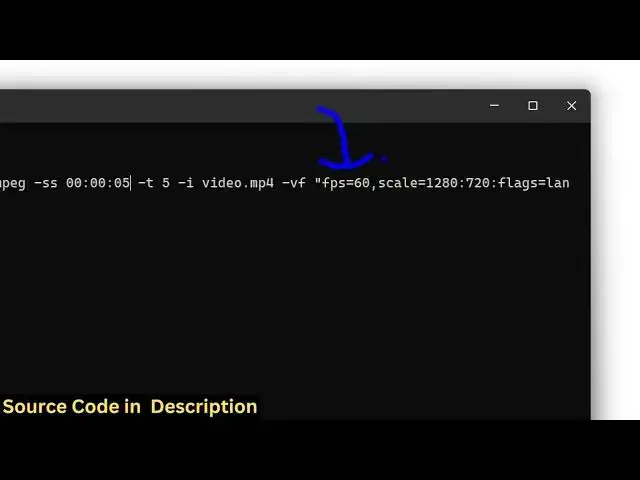
ffmpeg -ss 00:00:25 -t 5 -i video.mp4 -vf "fps=60,scale=1280:720:flags=lanczos" -gifflags -transdiff -y output.gif
Show More Show Less View Video Transcript
0:00
uh hello guys welcome to this video so
0:02
in this video I will show you how to
0:04
create a GIF animation from an existing
0:07
video MP4 video so if you have a video
0:10
file if you want to construct a small
0:13
little GIF
0:16
animation so I'm taking this simple
0:18
video right here if you see it's a
0:20
30-cond video and uh I will create a
0:23
some GIF animation from using a very
0:26
simple fMPPG command where you can
0:29
provide uh a starting duration so at
0:32
which time period you want to create a
0:34
GIF animation so we will provide the
0:36
starting time in this
0:38
format so for this you just need to have
0:41
fmpp installed i've given this command
0:44
in the description of this video so let
0:46
me just paste it and show to you so here
0:50
first of all we are providing
0:53
a the time period from which you need to
0:56
create the GIF animation so let me just
0:59
provide here the time
1:02
period which will be 0 0 col 0 0 col 0
1:07
05 so this is the starting duration and
1:11
then for how long the length of the gift
1:13
so here dash d five so the length of the
1:16
GIF animation will be 5 seconds so here
1:19
we are explicitly providing it and then
1:21
we are giving this video as an input
1:24
dash I
1:26
video.mpp4 and then we are providing
1:28
this uh video filter we are setting the
1:31
FPS to be 60 we are scaling it to 1280
1:35
into 720 so this will scale the GIF
1:38
animation to the width of 1280 and
1:42
height of 720
1:44
and then we are providing a bunch of
1:46
encoders and then this is your output
1:49
GIF file which will get created so as
1:52
soon as you do
1:53
this enter it you will see the GIF file
1:57
will get
1:59
created so this is actually your GIF
2:03
animation
2:05
file so if I try to open this you will
2:08
see it will play it
2:11
so you can see that in this easy way you
2:15
can create a GIF animation from a video
2:18
file using this command and you can
2:20
adjust all these
2:22
options so here we provide the starting
2:25
duration for how
2:28
long everything you can customize it you
2:30
will see if I say 15 the length of the
2:34
GIF animation 8 second
2:40
so you will
2:43
see so this is actually in this way you
2:46
can create small little GIF animations
2:49
from a video file using ffmppg right in
2:52
the terminal
2:53
itself so I've given the command in the
2:56
description of this video and also check
2:59
out my website freemediatools.com
3:02
uh which contains thousands of tools
#Movies
#Online Goodies
#Clip Art & Animated GIFs
#Animated Films