Up next in 10


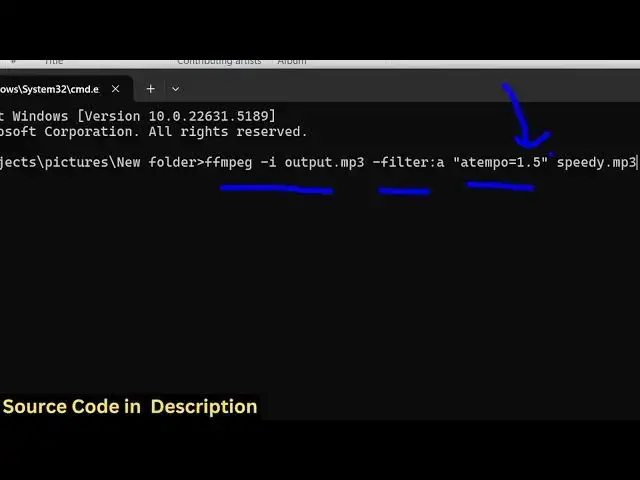
ffmpeg -i input.mp3 -filter:a "atempo=1.5" output.mp3
ffmpeg -i input.mp3 -filter:a "atempo=0.75" output.mp3
Show More Show Less View Video Transcript
0:00
uh hello guys uh welcome to this video
0:02
So in this video I will show you how to
0:04
increase or decrease the speed of an
0:06
audio file inside
0:08
ffmpg So I will write a simple command
0:12
which will do this process automatically
0:14
So we have this mp3 file here If you if
0:16
I open this file it contains this audio
0:20
Hello guys So welcome name of the file
0:21
here 1.mpp4
0:23
MP4 and then used the so this is uh the
0:28
audio file that we are working right
0:30
here So just open a command line window
0:32
and just uh write this command right
0:34
here
0:35
ffmpg and then -ash i for providing the
0:39
input file here So input is output.mpp3
0:42
This is our input file So we're just
0:44
providing it fmpp i the input file name
0:48
After that there is a filter right here
0:50
that you need to provide here dash
0:52
filter a colon a and then in double
0:56
quotes you need to manipulate this uh
0:58
property here a tempo and we will just
1:02
write 1.5 So first of all I will show
1:05
you how to increase the speed of the
1:08
audio So here we are providing 1.5 This
1:12
will increase the speed and then
1:14
followed by the output file name So let
1:16
me just create a file
1:19
speedy.mpp3 So very simple command we
1:22
simply provide the input right here Then
1:24
we apply this filter a tempo is equal to
1:26
1.5 and then we provide the output file
1:29
So now it will create this file here If
1:31
you see speedy and if I try to open this
1:34
file just listen Uh hello guys welcome
1:36
to this studio So in this video I'll
1:38
show you how to change frame per second
1:40
of a particular video or also speed of a
1:42
video using f So you can see the speed
1:45
of the audio is uh increased So it
1:48
depends upon this value You can even
1:50
change this to let's suppose
1:53
2.5
1:55
So now it will be more increased if I
1:59
show you Otherwise in this video I'll
2:02
show you how to change frames per second
2:03
of the video or also speed of the video
2:05
So this is actually the command guys
2:07
It's very simple uh in ffmppg to
2:10
increase the audio of the file You just
2:12
need to manipulate this property here A
2:14
tempo filter So higher the value higher
2:18
will be the speed So now if you want to
2:20
decrease it you simply decrease this
2:22
value So you simply say
2:24
0.75 So this will decrease the speed of
2:27
the video So here we are decreasing this
2:30
And let me just create slow.mpp3 So it
2:34
will slow down the speed And you can see
2:38
it has created this file here slow Just
2:41
listen
2:42
this Uh hello guys welcome to this video
2:45
So in this video I'll show you how to So
2:49
you can see that uh the speed is
2:53
decreased So this is actually dependent
2:55
upon this value Let me just make it
2:58
0.50 So it will be even
3:03
slower So it is very much easy to uh
3:08
Hello guys
3:10
Well so this is the actual So in this
3:14
way guys uh in ffmppg you can manipulate
3:17
the speed of the audio file very easily
3:19
This is a command and thank you very
3:21
much for watching this video and uh also
3:25
check out my website freemediatools.com
3:28
uh which contains thousands of tools
3:30
regarding audio video and image
#Software
#Multimedia Software