Up next in 10

CodeGeeX The Most UNDERRATED VSCode AI Coding Assistant – Better Than GitHub Copilot & Claude
Jul 22, 2025

Get the full source code of application here:
Show More Show Less View Video Transcript
0:00
Uh hello guys, welcome to this video. So
0:01
in this video I'll show you a AI
0:03
platform similar to GitHub copilot. Uh
0:06
this uh plug-in allows you to understand
0:09
it's a program assistant tool. It's
0:12
called as code geeks c o d e ge x. It's
0:17
a Chinese website. It's also available
0:19
in English as well. Originally it's a
0:21
Chinese kind of a AI assistant similar
0:25
to GitHub copilot and it has all the
0:28
extensions available for all the editors
0:30
VS code PyCharm web studio Android
0:34
Studio. So this is actually the
0:37
platform. So if you just go to Google
0:39
just type here code
0:41
geeks
0:43
AI. So this will be the platform which
0:45
comes right here. It's also on GitHub as
0:49
well. So you can check out there.
0:54
So now if you go to installation simply
0:59
go to extensions and just type in the
1:01
extensions tab which is code geeks. So
1:05
as you write this now this extension
1:08
will come right here.
1:11
It's almost having 1 million installs.
1:14
So it's a AI powered coding assistant
1:16
which can suggest code.
1:18
So
1:20
just click the install button to
1:22
activate this plug-in. So once you
1:25
activate this plug-in in the sidebar
1:28
section, this will show.
1:36
So just wait for the installation to
1:38
complete. So,
1:41
so just accept the s uh terms and
1:43
conditions and then login
1:46
uh with uh just click open.
1:50
So here you can login with your Google
1:51
account. So click on login.
1:58
So just today it's this website is in
2:01
Chinese. So just if you are not Chinese
2:04
user you can turn on the Google
2:06
translate. So as soon as you do this you
2:09
will be automatically logged in. So now
2:12
you can open your VS code. So right in
2:14
the sidebar section this icon will show
2:17
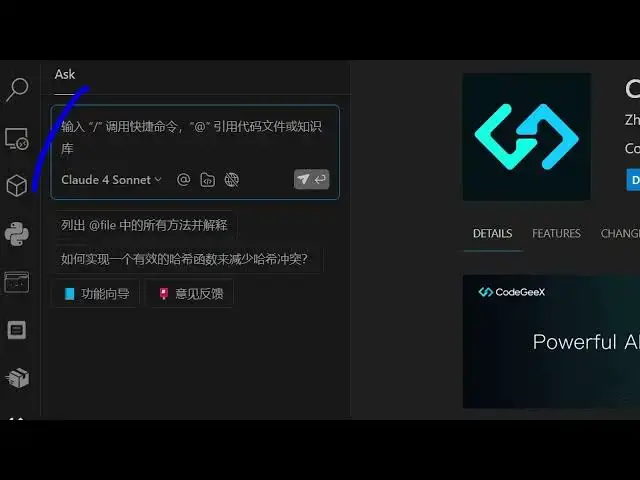
code geeks and simply activate this. So
2:20
once you activate this you will have
2:22
this chat prompt and one problem is that
2:25
in Chinese here you can see you can use
2:27
all the models AI models. So you are
2:31
using the anthropic claude for sonet
2:33
model. They also have their own pro
2:35
model as well.
2:37
So I can generate here any code here. So
2:39
I will say build a
2:41
I can open a file right here. Just
2:44
attach open a file right here. You can
2:46
even attach files as well.
2:49
So just select whatever file that you
2:52
want to attach.
2:54
So I attach this. So here I will say
2:56
build a simple image to PDF web app and
3:02
browser.
3:04
So as soon as you do this guys, you will
3:06
see it will try to generate the file for
3:08
you automatically the source code.
3:19
So
3:22
it will automatically insert this and uh
3:27
send you can see that.
3:42
So it is you can see automatically it is
3:44
doing it the job here. After you can run
3:47
this application
3:49
once the application is generated. So
3:51
you can see it created a simple image to
3:54
PDF application.
3:56
So image to PDM. So you can see
3:58
instantly this is the application that
4:00
it generated. So we can ask you to as
4:04
well you can attach the file here. Just
4:07
reference the file whatever file. So
4:09
it's completely free to use guys. You
4:11
can see we are using the latest cloud 4
4:13
model. Please uh modify the source code
4:19
and just write inside the file.
4:25
Make a scientific
4:27
calculator
4:29
in simple file. Just write the code
4:33
inside the file.
4:36
If you just give the instructions here,
4:39
it will try to automatically
4:42
build out the scientific calculator.
4:50
Please automatically.
5:04
So as you can see the speed here it is
5:06
automatically
5:08
suggesting the source code. So this is
5:12
the AI coding assistant. So if you go to
5:14
any file it can even suggest you th some
5:17
things as well. So if you just open
5:20
just write this.
5:24
So as you can see it is just need to
5:27
press the tab key to accept the
5:29
suggestions. So just require.
5:32
So as you can see it is uh suggesting
5:34
me. So I will simply press the tab key
5:37
and after that as you write again it is
5:41
suggesting you you can see.
5:47
So in this easy way guys you can use
5:49
this extension. It's very good extension
5:51
and it's completely free to use. As you
5:54
can see it's having almost 1 million
5:56
installs. So it's similar to GitHub
5:58
copilot but the thing about this
6:01
extension is that it doesn't cost you
6:03
money as opposed to GitHub copilot. So
6:06
as you can I basically suggested all the
6:09
features right here. So it basically
6:12
suggest you suggestions right here.
6:25
You can see
6:27
it can be in any language. Here you can
6:29
see as I'm writing the code here it is
6:31
suggesting me.
6:35
So definitely install this extension
6:37
guys, code geeks AI coding assistant and
6:41
thank you very much for watching this
6:43
video and also check out my website
6:46
freemediattools.com
6:48
uh which contains thousands of tools.
#Programming
#Software