Up next in 10

Code View VSCode Extension is INSANE – Track & Time Travel Through Code Instantly!
Aug 15, 2025

Get the full source code of application here:
Show More Show Less View Video Transcript
0:00
Uh hey guys, welcome to this video. So
0:01
in this video, I'll show you a very
0:03
important extension for VS code where
0:05
you can actually view the code. If you
0:08
go to the extension tab, just type this
0:10
code view. In the extensions tab, this
0:14
extension will come right here. From
0:16
this extension, you will be able to
0:18
track and visualize your code changes
0:20
over time. So if you make multiple
0:22
changes in a single file, then you can
0:24
keep track of those changes by using
0:26
this extension. So it's I've basically
0:29
used this extension a lot and I
0:31
basically like it. So once you activate
0:33
this extension you will see it will be
0:36
added.
0:39
So
0:41
once it is open you basically open any
0:44
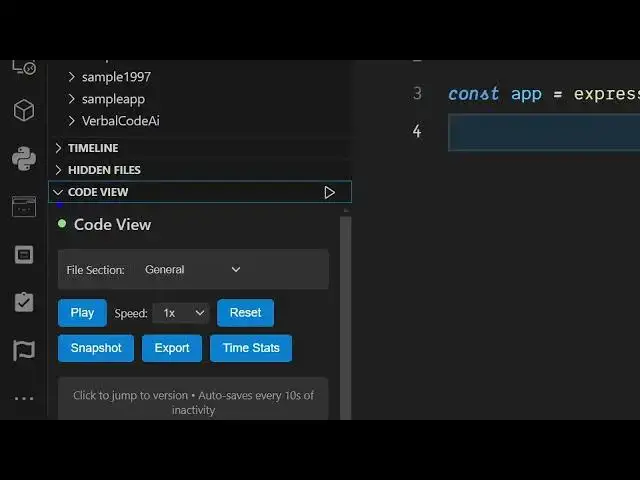
file and you basically see this icon
0:47
appearing.
0:52
So right here this icon will appear.
0:57
Yeah. So this timeline icon will appear
1:00
right here. Code view.
1:05
So I think Yeah. So this is the icon.
1:21
So right here in the bottom section
1:23
corner of the screen you will see this
1:25
option appear in code view and you
1:28
simply
1:31
uh if you make any sort of changes here
1:33
let's suppose
1:43
uh you click on play.
1:49
You can even create or take the snapshot
1:52
of this as well.
2:03
So after uh every 10 seconds it will
2:06
save your code and now you can keep
2:08
track of what sort of changes you made.
2:15
So if you make any sort of changes just
2:17
wait for 10 seconds it will keep track
2:20
of you can even take snapshot as well.
2:50
So here you just need to select the file
2:52
here whichever file that you're working.
2:59
So this is the extension guys.
3:00
Definitely try this code view
3:05
and also check out my website
3:09
freemediatools.com
3:11
uh which contains thousands of tools.
#Programming
#Business & Productivity Software