Up next in 10


Get the full source code of application here:
Show More Show Less View Video Transcript
0:00
Uh hello guys, welcome to this video. So
0:02
in this video I'll show you a very
0:04
prominent VS code extension which is
0:06
used by almost every developer which is
0:09
called as code spell checker. And as you
0:12
can see it's used by 15 million
0:14
developers and by the name itself
0:18
it checks the spelling mistakes that you
0:21
have done inside your source code in VS
0:25
code. Not necessarily the mistakes
0:28
syntax wise but if you have made a
0:31
spelling mistake such as declaring a
0:34
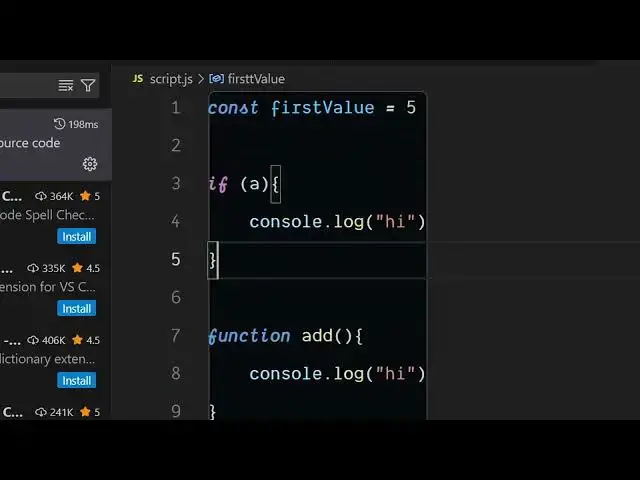
variable name which is like this first
0:37
value. So it will underline that. So if
0:40
you don't use this extension and make a
0:42
mistake in declaring a variable as you
0:46
can see first value spelling is uh not
0:49
right. But this code will execute proper
0:53
because this code doesn't have any sort
0:55
of uh syntax errors. It does it just
0:59
have the spelling mistake.
1:01
So after activating this extension,
1:03
click on install and activate. Now this
1:06
will show you this underline. So as you
1:09
are scrolling your code, you will find
1:11
out that you have made this spelling
1:14
mistake and you can easily correct that
1:18
manually. And after that now your code
1:21
is
1:23
correct spelling wise also. So here it
1:26
supports all the languages and you if
1:29
you make any sort of mistake it will
1:32
detect all the spelling mistakes
1:37
where it is correct it will not show you
1:40
but when you have made mistakes in
1:43
spelling it will underline those using
1:46
this blue underline. This is not a
1:48
syntax error just
1:51
you can ignore these errors but it's
1:53
still very much useful to use this
1:56
plug-in in VS code to actually check for
1:59
spelling mistakes and as you can see
2:01
it's a JavaScript file it works with all
2:04
the languages it can be a PHP file as
2:06
well let's suppose here you declare a
2:09
variable
2:19
So as you can see the first variable
2:21
name spelling mistake is there so it
2:24
underlines it so you can correct it.
2:26
It's a very useful extension definitely
2:28
install it inside your VS code. Also
2:32
check out my website freemediattools.com
2:35
uh which contains thousands of tools.
#Software
#Educational Software