Up next in 10

CLINE VSCode IDE Open Source INSANE FREE AI Coding Assistant Similar to CLAUDE,GEMINI & CHATGPT
Jul 12, 2025

Get the full source code of application here:
Show More Show Less View Video Transcript
0:00
Uh hello guys, welcome to this video. So
0:02
in this video I'll show you a AI coding
0:04
assistant called as client which is
0:07
opensource and it's completely free
0:10
forever and I will show you how to
0:12
install it inside VS code. So this is
0:14
their official website client.bot.
0:18
So as you can see it's completely open
0:21
source and it's available on GitHub and
0:23
it's used by almost 2 million
0:25
developers. So simply go to the
0:26
extensions and just write here client.
0:29
Now the very first extension which comes
0:31
right here you just need to click the
0:33
install button and it comes right inside
0:36
your IDE
0:38
and you can install all the popular AI
0:42
models such as claude chat GPT and once
0:45
you install this you will see this will
0:47
appear right here in the sidebar section
0:50
which is climb.
0:52
You just need to click this and just
0:54
activate this coding
0:57
AI assistant. And once it is activated,
0:59
you will see the search bar. And here
1:02
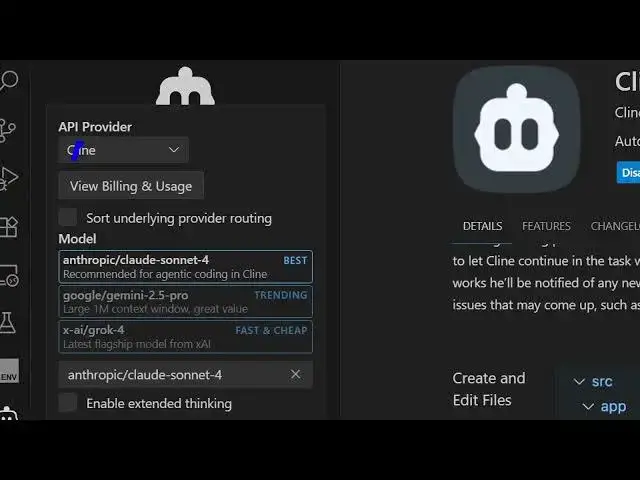
you can ask any sort of questions. And
1:04
then you can activate this uh AI API
1:07
provider. As you can see, it supports
1:09
all the AI providers. Client, Anthropic,
1:13
Cloud Code, OpenAI, Google, Gemini,
1:16
DeepSync,
1:18
Grock,
1:20
all the major ones. And uh you basically
1:23
paste API key after that.
1:32
So this is their basic. You just need to
1:35
sign up for them before you use it. So
1:38
just loging in with your Google account
1:41
and simply sign up.
1:50
So once it is signed up here you will
1:55
click the authorize button and then
1:56
open.
2:05
So now you are automatically signed in.
2:08
So here you select the model. After that
2:13
now you basically ask a question right
2:16
here. So we simply say build a.
2:27
So here it will use some of the tokens
2:30
as you make the request which clearly
2:32
shows you how much tokens you have which
2:35
is 2,000 tokens. Current balance it will
2:38
show you.
2:40
So you need to buy credits after you run
2:44
off time.
2:47
So,
2:54
so this is a thing about this.
3:00
It's a great alternative to
3:05
this. So, it comes with all the
3:07
extensions, all the plugins as well.
3:13
You can open a new task by clicking this
3:15
plus icon. And this will open a new tab.
3:31
And here just select your provider and
3:33
after that you simply paste the API key
3:39
cloud code entropic.
4:00
And as you can see it is making the API
4:02
request
4:05
and as you can see it is doing the
4:07
changes.
4:12
After that you can either save or
4:14
reject. So I will say save. So you can
4:18
now open this.
4:28
So as you can see it has made this. So
4:30
in this easy way you can make multiple
4:33
files here and now it will make the
4:36
JavaScript file here. So it will
4:38
automatically create files
4:40
write the code for you. So I think this
4:43
is a great AI coding assistant you can
4:45
install in VS code. It's completely open
4:48
source and it uses all the major models
4:58
can see that. So,
5:01
thank you very much for watching this
5:03
video and also check out my website free
5:07
mediatools.com
5:08
uh which contains thousands of tools.
#Programming
#Development Tools
#Open Source