Up next in 10


Get the full source code of application here:
Show More Show Less View Video Transcript
0:00
Uh hello guys, welcome to this video. So
0:02
in this video, I'll show you a Google
0:03
Chrome extension which will actually uh
0:06
measure the loading speed of a website
0:08
and it will show you the total time
0:10
taken by the website to load directly
0:12
inside a Google Chrome browser. So this
0:14
is a extension page load timer. It's you
0:18
can see that it's got almost 10,000
0:21
installs. So you simply go to the
0:24
extensions tab. Simply search for this
0:26
paste page load time and this extension
0:29
will come right here.
0:33
So from the name itself it will measure
0:35
how long the website takes to load
0:38
completely. So once you activate this
0:40
extension you simply activate this and
0:44
pin this extension. Now you visit any
0:46
website. Let me visit my own website
0:49
freemediatools.com
0:51
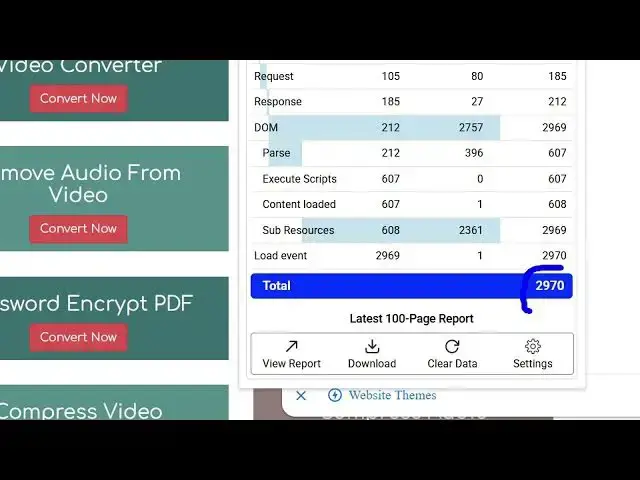
and then simply click on that. And now
0:54
it actually shows you how much time it
0:56
take takes to load. So this is it takes
1:01
around 2 970 millisecond. So this is you
1:07
can download the full report here. You
1:09
can say view report and this is the load
1:12
time 2.97 second average load time. This
1:15
is your time stamp you can see.
1:19
And uh if you visit another website here
1:21
let's suppose I say google.com
1:25
and this actually takes around 826
1:30
you can see 0.83 second very fast
1:34
google.com this is my website little bit
1:37
slow. So in this easy way you can try
1:39
this any domain name you just write the
1:42
domain name automatically in the
1:43
background it actually measures how much
1:47
time it takes to
1:52
so you can see 0.64
1:56
so in the background it is measuring as
1:59
soon as you write the domain name in the
2:02
search bar it uh it is doing its job in
2:06
the background. So you simply refresh
2:08
this page.
2:13
So now it has
2:17
this is 6.83 seconds. So this is the
2:20
slowest website. So in this easy way
2:23
guys you can take care of of the issues
2:26
which are working inside your website
2:28
and troubleshoot
2:30
and instantly see how much time it takes
2:32
to completely load. So in this easy way
2:35
you can see this is taking 5.70 seconds
2:39
to load. So in this easy way you can
2:42
actually see all the websites loading
2:44
speed and then you can even export this
2:46
data inside different formats Excel CSV.
2:49
You click this it also exports all this
2:52
inside a CSV file as well. So definitely
2:56
a very good extension definitely install
2:58
this and start using it. Page load
3:00
timer.
#Internet Software