Up next in 10

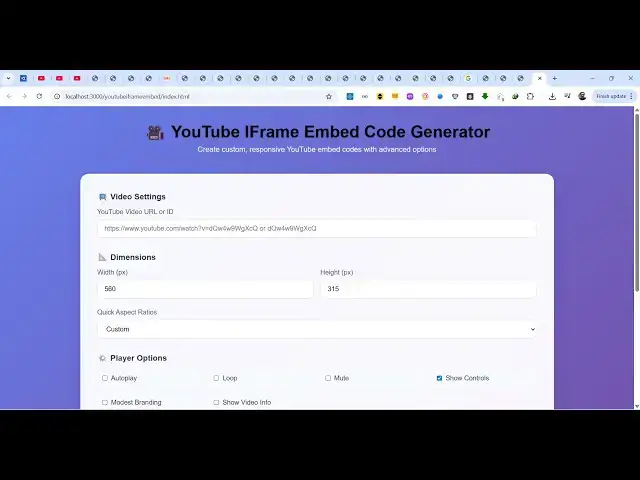
Build a Youtube IFrame Embed Code Generator Tool in Browser to Embed Videos on Website in JavaScript
Jun 25, 2025

Buy the full source code of the application here:
https://procodestore.com/index.php/product/build-a-youtube-iframe-embed-code-generator-tool-in-browser-to-embed-videos-on-website-in-javascript/
Official Website:
https://freemediatools.com
Show More Show Less View Video Transcript
0:04
uh hello guys welcome to this live
0:06
stream so in this live stream I will
0:07
show you a new tool that I deployed on
0:10
my website freemediatools.com
0:12
it's a YouTube iframe embed code
0:14
generator so if you want to embed the
0:18
YouTube videos directly on inside your
0:20
website this tool will be very much
0:22
helpful here you need to simply paste
0:24
the URL of the YouTube video that you
0:27
want to embed so I come to the tool i
0:30
directly paste the URL then we also have
0:33
the button generate embed code so as you
0:35
click the generate embed code it will
0:37
display the live preview of the YouTube
0:39
video and at the bottom side it will
0:41
give you this I frame code which is
0:44
helpful to embed this YouTube video and
0:47
then we have a certain amount of options
0:49
as well we can control the width and
0:51
height of the video let's suppose I give
0:54
the width 800 height to be 600 you can
0:58
select the aspect ratio 16x9 widescreen
1:01
or you want the standard one or square
1:03
as you are making these options the code
1:05
is automatically updating right here you
1:08
can also click the copy to clipboard
1:10
button as well so this will copy to
1:12
clipboard everything it's a ultimate
1:13
editor all these options are there and
1:16
then we also have certain options if you
1:19
want your video to autoplay
1:21
loop as well repeat if you want to don't
1:26
have the audio you can mute it if you
1:28
don't want the controls you can untoggle
1:30
this option
1:32
and then after that it will give you
1:34
this you simply copied this to your
1:36
clipboard just make a simple index html
1:39
file paste this iframe code and then
1:42
open it in the browser so what you will
1:44
see it will display your video and you
1:48
can see the video will automatically
1:50
embed itself
1:52
this I iframe code this application will
1:55
generate for you so it's a very good
1:57
tool YouTube iframe embed code generator
2:01
so all the source code if of this
2:03
project you can directly purchase it as
2:05
you can see on Google various tools are
2:07
developed specifically for this purpose
2:09
you can rank this tool directly this
2:12
tool is very much doing the same thing
2:14
so let me show you the source code of
2:16
this so once you purchase it you will
2:18
automatically be redirected to Google
2:20
Drive where you will get this index.html
2:21
html file here and as you can see the
2:25
code is about uh 471 lines of code so
2:28
it's entirely HTML CSS and JavaScript
2:31
fully client side app no server side
2:34
code is involved and once you get the
2:36
source code you can easily modify it and
2:39
you can easily run this project locally
2:42
as well or deploy this as well so again
2:45
you repeat the process you actually
2:50
target any YouTube video that you want
2:52
to embed simply plug the URL change the
2:55
dimensions all these things and then get
2:58
your iframe code so it's completely
3:01
responsive as well so you just add some
3:03
content and you can deploy this on your
3:05
own website and you can rank this tool
3:09
so the link is given you can directly
3:12
purchase the full source code of this
3:14
project and thank you very much for
3:16
watching this video
3:18
and I will be seeing you guys in the
3:21
next live stream