Up next in 10

Build a Word DOCX Viewer & Editor With Live Preview in Browser Using HTML & JavaScript
Jun 26, 2025

Buy the full source code of the application here:
https://procodestore.com/index.php/product/build-a-word-docx-viewer-editor-with-live-preview-in-browser-using-html-javascript/
Official Website:
https://freemediatools.com
Show More Show Less View Video Transcript
0:01
uh hello guys welcome to this video so
0:04
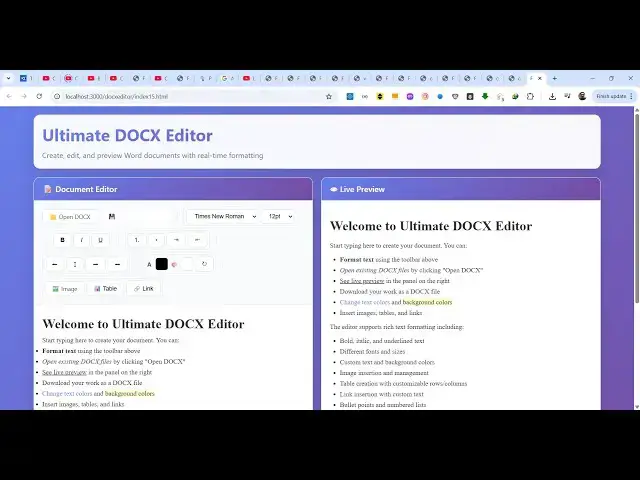
in this video I will show you a ultimate
0:07
word document viewer and editor that I
0:10
developed inside the browser so it's a
0:13
simple Microsoft word editor where you
0:15
can actually preview your word document
0:18
files and also edit them as well with a
0:20
complete live preview editor as you make
0:23
the changes on the live preview section
0:26
you will see the changes reflected back
0:29
you can create edit and preview your
0:31
word documents directly in the browser
0:33
with realtime formatting here you can
0:35
see the application i'm running it on
0:36
local host so it's a simple application
0:39
built using HTML CSS and JavaScript we
0:42
have used open-source packages
0:45
so if you are interested in this the
0:47
link is given in the description you can
0:49
directly purchase the full source code
0:51
it's almost about thousand lines of code
0:54
here so you can easily modify it and see
0:57
how I built this application so let me
1:00
show you the actual tool here so you
1:02
just open inside the browser it will
1:05
look something like this so
1:09
you can actually
1:13
make changes here so as you can see as
1:15
you are making the changes the changes
1:17
are reflected back you can highlight any
1:19
text and add some kind of color to it
1:30
you can even add images as well
1:33
so as you can see it has been
1:35
highlighted with a green background
1:36
color you can even change the color of
1:39
the text as well by using this color
1:41
picker
1:44
so you can see now it has been
1:46
highlighted so we also have basic
1:50
controls here for getting bold and
1:53
underline italic
1:56
you can just have
2:01
you can change the font all these
2:04
controls then we also have the option to
2:06
add images which is this option right
2:09
here if you see you can add it will open
2:13
the image picker and then it will add
2:15
this image
2:22
so you can add this image and uh then we
2:25
also have the option to add table as
2:28
well so if you want to add a table
2:30
select the number of rows columns
2:33
so the table is inserted successfully
2:36
you can see that
2:39
you can see that live preview and then
2:41
we have the option to save this as a doc
2:44
file so you will see automatically your
2:47
word document file has been successfully
2:49
exported it will have all these changes
2:54
the images and the tables and the
2:56
editing that you have performed here you
2:58
will see that very simply we are having
3:01
this word document file so it's a
3:03
Microsoft Word document clone editor
3:06
guys i basically developed this inside
3:08
the browser it's a single HTML file you
3:11
will get after the payment is done the
3:13
link is given in the description so this
3:15
is actually the actual editor and the
3:18
nice thing is that you can even edit a
3:22
uh word document file so there is an
3:24
option right here to open uh existing
3:27
word document file if you have
3:30
so I've already have this word document
3:32
file it will load the content here you
3:35
can see document loaded successfully and
3:38
now you can actually change the content
3:40
of this
3:43
you can add a image
3:55
so we added this image uh again if I
3:58
want to download the modified file you
4:01
will see the document will be edited
4:03
successfully so we added this image here
4:05
you can see you can also add the table
4:08
you can make the changes so this will be
4:11
the tool guys you will get the link is
4:13
given
4:15
for the source code it's very easy
4:18
a single index html file is there it's
4:21
very easy to deploy this as well and uh
4:24
it's a full source code you will get
4:26
after the payment is done the link is
4:28
given in the description so thank you
4:30
very much for watching this video and I
4:33
will be seeing you in the next video
#Business & Industrial
#Computers & Electronics