0:00
uh hello guys welcome to this video so
0:03
in this video I will show you a ultimate
0:05
Cana clone editor which I developed
0:07
where you can actually generate PDF
0:09
documents or Word documents uh directly
0:12
using raw text you can also check out
0:15
this uh tool right here by visiting my
0:17
website free mediat tools.com and this
0:20
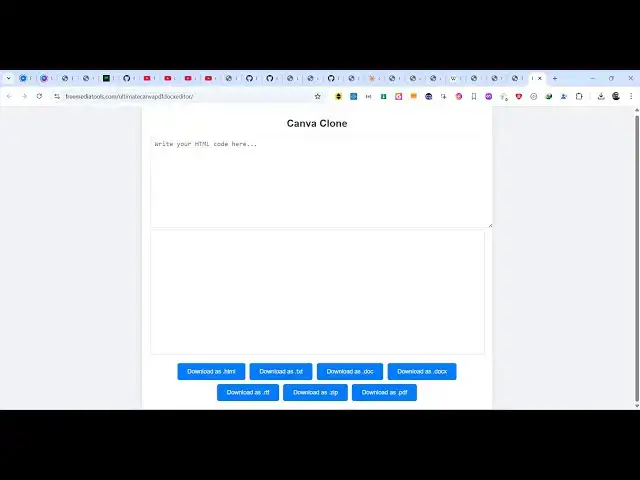
tool actually is very simple you have a
0:22
text area where you can actually
0:26
write HTML or you can write raw text and
0:29
then we have different kinds of buttons
0:31
out there at the bottom side you can
0:33
export this to HTML file or you can
0:36
export them to txt PDF Word document
0:44
RTF zip file as well so all these
0:48
buttons are there so now let's suppose I
0:50
paste some raw text you will see the
0:52
live preview as well so when you paste a
0:55
bunch of text right here now you can one
0:58
by one let me show you if I click this
1:03
document you will see Word document file
1:05
will be downloaded and if I try to open
1:09
here so this is your word document file
1:13
here uh the text has been automatically
1:16
inserted with the full formatting and
1:18
same if I press the PDF button you will
1:20
see the PDF file will get downloaded
1:22
this is a page one this is page two so
1:25
in this easy way you can use this tool
1:30
so this code can be anything it can be
1:32
HTML code as well so you will see a live
1:48
preview so you can see that so now we
1:50
can download this as an HTML file as
1:53
well so you can see the HTML file has
1:55
been downloaded and same goes with the
1:58
word document file is as well so if you
2:02
now you can see all the HTML that you
2:05
return has been exported to your word
2:08
document and same goes with the PDF file
2:10
as well so if I see the HTML that you
2:13
see right here has been
2:18
exported so this is actually a
2:22
rich text editor something like canvas
2:25
so you can first of all try this by
2:27
visiting this website free mediat tools.
2:31
and now let me show you the source code
2:34
here uh how I build this tool so you
2:36
will see we have used quite a number of
2:38
third party dependencies which is uh
2:40
jspdf for exporting the content to PDF
2:44
and then also for pdf.
2:48
min.js these are all third party
2:50
packages which is completely free so if
2:52
you just write here JS PDF the very
2:55
first link which comes right here you
2:57
can see it's a PDF document generation
2:59
Library specifically for
3:01
JavaScript I have used this one you can
3:04
see 1 million weekly downloads and then
3:07
we also are using PDF
3:14
well so if you are interested guys the
3:17
link is given in the description you can
3:19
directly purchase it uh if you go to my
3:24
store.com once you purchase it you will
3:26
be automatically be redirected to Google
3:28
Drive where you will actually get this
3:30
single file here so as you can see it
3:32
runs entirely in the browser no server
3:34
site code is involved it's built using
3:41
JavaScript so if I just show you the
3:48
complete so this is actually the single
3:51
file that you will need here and for
3:53
running this file it's very simple you
3:55
can use vs code extension to run it
3:57
locally so it will run this project
3:59
locally here so you can see we running
4:02
this project locally so in this
4:05
way so if you're interested guys the
4:07
link is given in the description and I
4:10
will be seeing you in the next video and
4:13
also check out my website free mediat
4:15
tools.com uh which contains thousands of
4:18
tools regarding audio video and image