Up next in 10

Build a React.js SVG Path Marker Using react-path-marker Library in Browser Using JSX
Jun 3, 2025

Get the full source code of application here:
Show More Show Less View Video Transcript
0:00
uh hello guys uh welcome to this video
0:02
so in this video I will show you a new
0:04
JS uh new ReactJS package which is
0:07
specifically related to SVG path marker
0:12
so if you go to the npmjs website just
0:15
search for this package which is react
0:17
path
0:19
marker react path marker so it is very
0:23
much useful for designing scalable
0:25
vector graphics inside your ReactJS
0:28
applications so React path marker this
0:31
is actually the
0:32
dependency so click on the search button
0:35
and you will see yeah this is actually
0:38
the dependency react path
0:41
marker uh the command is simple you
0:44
simply execute this command to install
0:46
this it's almost having 102 weekly
0:49
download it's a fairly new package and
0:52
they also given a live demo as well on
0:55
their website as well
0:58
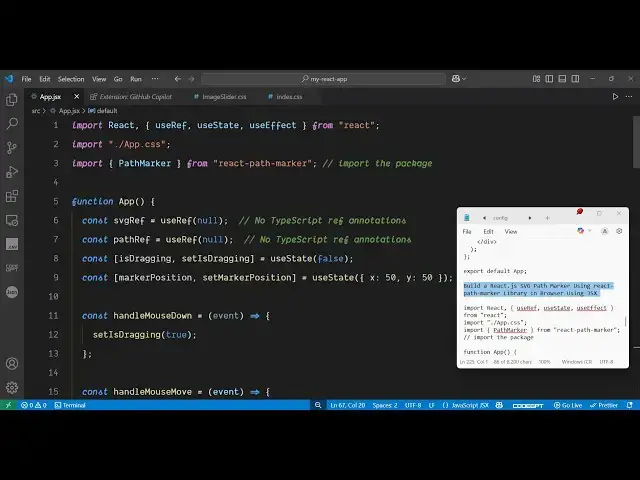
so now to get started I have
1:00
give just create a simple functional
1:03
component and first of all you just need
1:06
to require the package by using the
1:08
import statement so we simply say import
1:11
and path
1:16
marker from this react path marker after
1:20
you require the package we simply
1:22
declare a variable for this SVG so we
1:27
simply say SVG
1:30
reference we use the use ref
1:36
hook and after this we init initial
1:41
value will be
1:42
null and uh then we also give it a
1:46
variable for path path ref use ref will
1:51
again be
1:53
null and basically we can even drag this
1:56
by the mouse as well for dragging this
1:59
we will declare one other variable which
2:02
will be is
2:04
dragging so this will be a boolean
2:06
parameter whether the mouse is dragging
2:08
or not we will basically keep track of
2:11
all the position of the mouse as well
2:13
for that as well we will declare one
2:16
other variable initial value will be of
2:18
the mouse will be 50 by 50 x coordinate
2:22
will be 50 y coordinate y will be 50
2:27
and uh then we will basically make use
2:31
of this use effect hook where we will be
2:34
initializing all the
2:39
functions so we are actually having this
2:43
is dragging function so if the mouse is
2:46
dragging then we need to moves the move
2:48
the mouse up and like this
2:59
i think yeah this is the overall
3:01
function I
3:07
forgot so now in the JSX wherever you
3:10
need to embed this you actually embed
3:17
this embed the JSX you can read their
3:22
documentation full source code is given
3:24
so now to basically make the path marker
3:27
we use this component path marker we
3:30
specify the SVG reference path reference
3:33
the color which is red the border color
3:36
which is blue I think yeah
3:40
so here we draw the circle here of red
3:43
color like this so if you see the result
3:46
in the
4:02
browser I think I
4:16
You will see the result something like
4:18
this you can actually move this it's a
4:21
scalable vector graphics it's not a
4:23
image it's a SVG graphics which we can
4:26
move using our
4:28
mouse so this mouse dragging that we can
4:32
do right here we have declared variables
4:34
for this so this is the function
4:35
responsible for this so for moving of a
4:39
mouse so these functions are called so
4:42
you can actually use this package guys
4:44
react path
4:46
marker
4:49
to make these SVG graphics SVG path
4:53
graphics with mouse
4:57
movement and thank you very much for
5:00
watching this video and also check out
5:02
my website freemediattools.com
5:05
uh which contains thousands of tools