0:00
uh hello guys welcome to this video so
0:02
in this video I will show you a
0:05
application that I developed in ReactJS
0:07
which allows you to uh actually convert
0:10
your markdown into PDF which with a nice
0:13
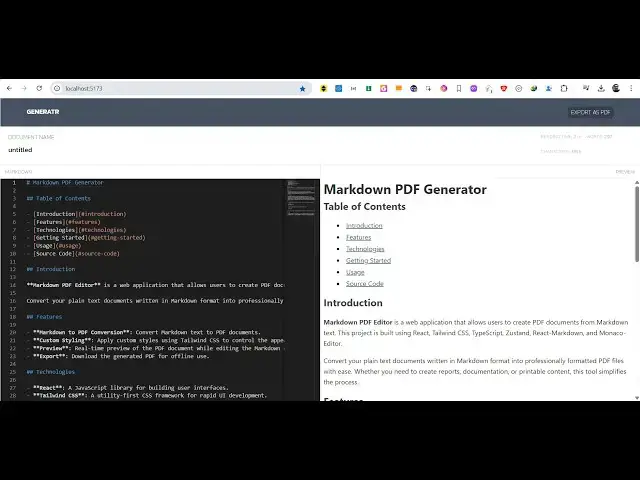
little editor so you can see we are
0:16
running it on locally localhost 5173 so
0:19
this is your markdown so whatever
0:21
markdown that you write it will be
0:24
previewed with live preview and we have
0:26
the option to export this as a PDF so if
0:30
I make some changes right here you'll
0:32
see it will automatically reflect on the
0:39
that so once you let me delete some
0:42
things from here and just show
0:53
you so if I simply click this button
0:58
PDF you will see the markdown that we
1:01
created will be converted to the PDF so
1:05
this is a simple react project which
1:07
directly runs in the browser you see
1:10
we're running it no server side code is
1:12
involved you whatever your markdown is
1:15
you simply write it that it will be
1:17
automatically be live reviewed you see
1:20
that it's a complete editor
1:26
you can see that you can
1:31
export so the link is guys given in the
1:35
description of this project if you need
1:39
uh the link is given after purchasing it
1:42
you will get this zip file you just need
1:44
to extract the zip file which will
1:46
contain this full directory
1:48
structure and for building this we are
1:51
using quite a number of thirdparty
1:52
libraries first of all we are using
1:54
react markdown which is a third party
1:57
package for working with markdown files
1:59
in react and then we are also using
2:01
JSPDF and HTML to canvas library as well
2:05
so if you don't know about these
2:07
libraries if you just write react
2:10
markdown it's a package for react for
2:14
rendering the markdown in the browser
2:17
it's a very popular package almost 4
2:19
million downloads so we are using this
2:22
then we are also using JSPDF module
2:25
which is used to create PDF files right
2:28
in the browser itself 2 million weekly
2:31
downloads and then we are also using
2:37
canvas which is a screenshot library for
2:40
taking screenshots of DOM elements
2:44
almost 3 million weekly downloads so
2:47
this is actually third party packages so
2:50
once you get the source code you will be
2:51
able to modify the source code as well
2:53
so each component if you see it's coded
2:55
inside Typescript so everything you can
2:59
see if you are a student or collegegoing
3:02
student this will be a nice little
3:03
project for you to see how I developed
3:06
this project using these third party
3:09
opensource packages so once you purchase
3:11
it just go to the module just open this
3:15
file npmi to install the NodeJS modules
3:19
and then just run this npm rundev so
3:22
this will start the development server
3:27
5173 so your project will
3:30
start and now for deployment purpose npm
3:33
run build command is there so it will
3:35
create a test folder to
3:38
actually if you want to
3:40
modify this application so this is
3:44
the the build command is simple you just
3:48
run the build command to deploy this
3:49
application to your shared hosting or
3:51
any domain name that you want to so this
3:54
is actually application guide thank you
3:56
very much for watching this video and
3:58
also check out my website
4:00
freemediadtools.com which contains
4:02
thousands of tools regarding audio video
4:04
and image and I will be seeing you in