Up next in 10

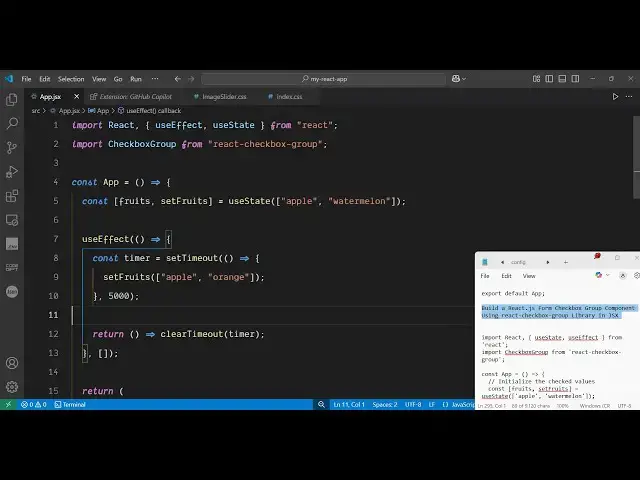
Build a React.js Form Checkbox Group Component Using react-checkbox-group Library in JSX
Jun 3, 2025

Get the full source code of application here:
Show More Show Less View Video Transcript
0:00
uh hello guys uh welcome to this video
0:02
so in this video I will show you a
0:04
ReactJS package which is used to build
0:06
out a checkboxes group so there is a
0:09
dependency here or package which allows
0:11
you to build this uh checkboxes group
0:14
form checkboxes group so checkboxes are
0:18
nothing but these small little check
0:20
boxes where you can check some of the
0:23
options or not so you can see if you
0:26
reload the page here by default apple
0:29
and watermelon will be checked and
0:31
orange will not be checked so you can
0:34
see you can check all the bottom boxes
0:36
or you can uncheck
0:38
them
0:40
so so this is actually the way uh the
0:43
thing that I will show you in this video
0:45
how to implement this so there is a
0:47
package here specifically for reacts
0:49
applications so react checkbox group so
0:52
if you go to this website just search
0:55
for this dependency which is react
0:58
checkbox-g groupoup this is actually the
1:01
dependency which is used to build out
1:05
this functionality the command is simple
1:07
you simply execute this command
1:10
uh this is actually the package it's
1:13
almost having 9,000 weekly downloads
1:16
i've already installed it and now to get
1:18
started it's very simple first of all
1:21
you create a simple functional component
1:23
and after that you require this package
1:26
by using the import statement and we
1:28
simply import the package import
1:31
checkbox group from this
1:34
library so after you import this now it
1:38
becomes really
1:39
easy now we just need
1:42
to declare a variable
1:47
whatever checkboxes you want to embed
1:49
you will be creating variables for that
1:53
so we'll use the use state
1:57
hook so you'll be having a single
1:59
variable for fruits so we will have a
2:02
checkbox for
2:04
fruits so we will have three options the
2:08
apple and then we will have water
2:15
melon so by default we will have two
2:18
options and now we will also use the use
2:21
effect
2:26
hook and now inside this
2:29
function we'll use a set timeout
2:33
function after 5
2:39
second we will change this set
2:45
fruits to add a new option so we'll call
2:49
the set fruits and
2:53
uh here we'll be adding a new option
2:56
which will be orange and apple
3:02
so as you can see we have added a new
3:04
option such as orange apple was already
3:07
there we
3:09
replaced orange with water like
3:20
this so now we need to go to the
3:23
JSX where we need to embed this so right
3:27
here we embed this component which is
3:29
checkbox
3:34
group and here you just need to give it
3:37
a
3:42
name and then the
3:49
value and then we will also need to give
3:51
it a function on change function so
3:53
whenever the value changes we will call
3:56
this function set
3:59
fruits and now we need to loop through
4:02
all the values so right
4:22
here so we'll have this checkbox here
4:25
each checkbox will be there for each
4:27
value so the first value here will be
4:30
apple we close
4:40
this so if you just refresh your
4:43
application you will actually see one
4:45
value will be added
5:03
so in this way you can see we added all
5:06
these three
5:08
options apple orange so if you have more
5:11
options you can add like this uh if you
5:14
refresh so by default you will see apple
5:17
and watermelon will be
5:26
checked so you can see that so in this
5:28
way
5:40
so in this way you first of all require
5:42
this package react checkbox group you
5:44
initialize your variable whatever
5:47
variable of checkboxes you have you
5:49
initialize the initial values and then
5:52
you come to the JSX you basically use
5:55
this component checkbox group you
5:58
initialize your variable the value and
6:01
the
6:02
onchange onchange is actually the
6:05
function which will execute this is a
6:07
function I set fruits and then whatever
6:10
is your label whatever is your checkbox
6:14
repeat this for all the values so in
6:16
this way you can initialize a series of
6:18
checkboxes inside your ReactJS
6:20
application using this package uh thank
6:23
you very much guys for watching this
6:25
video and also visit my website
6:28
freemediattools.com
6:30
uh which contains thousands of tools