Up next in 10

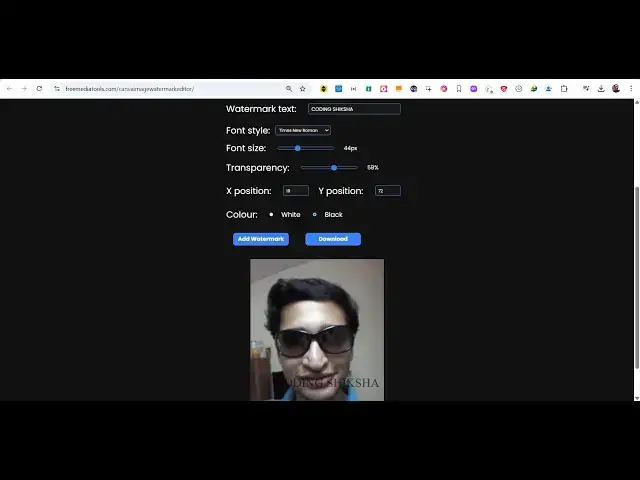
Build a React.js Canva Image Watermark Editor With Live Preview in Browser Using JSX
Apr 1, 2025

Buy the full source code of application here:
https://procodestore.com/index.php/product/build-a-react-js-canva-image-watermark-editor-with-live-preview-in-browser-using-jsx/
Watch My Visual Studio Code IDE Setup Video For Fonts,Themes & Extensions
https://youtu.be/Bon8Pm1gbX8
Hi Join the official discord server to resolve doubts here:
https://discord.gg/cRnjhk6nzW
Visit my Online Free Media Tool Website
https://freemediatools.com/
Buy Premium Scripts and Apps Here:
https://procodestore.com/
Show More Show Less View Video Transcript
0:00
uh hello guys uh welcome to this video
0:02
so in this video I will show you how I
0:05
built this react uh Canva image for
0:08
watermark editor so I have also deployed
0:10
this on my free media tools website you
0:13
can check out this live demo so what
0:15
this tool does it actually allows you to
0:17
select any image file as you select the
0:20
image file uh we have this controls UI
0:23
user interface you will provide your
0:25
watermark text you can choose the font
0:28
size transparency and the position as
0:30
well and the color of the font now let
0:33
me provide my channel encoding section
0:36
and I provide the font size you can also
0:40
control the opacity or transparency and
0:43
we have the button here add
0:45
watermark as soon as you do this you
0:47
will see the watermark will get added so
0:49
I just want to adjust the position so I
0:52
will use
0:54
this X coordinate so you can see in the
0:57
middle of it we can adjust the opacity
1:00
here so it will look something like this
1:03
if you are interested you can download
1:05
the image you can see that the image
1:09
downloads so it's a simple image
1:11
watermark editor guys you can change the
1:13
color here let's suppose I want to
1:15
change the color to black you can see
1:18
you can adjust the opacity here
1:22
you can adjust the phone size if you are
1:25
if you want bigger you will
1:30
see we can adjust the Y position as well
1:33
which is
1:35
the can adjust
1:38
it can see that so all these parameters
1:42
you can control guys it's very easy to
1:44
do
1:51
so this is actually the React project
1:53
here uh if you are interested in this
1:55
you can purchase the full source code of
1:58
this project uh the link is given in the
2:00
description you can go to my website
2:02
procodestore.com after you purchase it
2:04
you will be redirected to Google Drive
2:06
where you will get this zip file uh
2:08
after you extract the zip file you will
2:10
get this directory structure this is the
2:12
main file here which contains all 253
2:15
lines of code here so this is actually
2:17
the image editor and uh in the
2:20
package.json you can see we are using
2:22
the latest version of react which is
2:24
19.0 at the time of recording this video
2:27
so before purchasing it you can actually
2:30
look at this tool it is deployed here at
2:34
the check out page also I've given the
2:36
link so this is the thing here you can
2:40
use different
2:42
phones can see that you can adjust the
2:45
positioning transparency everything you
2:47
can control right
2:49
here
2:52
see if I increase
2:54
this it will move
2:57
downward so you can also right click and
3:00
save this image as well like this so you
3:03
can
3:04
see the watermark will be
3:11
added so once you get the source code
3:13
guys you can directly uh modify this you
3:16
can also deploy this as well you will
3:19
get full commercial right you can adjust
3:20
it and add some more functionalities to
3:23
it you will get to know about how I
3:25
built this uh image Canva image
3:28
watermark editor
3:30
and uh if you are basically doing it for
3:34
the very first
3:35
time after you extract it what we need
3:39
to do we simply need to first of all
3:43
invoke this command npmi so this will
3:46
install all the NodeJS modules which are
3:48
mentioned in the package.json and then
3:49
you simply need to say npm
3:52
rundev so this will sorry npm run start
3:56
so this will start the application
3:58
locally at localhost 3000 so just you
4:02
need to do
4:04
this so it will start this uh
4:07
application you see at the local host
4:11
3000 so you can run this application
4:14
locally after you purchase it the source
4:16
code this is the first step and you can
4:19
see the application will open again you
4:22
do the same thing
4:25
you can see that you can adjust all the
4:27
options so if you want to build this and
4:29
deploy this it's very simple a command
4:32
npm run build to build out this uh react
4:36
project and it will create this build
4:38
folder which will be the static project
4:41
here which will contain the HTML CSS and
4:43
JavaScript minified core so this is
4:45
actually the tool guys if you are
4:47
interested you can try this tool before
4:49
purchasing it and you can purchase it
4:51
and thank you very much for watching
4:53
this video and also check out my website
4:56
freemediatools.com which contains
4:58
thousands of tools regarding audio video
5:00
and image and I will be seeing you in
5:03
the next video
#Multimedia Software
#Other