0:00
uh hello guys welcome to this video so
0:02
in this video I'll show you a ReactJS
0:04
Canva clone kind of editor that I
0:06
developed uh using React Conva kind of a
0:10
library uh which is opensource library
0:13
specifically for ReactJS applications so
0:15
we have built this editor you can check
0:18
out the live demo i have this on my free
0:20
media.com website you can check out the
0:23
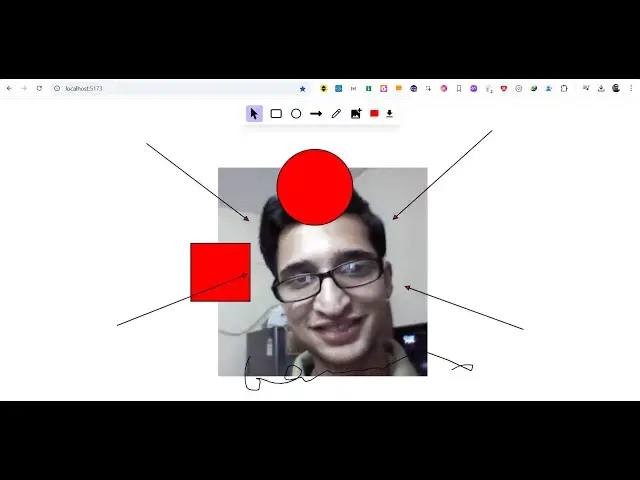
demo so this is actually a editor which
0:27
have all these controls out there we can
0:28
add text images we can add different
0:31
kinds of shapes and then we can export
0:34
so we can click on circle here and we
0:38
can add shapes here and then we can just
0:41
position them we have this rectangle one
0:45
you can even change the color
0:56
editor canvas editor you can even add
0:59
these shapes arrows as well and then we
1:04
can even draw something
1:11
here and then we can even add images so
1:20
image so you can just uh position the
1:25
accordingly and after this if you are
1:28
interested in exporting this you have a
1:30
download button right here which
1:33
downloads everything as a PNG file so if
1:35
you open this image here you will see
1:37
all the canvas is exported to a image
1:40
file so this is actually the project you
1:44
uh use this on this website and uh I
1:48
developed this inside reacts you will
1:50
see this is actually the overall project
1:54
here so if you are interested in this uh
1:57
you can see this is a singular file here
1:59
which contains everything right here 58
2:02
lines of code here so for building this
2:05
editor we have used uh ReactJS which I
2:08
showed you React 18 the latest version
2:10
and also we have used this library
2:22
here conv.org og it's open-source canvas
2:27
graphics library of react so we have
2:29
used this library for making this
2:31
graphic whiteboard canvas canva clone
2:37
so so this will be the project you will
2:39
get after you make the payment you will
2:41
actually get the zip file automatically
2:43
from Google drive and you just need to
2:45
extract this so if you're running it
2:47
locally so what we need to do if you are
2:51
running it for the very first time you
2:57
terminal you first of all execute the
3:00
command here npmi so to install the
3:03
NodeJS module so it will create this
3:05
folder and then for running it locally
3:07
you simply type the command here npm
3:10
rundev so this will start the
3:11
development server localhost 5173
3:15
so similarly we can start this
3:16
application locally 5173 you will see
3:19
the application will perfectly
3:22
work you can see that you can draw
3:34
that then we can export this you can see
3:38
that so this is actually the tool right
3:44
uh once you purchase it you will
3:46
actually get the full source code and
3:48
you can even modify this as well to add
3:50
additional features and if you want to
3:52
deploy this it's very easy the build
3:55
command you simply run the command npm
3:57
run build so this will build out
3:59
everything into a minified HTML CSS and
4:02
JavaScript it will create a test folder
4:05
this folder it will create and you can
4:08
simply deploy this application as well
4:10
so if you are interested guys first of
4:12
all you can try out the live demo which
4:14
is mentioned the check out
4:18
so you can use it if you are interested
4:22
the link is given in the description you
4:23
will get the full source code with full
4:26
directory structure and you will be able
4:28
to modify the code as well so thank you
4:30
very much for watching this video and I
4:33
will be seeing you in the next video