0:00
uh hello guys welcome to this video So
0:02
in this video I show you a uh
0:05
open-source library where you can
0:07
actually PDF render your PDF directly in
0:10
the browser It's open-source JavaScript
0:12
and HTML library This is the name of the
0:18
object.com This is their website and uh
0:21
you can directly use it uh in the
0:23
browser uh and we will try to build this
0:26
application where we allow the user to
0:28
simply select any PDF file that they
0:30
want to view in the browser As you
0:34
select and as the file is rendered you
0:36
will able to see the live preview of
0:38
each page and you can navigate to any
0:40
page right here You will see that the
0:42
PDF file will get rendered right here So
0:45
in this easy way uh I will show you how
0:47
to integrate this library
0:50
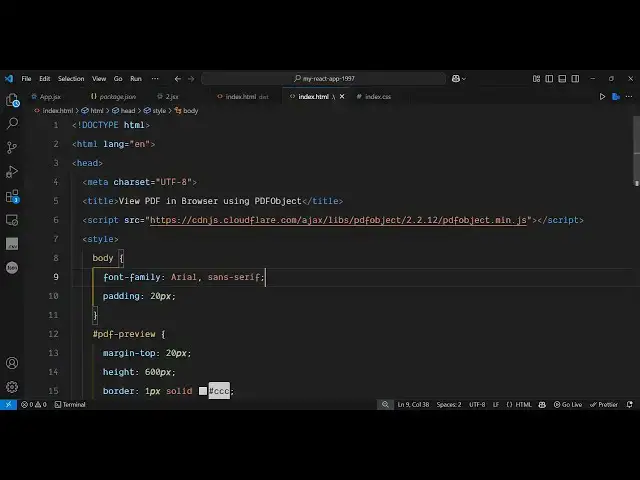
So just create a very simple index html
0:53
file I've given all the source code in
0:55
the description So now to get started
0:59
just create a simple index html file And
1:02
uh we just need to include the CDN here
1:05
of this library So just after the title
1:07
simply paste the CDN And we are simply
1:10
including the CDN right here And then we
1:13
will just write some basic stylesheet
1:15
code here And we will just style the
1:24
And after that we will
1:29
PDF preview and we will style
1:33
this margin top to 20 pixel height of
1:37
the PDF here 600 pixel and a border of 1
1:44
solid this gray color So that's all the
1:47
styling which is needed and then we will
1:49
just have an H2 tag here and we will
1:55
select a PDF file and then we will
2:01
input type is equal to file and we'll
2:05
only be accepting PDF file So file
2:12
input and let me just make it
2:16
required So then we will have an div tag
2:19
where we will just give it an ID here to
2:21
this where we'll be storing the PDF
2:24
preview So PDF preview right here
2:28
and you'll say your PDF will appear here
2:37
So after this you just write the
2:39
JavaScript code here and inside the
2:41
JavaScript here you'll
2:44
just target this element here which we
2:49
ID we will add a event listener to
2:54
it So we are targeting this file input
2:59
we on change event handler So this call
3:03
back function will execute So right here
3:05
we will get access to the file here by
3:12
files after getting access to that file
3:16
compare or we can directly write we can
3:22
here by this file reader constructor
3:25
which is available for every browser and
3:28
it contains this onload function
3:32
And from this we will simply be getting
3:38
64 URL of this PDF file
3:45
and then it actually contains you using
3:48
this uh library and it contains this
3:52
embed and using this base 64 code PDF
3:56
data URL So wherever you need to embed
4:00
we need to paste the ID here So we have
4:02
given this ID here PDF preview You just
4:13
preview So that's all that we need to do
4:16
and just after this we just need to
4:18
invoke this function reader dot read as
4:22
data URL and just pass the file here So
4:27
this completes the application and if
4:31
you open this application in the browser
4:33
you see this choose file button and as
4:36
soon as you select the PDF file you will
4:38
see the PDF file will
4:43
display It is saying that on this line
4:59
34 Okay I think here in this line number
5:17
So all the source code is given in the
5:20
description So if you just
5:41
this all the source code is given in the
5:44
description guys You can go to my blog
5:46
post and copy paste the source code and
5:49
as soon as I select it you will see the
5:51
file will display You can go to any page
5:54
here So this is actually the library
5:58
pdfobject.com and we basically showed
6:00
you an simple example of rendering this
6:03
PDF directly in the browser and also
6:07
freemediatools.com which contains
6:09
thousands of tools regarding audio video