Up next in 10

Build a Next.js Paypal,Stripe,Razorpay & Coinbase Payment Gateway Integration Project in Browser
Mar 5, 2026

Buy the full source code of application here:
https://procodestore.com/index.php/product/build-a-next-js-paypalstriperazorpay-coinbase-payment-gateway-integration-project-in-browser/
Show More Show Less View Video Transcript
0:00
Uh hello guys in this video I'll show
0:02
you I built out a nextjs application to
0:04
integrate various payment gateways such
0:06
as stripe razor pay and payle and
0:09
coinbase. So this is actually the demo
0:11
of the application.
0:13
So it's a quick little application. So
0:16
for get started this is a directory
0:17
structure. It's very easy for you to
0:19
actually the source code is given in the
0:21
description. You can directly purchase
0:23
it. After that it's fully customizable
0:25
for each payment gateway. We have this
0:27
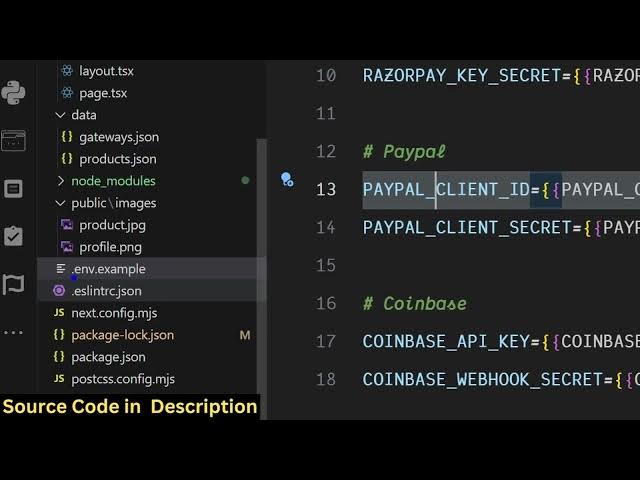
typescript file and uh then you just
0:30
need to create av file here and replace
0:33
all the values for stripe, razor pay,
0:36
PayPal and Coinbase.
0:39
And this is actually the demo. Let me
0:41
show you. So for each of the payment
0:43
gateway, if you click it, you will be
0:45
redirected to the product screen. So
0:47
this is as soon as we click the buy now
0:49
button, it will redirect you to the
0:51
sprite. So we are actually using my own
0:54
test details here. So here you will fill
0:56
out the details and the payment will be
0:59
successful. Same goes with the other
1:02
networks as well. So if you click for
1:05
PayPal, it will redirect you to the this
1:07
is a test mode.
1:10
So in this easy way and same goes with
1:13
Coinbase as well which is a cryptobased
1:16
network. You click buy now and
1:18
automatically it's
1:20
so it's developed in next year. So as
1:23
you can see you just need to after you
1:26
purchase it automatically the source
1:28
code will be downloaded from Google
1:30
drive and the very first thing you need
1:31
to do just create av file and replace
1:34
all the values of the payment gateway
1:36
such as stripe razor paypal and coinbase
1:41
replace it with your own values and then
1:44
run the project npm rundev so it will
1:46
start the application for you
1:50
so each and every file is customizable
1:52
simple as you can see it's coded inside
1:54
TypeScript so
1:59
so you can even add more functionalities
2:01
as well so
2:08
after you install all the modules npmi
2:11
so you simply run the application
2:17
by npm rundev so as you see we are
2:22
actually using next latest version and
2:25
we are using PayPal stripe SDK razor pay
2:29
and also
2:31
coinbase as well. So if you're
2:33
interested in this project, the link is
2:35
given in the description. If you still
2:36
face any problem, you can email me while
2:39
running or deploying the projects. It's
2:41
really simple. It's you can add your own
2:45
products as well. But the main thing is
2:47
the integration and it's really simple.
2:50
Just need to replace the values
2:53
for Stripe, PayPal, Razor Pay, and
2:56
Coinbase.
2:57
So I'm just using the test values. So
3:00
for production level values you just
3:02
need to create a count there and paste
3:05
the values inside this DNV file.
3:13
This is the product image. You can add
3:15
your own products as well.