Up next in 10


Buy the full source code of application here:
https://procodestore.com/index.php/product/build-a-netflix-website-ui-clone-in-browser-using-html-css-javascript/
Show More Show Less View Video Transcript
0:00
show you I built out a Netflix
0:03
website UI clone in the browser using
0:06
HTML and CSS and JavaScript. So this is
0:11
actually the demo that I'm showing you.
0:12
I'm running it on local host is it
0:15
exactly it's the same Netflix the
0:18
popular video streaming website.
0:21
This is the landing page. This is the
0:23
homepage here. It contains this form
0:26
where you can fill out the email
0:27
address.
0:29
So if you need this source code in HTML,
0:32
CSS and JavaScript, I've given the link.
0:35
This is the full directory structure.
0:36
You can customize each and every file.
0:39
And once you purchase the source code,
0:41
the link is given. You will actually get
0:43
a zip file from Google Drive
0:45
automatically. And then you can simply
0:47
run this file. Once you open the index
0:49
html file, simply open it inside VS
0:53
code. You can easily deploy this as
0:55
well. So once you open this, it will
0:57
open something like this. This is the
1:00
homepage. It exactly resembles the
1:04
official Netflix homepage. It also have
1:07
this section as well. Frequently asked
1:10
question. So it's totally responsive. It
1:13
can you can just see here it's mobile,
1:16
desktop, tablet. So if you just resize
1:20
it, it's exactly the same.
1:23
So you can just see here each and every
1:25
section is customizable. You can
1:27
customize it. And these are the footer
1:31
section. This is the header section. And
1:33
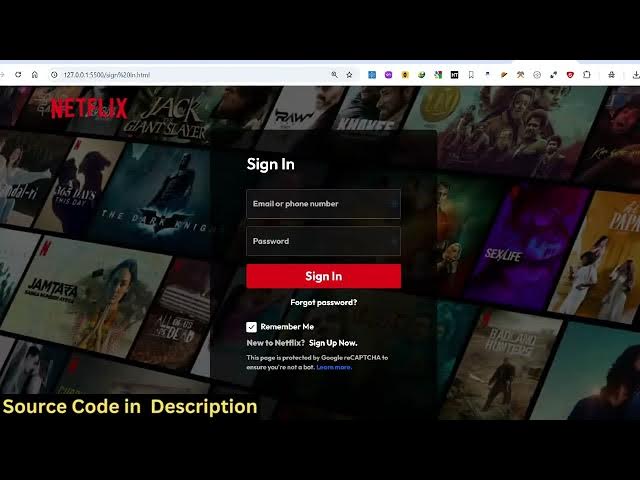
uh if you click the sign in button, you
1:36
will be redirected to the sign-in page
1:38
where you can actually sign in with your
1:40
email address, password. This is the
1:42
signin form.
1:44
So it's exactly the Netflix official
1:47
website. If I open it in a new tab, you
1:50
will exactly see the design resembles
1:53
exactly.
2:00
So this is actually the homepage of the
2:04
Netflix official website. So we exactly
2:06
resemble this. This also has this
2:08
frequently asked question. This is the
2:11
actual signin page that you see.
2:15
So it's exactly resembling this. So if
2:17
you need the source code, you can
2:18
directly purchase it. The link is given
2:21
in the description. So it's exactly
2:23
built using HTML, CSS and JavaScript. As
2:26
you can just see here,
2:31
each and every section has its own file
2:33
here. You can look at the code once you
2:36
purchase it. So it's also very easy for
2:38
you to run this and deploy this as well.
2:41
So each and every section is
2:42
customizable
2:44
and it's completely responsive. So it's
2:46
a UI design clone.
2:50
So nothing is functional if you click.
2:52
Uh so this is not a back end application
2:55
just a front end only. So just the
2:57
design that you see right here.
3:03
So
3:04
these are different videos that we used
3:07
right here. If you see
3:10
these are different sections out there.
3:14
Everything is customizable. This is a
3:16
footer section that you see.
3:21
So you can just see here this is the
3:23
help page.
3:27
This is actually the help page that you
3:29
see. So quite a number of pages that I
3:31
made right here.
3:35
So I think there are three pages out
3:37
there. This is the help page.
3:40
This is the sign-in page and this is the
3:42
homepage that you see. So, three pages
3:45
are there.
3:49
So, if you're interested guys, the link
3:51
is given in the description. You can
3:53
directly purchase it.