Up next in 10

Build a FFMPEG WASM Video Editor to Extract Video Thumbnails as Images in Browser Using HTML & JS
Jun 26, 2025

Buy the full source code of the application here:
https://procodestore.com/index.php/product/build-a-ffmpeg-wasm-video-editor-to-extract-video-thumbnails-as-images-in-browser-using-html-js/
Official Website:
https://freemediatools.com
Show More Show Less View Video Transcript
0:02
uh hello guys welcome to this live
0:04
stream so in this live stream I will
0:07
show you a tool that I added on my
0:09
website freemediattools.com
0:11
it's actually a video thumbnail
0:13
extractor
0:15
so it basically extracts all the
0:18
thumbnails of all the frames inside the
0:22
video
0:24
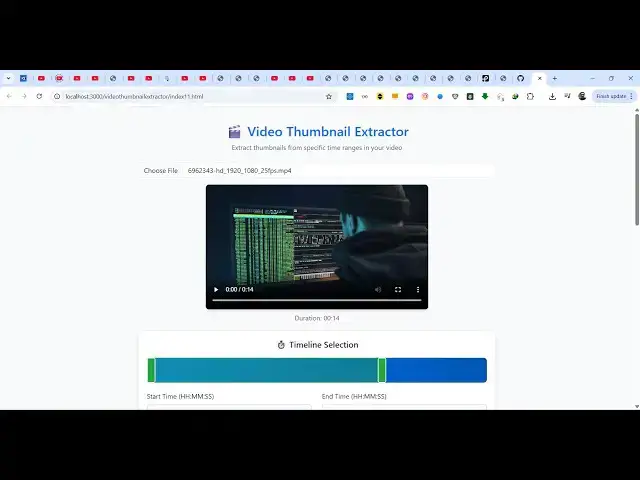
so this will be the tool here you will
0:26
select your video file
0:29
uh let me just select
0:33
this MP4 file the video will display in
0:36
this video player and using this
0:37
timeline you can control specific
0:39
sections if you want to extract the
0:41
thumbnail specific time i want it to
0:44
extract all the video so the total
0:48
length of the video is 14 second so we
0:50
have these options we can also control
0:52
it by start time end time and then how
0:56
many frames you want to capture per
0:58
second i will say five frames per second
1:01
here you can even control the quality of
1:03
the image so I will say high quality
1:05
images i want to extract the thumbnails
1:09
so now the processing will start using
1:11
ffmpg and it will show you this progress
1:14
bar and second by second it is
1:16
extracting all the thumbnails
1:19
five frames per second you can adjust
1:22
all these options once you get the
1:24
source code so the source code is given
1:27
you can directly purchase it after
1:29
purchasing it you will get a zip file
1:31
which will contain the source code so
1:33
you can see it will extract all the
1:35
frames design all these thumbnails and
1:38
you can individually download this
1:40
thumbnail highquality thumbnail
1:43
so this is particularly useful tool
1:45
because if you are a content creator if
1:47
you want to design a thumbnail then it's
1:50
quite useful tool to basically capture
1:53
the thumbnail at a specific time so in
1:57
this easy way you can download a
2:01
thumbnail at a specific second in high
2:03
quality thumbnail which is 1280 by 720
2:09
you can see this is your thumbnail
2:12
so it basically generated 70 thumbnails
2:16
so we are using fmmppg web assembly
2:18
library for building this application so
2:21
you can directly purchase the full
2:22
source code after purchasing it you will
2:25
get this index.html
2:27
file apart from that you will also get
2:29
this fmpg binaries pre-ompiled into a
2:33
single folder and then after you get
2:36
this you can easily modify the source
2:38
code as well and easily run this project
2:40
locally as well so we are now running it
2:43
on local host and again you repeat the
2:46
same process you select your video and
2:48
then you extract the thumbnails
2:53
so before purchasing it definitely try
2:55
out
2:57
on the check out page I have given the
2:59
demo link so if you are interested in
3:01
purchasing the source code the link is
3:04
given in the description
3:06
so almost I think this will be a single
3:10
file and uh 573 lines of code here so
3:15
typically it's a good little application
3:18
you will get to know that how I used
3:20
FMPG for building this awesome
3:23
application
3:25
where you can extract thumbnails
3:28
for a specific time period as well so
3:31
you can use also use this timeline to
3:34
only capture these 3 second thumbnails
3:38
so now it will only extract thumbnails
3:40
based upon this specific range
3:45
so now you can see you can also use
3:47
these timeline as well so this was the
3:50
application and uh I will be seeing you
3:52
in the next one
#Online Media
#Multimedia Software
#Video Sharing