Up next in 10

Build a FFMPEG WASM Video Cropper & Zoom Timeline Editor in Browser Using HTML & JavaScript
Jun 26, 2025

Buy the full source code of the application here:
https://procodestore.com/index.php/product/build-a-ffmpeg-wasm-video-cropper-zoom-timeline-editor-in-browser-using-html-javascript/
Official Website:
https://freemediatools.com
Show More Show Less View Video Transcript
0:03
uh hello guys welcome to this video so
0:06
in this video I will show you a new tool
0:08
that I developed on my website which is
0:10
a video cropper timeline editor by which
0:13
you can actually uh trim out or crop
0:18
your videos directly in the browser
0:19
itself
0:21
using a simple editor
0:24
cropping editor so if you come to my
0:26
website freemediatetools.com this is a
0:29
tool here that I added video cropper and
0:31
zoom editor if you go to this tool here
0:34
you will select your video file
0:36
whichever video file that you're working
0:38
right here after selecting the video now
0:42
using your mouse you will simply drag
0:44
your mouse to select whichever portion
0:46
that you want to crop or zoom
0:50
so it will re-encode your video using
0:51
ffmpg
0:53
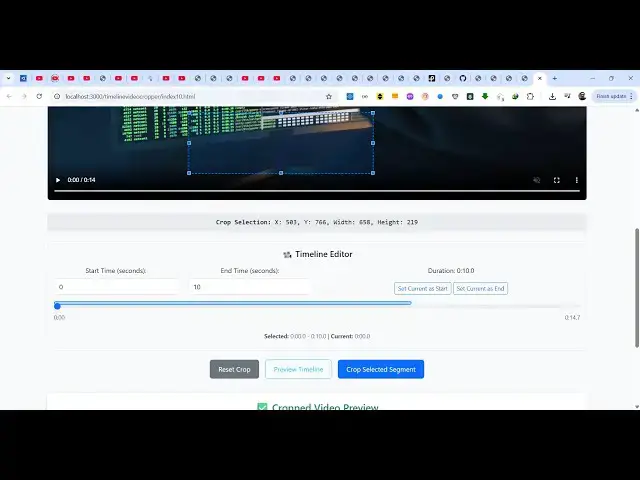
simply select the portion so let me
0:55
select uh only this portion and also we
0:59
have the timeline as well where we can
1:01
trim out specific portion only so here
1:04
we can using this timeline you can say
1:07
set start time this from 2C up till
1:13
6 second so now only for these 4 seconds
1:17
we need to crop this and we have this
1:20
button here crop selected segment so
1:23
once you do this the cropping will start
1:25
it will show you this processing right
1:28
here so it is processing your video and
1:31
now it has successfully cropped your
1:32
video and also trimmed the video at the
1:36
same time so 4 second
1:39
now you can download your cropped video
1:41
inside your local machine so this is all
1:44
happening in the browser side no server
1:46
side code is involved it is entirely
1:48
built inside HTML CSS and JavaScript
1:52
in this easy way you can crop your
1:54
videos as you crop your images simply
1:58
select using your mouse so it's a very
2:01
userfriendly interface again click crops
2:04
selected segment again now the cropping
2:07
will start
2:10
you can see that
2:13
you can crop any section using your
2:14
mouse and before purchasing it you can
2:18
actually try this tool so once you
2:20
purchase it you will get the full source
2:22
code of this project this index html
2:25
file this is the only file which is
2:27
there
2:28
so you can see it's almost I think 579
2:33
lines of source code so once you
2:35
purchase it you will actually see how I
2:37
built this application it's entirely
2:40
HTML CSS and JavaScript and you will be
2:44
able to modify the source code as well
2:46
so apart from that we also have the
2:48
folder where we have all the pre-ompiled
2:51
ffmpg binaries which is helpful for
2:56
starting this project and then you can
2:59
simply run this project locally as well
3:01
after you purchase it so again repeat
3:04
the process simply select portion that
3:08
you want to crop
3:14
you can see that
3:16
so the processing will start
3:20
so thank you very much guys for watching
3:23
this video so you can build out your
3:26
video cropper in HTML CSS and JavaScript
3:29
so
3:31
so the source code is given in the
3:33
description you can purchase it and
3:35
thank you very much for watching this
3:38
video
#Online Media
#Multimedia Software