0:00
uh hello guys welcome to this video so
0:03
in this video I will show you how I
0:05
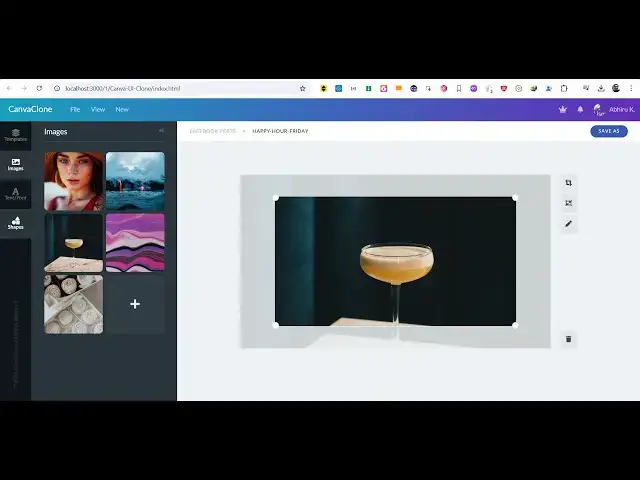
build this canva UI clone uh basically
0:08
in the browser canva is a very popular
0:11
website if you go to their
0:14
editor I just replicated the user
0:17
interface like this so this entirely
0:19
runs in the browser it is constructed
0:21
it's a static website web page and you
0:24
can actually see the sidebar of canva
0:26
where you actually have these elements
0:28
then we actually have the set of images
0:31
that we replicated and then we have this
0:33
plus icon to add a new image and then we
0:36
have this nice little canvas right here
0:38
where you will actually draw something
0:41
and then we also have these options
0:44
available and we also have the save
0:49
well and it is this is actually the
0:53
navigation bar here if you
0:55
see so we have this HTML code right here
0:59
it's built inside HTML and CSS 3 you can
1:02
see almost 550 lines of CSS code that I
1:06
developed here this is this canva user
1:09
interface clone right here if you are
1:12
interested guys the link is given in the
1:14
description if you need to purchase this
1:16
source code uh this user interface
1:19
source code you will be redirected to
1:21
Google Drive after you purchase it just
1:24
need to extract it and this will be the
1:26
directory structure all the files which
1:30
are there only two files are there this
1:32
is your HTML file and this is your CSS
1:34
file so you will get this and it's very
1:36
simple to run this in the browser simply
1:39
open your vs code and serve this project
1:43
and it runs in the browser so it's very
1:45
simple uh I built it from scratch so if
1:48
you're building some kind of image
1:49
editor similar to canva this uh design
1:53
code will be pretty much very useful for
1:55
you because you don't need to reinvent
1:57
the wheel you will get the CSS code
2:00
right here which will actually get you
2:02
the styling that canva occurs the color
2:05
schemes the color navigation the user
2:08
interface that they use so I basically
2:09
built it for you so if you are
2:12
interested the link is given in the
2:14
description you can go to my website
2:15
brod store.com and purchase the source
2:18
code and it will run in the browser and
2:22
it's a static website so thank you very
2:24
much I just wanted to make a video on
2:27
this and also check out my website free
2:30
mediat tools.com which contains
2:32
thousands of tools regarding audio video
2:34
and MH and I will be seeing you in the