Up next in 10

Build a Canva Clone Image to Pencil Drawing Sketch Editor in Browser Using HTML & JavaScript
Mar 3, 2026

Buy the full source code of application here:
https://procodestore.com/index.php/product/build-a-canva-clone-image-to-pencil-drawing-sketch-editor-in-browser-using-html-javascript/
Show More Show Less View Video Transcript
0:00
Uh hello guys, welcome to this video. So
0:02
in this video I'll show you a Canva lore
0:05
image to pencil sketch editor that I
0:08
developed in directly in browser. So
0:09
I've given the demo link in the
0:11
description of the video. So it's
0:13
deployed. You can check the description
0:15
link to see the demo. So this is the
0:18
actual editor where you will actually
0:21
choose any image file. After that this
0:24
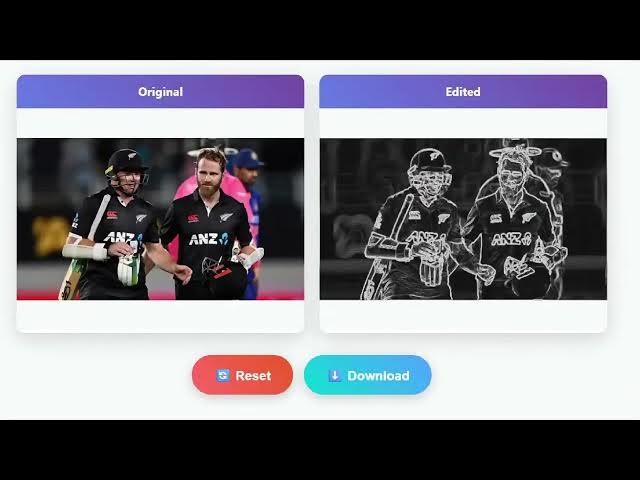
would instantly convert your image into
0:26
a pencil sketch similar to Canva clone.
0:29
So this is your original image and this
0:31
is the pencil sketch it has created.
0:34
Here you have different kinds of effects
0:36
that you can apply to your photograph.
0:38
We have pencil sketch, charcoal, ink
0:40
drawing. If I select this one, ink
0:43
drawing.
0:45
So mainly this is a pencil sketch
0:47
editor. You can download this pencil
0:50
sketch image as an image file. It's
0:53
entirely built inside HTML, CSS and
0:55
JavaScript. So you can just see the
0:56
quality of this pencil sketch which is
0:59
created. So if you want to purchase the
1:01
full script here, I given the link in
1:04
the description. Uh after purchasing it,
1:06
you will get this single index.html file
1:09
from Google Drive and it's entirely
1:11
built in the browser. It's almost
1:13
thousand lines of code here. As you can
1:15
see after purchasing it, you can simply
1:18
run this
1:20
inside your VS code by opening a live
1:23
server. So now we are running it on
1:25
local host as you can see. So again you
1:28
repeat the process you basically select
1:30
your image file and after selecting that
1:33
image it will convert it to a you can
1:36
also control using these sliders control
1:39
the intensity contrast levels everything
1:42
you can control it and whatever you
1:45
you're happy you can click download
1:48
button you can even adjust the
1:49
brightness
1:51
lower the brightness everything. So how
1:53
beautifully it has constructed this to
1:56
image to pencil sketch. As you can see
1:58
it's a good effect. You can also create
2:01
a blur effect as well.
2:05
So all these sliders are there.
2:06
Additional filters you can even apply
2:08
here which is this filter vintage
2:12
invert. So this is a very beautiful
2:15
filter. You can basically try out this
2:17
application before purchasing it. It's
2:19
entirely it's a single page application
2:21
built in HTML, CSS and JavaScript.
2:24
Uh so as you can see this is the overall
2:27
code here. So once you get the code you
2:30
can even modify the code as well. So
2:32
whatever you happy you click the
2:33
download button and then it exports the
2:35
pencil sketch into image file. So this
2:38
is a advanced level Canva clone image
2:42
pencil sketch editor. So you simply
2:44
basically select your image file
2:51
again you basically select a different
2:53
image here. So it works with all the
2:56
images you basically selected using
2:58
these sliders. You can adjust everything
3:01
here.
3:03
So the thing is that it's totally free.
3:06
It basically runs in the browser. I
3:09
basically used open-source libraries for
3:12
building this project here.
3:15
So yeah, using canvas API here which is
3:17
entirely free. So I basically written
3:21
each line of code by myself to build out
3:24
this.
3:26
So definitely first of all try this by
3:30
checking out the demo and then if you're
3:32
interested you can make the payment and
3:34
after that a zip file will be uh
3:36
automatically be downloaded through
3:38
Google drive and uh you will be able to
3:43
download the source code. So definitely
3:45
check out this. So it's a beautiful
3:47
canvage to pencil sketch kind of an
3:50
editor. So basically it transforms your
3:53
original image into a pencil sketch.
3:57
So like this. So definitely try this. It
4:01
has all the advanced filters as you see.