0:00
Uh hello guys in this video I'll show
0:02
you I built out a canva clone image
0:04
optimizer shrinker and compressor kind
0:07
of an application. It's a single page
0:09
application entirely built in HTML CSS
0:11
and JavaScript. So we are running it
0:13
locally. I've also deployed this. You
0:16
can check out the live demo. Check out
0:18
the full description. I've given this
0:19
link here. You can check out on my free
0:21
media tools website. So the interface is
0:24
quite simple. It's similar to Canva.
0:26
Here you simply drag and drop whatever
0:29
PNG image files that you want to shrink
0:31
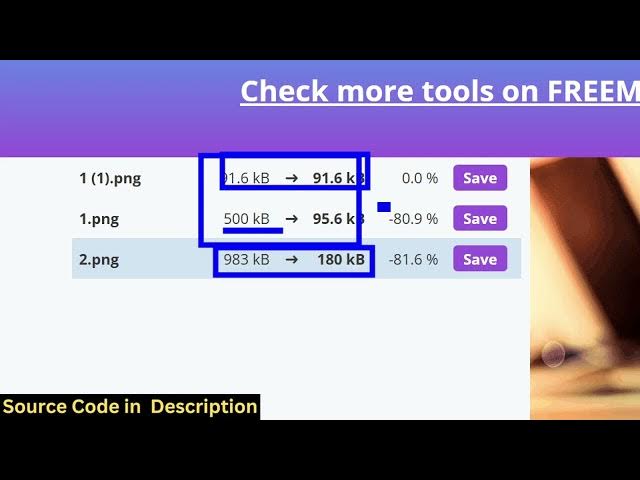
out and one by one it will compress all
0:33
the images for you. You will see that
0:35
the size will be reduced.
0:38
For some images it it is not possible to
0:40
compress. For some image it's very
0:42
possible. It gives you the reduction
0:44
minus 80% like this. Using this slider
0:47
you can control how much reduction that
0:49
you want to do. So the link is given.
0:52
You can try out this tool before
0:54
purchasing it. So if you need the source
0:57
code after you purchase it, you will get
0:59
the source code from Google Drive
1:00
automatically. So this is actually if
1:03
it's entirely built in SCSS, HTML and
1:08
So you can just adjust the slider here
1:11
how much compression you want and then
1:14
you can click save all and it will
1:17
download all the output files as a zip
1:19
file or you can individually click the
1:24
So this will save you a lot of time
1:26
because many a times you do need to
1:27
compress your PNG images. So this tool
1:30
is very powerful for this bulk PNG image
1:36
and same thing we are doing it running
1:38
it locally. So it's very easy for you to
1:40
deploy this application and run this
1:42
application locally as well and just
1:45
select your PNG images and then it will
1:48
actually minify, compress and shrink it
1:51
all in a matter of second and it shows
1:59
So it's a single page application. There
2:00
is no back end to it. So it entirely
2:05
So if you're interested you can the link
2:07
is given in the description.