0:00
uh hello guys welcome to this video so
0:02
in this video I will show you a canva
0:06
clone image editor that I developed it's
0:08
a all-in-one ultimate image editor which
0:11
supports all the operations at once you
0:13
can crop images you can resize images
0:16
you can compress images as well so when
0:18
you land on this tool right here I've
0:20
also deployed this on my website freem
0:22
mediat tools.com so you can check out
0:24
the live demo right here by visiting
0:27
this URL so when you land on this user
0:30
interface you need to select whichever
0:32
image file you are editing so let's
0:34
suppose I select the image file so as
0:36
soon as you select the image file you
0:38
will see you will see this list of
0:41
operations you can convert this
0:43
image to whichever format here so you
0:47
can need to select the format from the
0:49
drop-down you can convert this image to
0:51
jpg PNG gif file SVG as well so if I
0:56
want to convert to SVG I will say
0:58
convert to SVG and you will see the file
1:01
will be downloaded so this is at the SVG
1:04
file right here so the image file has
1:07
been converted to scalable vector
1:08
graphics or if you want to convert this
1:10
to PNG so you can see the file is
1:13
converted from jpg to PNG so this is the
1:16
first one and the next thing which is
1:19
there is the cropping functionality so
1:21
if you want to crop the image you can
1:24
click this button crop image now
1:27
automatically now you will see this crop
1:30
editor you can just crop whichever
1:32
portion of the image you want by this
1:36
editor and then click on this button
1:39
download crop image you can see your
1:42
image will be successfully cropped and
1:44
downloaded automatically the next
1:47
functionality is the compress image
1:50
functionality so this you will click
1:52
this button right right now and now you
1:54
can control the quality of the image the
1:56
compression quality right here using the
1:58
slider from 0 to 100 0 means the lowest
2:03
quality so as soon you will see the size
2:05
will be decreased and you will see the
2:08
quality of the imagees decreased so here
2:11
using this slider you can actually
2:13
control the quality and based upon the
2:15
quality the image will be
2:18
compressed so now the next one is of
2:22
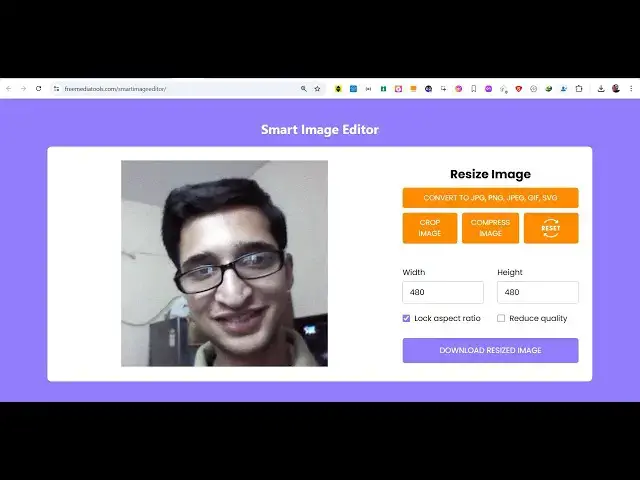
resize functionality as well so there is
2:24
also this resize you can directly
2:27
manipulate the width here 200
2:30
200 height there is also this option
2:33
here if you want to maintain the as
2:36
aspect ratio or if you want to reduce
2:39
quality so all these options are
2:41
available in this uh canva ultimate
2:45
editor so these are all the operations
2:48
which are there so if you need the full
2:49
source code of this project the link is
2:52
given in the description so you can
2:55
purchase the full source code and after
2:57
purchasing it you will get the zip file
2:59
automatically from Google Drive this and
3:02
you just need to extract this this is a
3:04
simple static tool which runs entirely
3:06
in the browser you will see this is HTML
3:09
code and this is almost 259 lines of
3:12
JavaScript code so once you get the
3:14
source code you can easily modify it
3:16
after you purchase it you simply can run
3:21
locally can see we are running this
3:24
project locally right here so it will
3:26
run entirely in the browser it's a
3:29
static single page application so which
3:33
operations you can convert image from
3:38
another you can compress you can crop
3:41
images you can resize images everything
3:43
you can do in allinone image editor you
3:51
so and for cropping the image we are
3:54
using a library open source Library
3:57
called as Cropper JS which is a Javas
3:59
script uh library for cropping images so
4:04
JavaScript library for cropping
4:07
images so if you are interested guys the
4:10
link is given in the description before
4:13
purchasing it you can see the live demo
4:15
of this application and if you are
4:17
interested the link is given you can
4:20
purchase the full source code of this
4:22
project so thank you very much for
4:24
watching this video and also check out
4:26
my website free mediat tools.com which
4:29
contains thousands of tools regarding
4:31
audio video and image and I will be
4:34
seeing you in the next video