0:00
uh hello guys uh welcome to this video
0:02
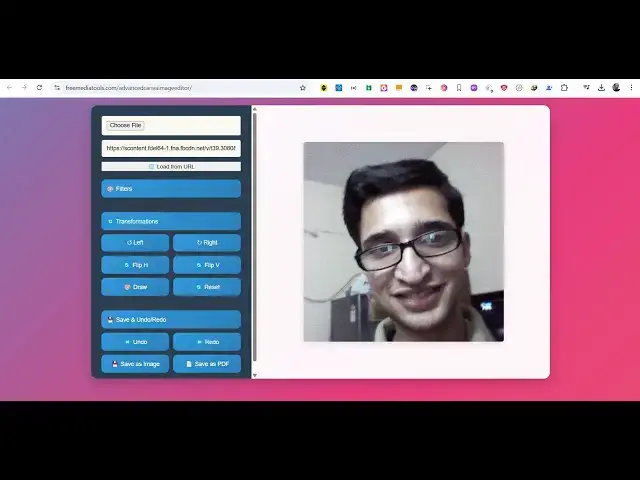
so in this video I will show you a image
0:04
editor that I developed which is similar
0:08
uh which directly works in the browser
0:10
it is built using HTML CSS and
0:12
JavaScript you can see the user
0:15
interface i have deployed this tool on
0:19
mediatools.com you can check this
0:22
live and here the interface is quite
0:25
simple you basically choose whatever
0:27
image file that you want to edit and the
0:30
image will display and then we have a
0:32
quite a number of filters available to
0:34
us controls we can adjust the brightness
0:36
contrast saturation so using these
0:43
see so we have this blur effect as well
0:48
if you want to blur your image you can
0:51
do that opacity you can even control the
0:54
opacity then we have the grayscale
0:57
filter this one we have all these
1:00
advanced filters available so once you
1:03
are done you can save this image either
1:06
to a image or PDF so we have two buttons
1:09
out there image or PDF so export this as
1:11
a image file so after you make the
1:14
modifications you can save your image
1:20
uh the nice thing about this editor guys
1:23
uh you can even load image from a URL so
1:26
if you have if you are having a image
1:31
which is deployed live you just need a
1:34
simple URL for this so let's suppose I
1:37
take this example right click copy image
1:41
address and you can use this tool
1:47
this can see the image will come right
1:50
here this is from a different website we
1:52
put the URL right here and load from URL
1:55
this is a second option you can do and
1:58
uh again you can do flipping as well so
2:02
there is this option also available
2:07
We can draw on a image as well you can
2:10
see there is these all are the controls
2:19
available so then you can save this
2:23
image if this button is not working uh
2:27
if you're loading the image from a
2:28
different domain you can right click
2:30
save this image this will be very much
2:33
it's easy and I think it works with
2:36
almost all the websites it also works
2:39
with Facebook as well so let's suppose
2:41
you are taking in any kind of image you
2:44
just right click on the post copy image
2:47
address and you again plug the if you
2:50
are coming from Facebook just load from
2:57
that it will load this
3:00
image you just need to go to the
3:13
so you right click copy image address
3:16
and you come to this uh
3:34
so you can even save this as a PDF file
3:44
PDF so click on this PDF you'll see that
3:47
PDF file will get downloaded so this is
3:49
your you can try this tool guys if you
3:52
are interested the link is given in the
3:54
description once you purchase the source
3:56
code from my website procodestore.com
3:59
you will actually get a zip file and you
4:02
can directly run this it will extract it
4:05
and this will contain your HTML CSS and
4:07
JavaScript file right here and you just
4:10
need to open this file and run this
4:14
locally you can see now I'm running it
4:17
locally so it works in the browser no
4:19
serverside code is involved it's very
4:21
easy to deploy as well because it's a
4:23
static single page application which
4:25
runs in the browser and uh once you get
4:27
the source code you can actually
4:30
uh modify this application add more
4:32
functionalities to it you will get full
4:35
right so it's coded inside HTML CSS and
4:41
see so this is HTML this is your
4:47
this is your CSS so it's entirely built
4:49
inside a static tool you can easily
4:53
deploy this as well to shared
4:55
hosting can see you can do all the
4:58
modifications that you want to do can
5:03
vertically you can draw as
5:08
well and then after that you can save
5:11
this image click on save
5:15
so this is actually the application guys
5:18
if you are interested the link is given
5:20
in the description you can directly
5:22
purchase it and thank you very much for
5:25
watching this video and also check out
5:29
freemediattools.com which contains
5:31
thousands of tools regarding audio video
5:33
and image and I will be seeing you in