Up next in 10

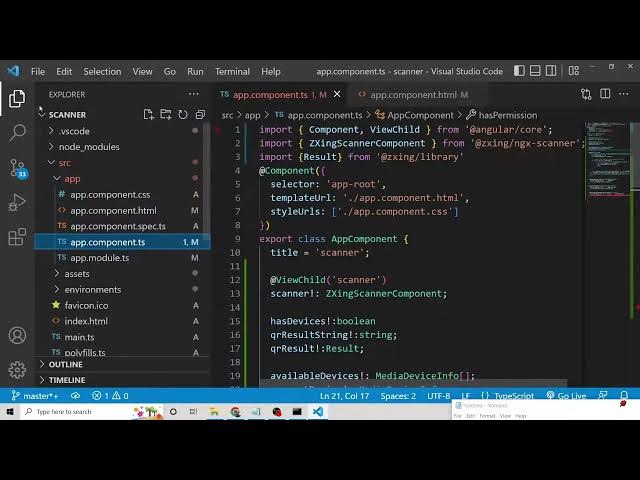
Angular 13 QR Code Scanner Using Webcam and Display Info in Browser Using ngx-scanner-qrcode in TS
Dec 22, 2025

Get the full source code of application here
https://codingshiksha.com/angular/build-a-angular-qrcode-scanner-from-webcam-file-using-ngx-scanner-qrcode-library-in-ts/
Show More Show Less View Video Transcript
0:07
Uh hello friends. Today in this tutorial
0:09
I'll be showing you that how to uh parse
0:12
the QR code inside your angular
0:14
application. How to scan it. So we will
0:16
be using uh a very special library which
0:18
is called as ngx scanner QR code with
0:21
the help of which you can scan colorful
0:24
QR codes as well very complex QR codes
0:27
as well. Let me show you a very simple
0:29
example here. You will see this is the
0:31
example which is hosted on stack
0:32
blitz.com. So there is a camera option
0:35
here. If you click this camera option,
0:38
this will display all the cameras which
0:40
are installed on your computer. So now
0:42
you can see that it has se selected my
0:45
web camera which is uh installed on my
0:47
laptop. So simply I can scan this QR
0:50
code here. And if I scan this, you will
0:53
see that
0:55
let me scan this again. this
0:59
QR code. Just wait.
1:21
So now you can see that guys it has
1:24
highlighted this Q QR code and you can
1:26
see the result here which is shown
1:28
inside the yellow window automatically.
1:31
So also it is highlighting it. You can
1:33
see that by the red green border. So
1:36
it's a very cool little effect that you
1:38
can have. It will highlight the QR code
1:41
where you can uh
1:43
uh simply display the result whichever
1:46
result is present inside the QR code. It
1:48
can be complex. It can also be colorful
1:50
QR code as well. So with the help of
1:53
this library, you can do this effect. I
1:55
will be building this effect step by
1:57
step in this video. So if you just open
1:59
this link here, it will just be a
2:01
WhatsApp link here. So
2:04
the last library was a little bit
2:06
complex library but this library will be
2:08
a very simple library. So this is the
2:10
library that we are using here which is
2:12
NGX scanner QR code. It's a relatively
2:15
new library. Only 174 weekly downloads
2:18
are there. So I think it's a very simple
2:21
library as compared to the last one. So
2:24
stepby-step instructions are given. You
2:26
can also refer my blog post as well. I
2:28
have written step-by-step instruction
2:30
here inside my blog post. So the blog
2:34
post address is given here inside the
2:36
video description. If you want to just
2:39
go to
2:41
the description of the video, let me
2:43
update the address. So copy the address
2:45
and paste it.
2:48
So this is the address which is given.
2:50
So you can follow along with the video.
2:52
So let's get started guys. So first of
2:54
all what you need to do is that inside
2:56
my
2:58
angular project you need to install this
2:59
library. So we will say ngx QR code
3:03
scanner. So just in install this by
3:06
using this command here which is npmi
3:09
ngx QR code scanner. You need to put
3:12
d-force for this to it's a comp to make
3:15
it compatible with uh it is saying that
3:20
ngx QR code scanner not found. Let me
3:23
see. Oh, sorry. This is NGX scanner QR
3:26
code.
3:29
NGX scanner QR code. So, the name was
3:34
little bit confused. So, now again you
3:38
need to put d-force to it. Anytime you
3:41
get an error.
3:44
So now this will install this. So you
3:46
will see inside your project. So the
3:48
very first thing guys you need to do is
3:50
you need to go to app domodule.ts TS
3:52
file and right here you need to include
3:55
the module which comes in this library
3:58
which is uh QR code
4:02
NGX
4:05
QR code module
4:08
NGX scanner QR code module which will be
4:10
imported from NGX scanner QR code. Now
4:13
just include this NGX scanner QR code
4:17
module and you are done. Simply uh close
4:20
this file and now you need to move to
4:22
app.component.html.
4:25
So the bulk of the work will be done
4:26
inside this file. So right here guys
4:29
what we need to do inside this simply we
4:31
need to have a div. So inside this div
4:35
we will have a simple heading which is
4:37
ngx scanner QR code.
4:42
And here we will be displaying ngxcanner
4:45
QR code tag directive.
4:51
So inside this directive guys what we
4:53
need to do is that we need to put the
4:55
action at the rate oh sorry hash symbol
4:58
action is equal to scanner
5:02
and whatever data we need to scan this
5:05
will be data property which will be
5:07
output is equal to event
5:12
and uh
5:17
if any sort of error take case
5:21
then this on error call back will
5:26
fire and it will get this event object
5:28
automatically passed to it. That's it.
5:31
This is all that you need to pass as
5:33
arguments inside this
5:36
one. And now to display the data we will
5:39
use the paragraph tag.
5:42
So we will attach
5:45
the output here like this. Another
5:49
paragraph we will have this will for
5:52
loading.
5:53
So this will be ng if
5:59
this is not mandatory but uh
6:02
it is just for loading purposes. So it
6:05
is not mandatory. Now the main thing so
6:08
there will be a simple but button
6:10
present when you toggle that button your
6:12
camera will be shown to the user uh
6:15
shown. So when you click the button this
6:18
will be action dot toggle camera. So
6:23
these functions we will write action
6:26
toggle camera and uh we will attach the
6:30
class to it or button.
6:37
So this you can paste it here. It's
6:40
just HTML code here. That's it. Just
6:43
paste it.
6:46
You can see that
6:49
by default it will be disabled
6:55
if the video is not started.
6:59
So just also paste this like this. So
7:03
right here inside this guys simply
7:05
delete all this. Inside this you will
7:08
simply need uh
7:11
if you see we only need this function
7:13
which is uh which will fire if any sort
7:16
of error take place and also we will
7:20
need to uh uh declare a variable for uh
7:24
the output string which will be
7:26
displayed.
7:28
So I think you need to put a this one
7:32
and uh
7:39
like this. So that's it. Now we can
7:41
start this application locally. So we
7:43
can simply say ngserve. This will start
7:46
this application on localhost 4200.
7:50
So just wait. It is starting this
7:52
application.
8:06
So now it has started this. So we can
8:08
open this application localhost 4200.
8:15
So now you loading it. You can see that
8:18
guys. Oh,
8:44
let me delete this.
8:51
NGX scanner QR code.
9:00
I think we have missed something. Uh let
9:02
me see if we have missed something here.
9:11
This is the demo it is showing us. So
9:14
let me paste this all this.
9:19
Sometimes if you write it manually there
9:22
will be chances of error.
9:30
So now you can see this is a button here
9:32
guys. If you click this button you it
9:34
will ask for the permission. Can it use
9:36
your camera? Allow it. So we have
9:38
successfully allowed this camera. So now
9:41
it is displaying this. You can see that.
9:45
So basically now if I
9:48
show the QR code
10:13
So now you can see it is highlighting it
10:14
and now it has shown the result also.
10:17
You can see that guys I think you can
10:20
see this right here at the bottom. This
10:22
is a link it has
10:26
this is actual WhatsApp link. So in this
10:28
way guys you can build out a simple QR
10:30
code scanner inside your Angular 13
10:32
application using NGX scanner QR code
10:34
library. It's very easy and uh I think
10:38
it will be very easy to implement. So
10:40
thanks very much for watching this
10:42
video. If you like this video then
10:43
please hit the like button, subscribe
10:45
the channel as well.