Up next in 10


Buy the full source code of application here:
https://procodestore.com/index.php/product/angular-13-ionic-pdf-document-custom-viewer-with-user-controls-in-typescript/
Show More Show Less View Video Transcript
0:07
Uh hello friends, today in this tutorial
0:09
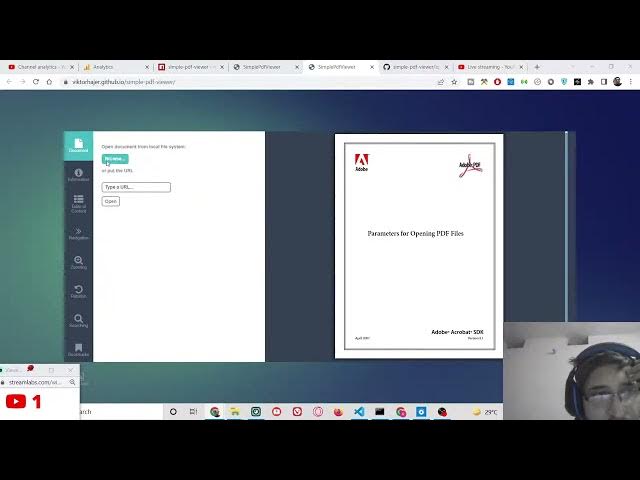
I will be showing you a very simple PDF
0:12
viewer and uh this is inside our angular
0:16
13 application or ionic application. So
0:19
this is a simple demo of the application
0:22
which we will be building in this
0:24
tutorial. You will see that this is a
0:25
simple PDF document viewer. So this is
0:28
built in uh angular and ionic. So
0:32
basically you can browse any PDF
0:35
document which is stored inside your
0:37
computer. So simply you can select this
0:40
PDF document and then it will
0:42
automatically open this PDF document on
0:44
the right hand side. So you can just see
0:47
here this is your PDF document and it
0:50
will show you a short preview of it and
0:53
you can change this using the browse
0:55
option. So simply so various controls
0:59
are there. You can also zoom in 50%,
1:02
100%, zoom out. You can also manipulate
1:06
the height, width. So you can manually
1:10
zoom the level as well like this.
1:15
So various options are there. You can
1:17
also go to the previous page, first
1:19
page, last page, next page, previous
1:21
page and manually you can enter a page
1:23
number and then you can go to that page
1:25
number like this. So it will tell you
1:28
the number of pages which are present
1:29
here inside this PDF document which is
1:32
number only one pages are present. So
1:35
you can also rotate
1:38
like this 90° 180° minus 90. So you can
1:43
do this rotation as well. You can also
1:46
perform a search query as well. If you
1:48
want to have a search query which is
1:50
present inside the PDF document, it will
1:52
exactly tell you the number of matches
1:54
which are there. And you can also create
1:56
a bookmark as well guys. So based upon
2:00
any sort of bookmark you can perform it.
2:03
You can create as many bookmarks as you
2:06
want. So this is the application guys.
2:08
So you can see you can browse any sort
2:12
of PDF document. So PDF document will be
2:15
opened on the right hand side and the
2:17
nice thing about it guys you can enter a
2:20
specific URL from the internet here and
2:23
it will open this. So let's suppose you
2:25
have a PDF file hosted on the internet.
2:29
So you have the URL. So simply you can
2:31
copy link address and simply you can
2:34
paste it inside this tool. Simply paste
2:37
it. Click open. So now it will it is
2:40
just saying fail to load the document
2:42
but you need to be having the actual
2:44
document installed on your computer so
2:46
that they can fetch it. So if I just
2:49
download this PDF document so you will
2:51
see all two pages are present inside
2:54
this. So if I download this sample
2:58
and if I now browse it. So now you will
3:01
see that it will open this.
3:07
>> [snorts]
3:08
>> So you can navigate you can go to the
3:12
next page you will see that this is the
3:14
second page two pages are present out
3:16
there you can go to the previous page go
3:18
to the last page first page table of
3:21
contents information is also present
3:23
what is a producer creator all the meta
3:26
meta information about the PDF document.
3:29
So this is the user controls out there.
3:32
You can
3:34
zoom in like this.
3:38
You can also perform a search query. So
3:40
let's suppose you want to perform search
3:43
for text. So now it will highlight all
3:46
the
3:48
uh search that you have done here. So
3:50
all it will highlight all the portion of
3:53
text which is having the text text. Here
3:55
you will see that it will highlight it
3:57
with a different background color. So
4:00
these are all the controls out there
4:01
that is there inside this PDF viewer
4:04
guys. So I have given the link in the
4:06
video description. So let me just give
4:09
the blog post link here. So the blog
4:12
post link will be written here. Let me
4:15
write a complete blog post on my coding
4:18
sa website. So I will give that blog
4:21
post link in the video description so
4:23
that you can
4:26
let me
4:30
copy the title
4:39
build a Angular 13 ionic PDF document
4:42
custom viewer. So this is the ionic
4:45
application guys and also angular 13
4:48
application. All the source code let me
4:50
just uh this is actual library that we
4:53
are using here.
4:54
So you will see that all the
4:57
documentation is present out there. So
5:00
this is actual library. If you go to
5:02
npmjs.com just search for simple PDF
5:05
viewer. This is a dependency we we are
5:08
using here. Let me just uh paste this
5:11
code here.
5:15
So all the documentation is given, demo
5:18
is also given. Let me copy this.
5:24
And now let me just give the link in the
5:26
video description so that you can also
5:28
download this. So
5:31
so I will give this link in the video
5:33
description guys. So please hit the like
5:35
button, subscribe the channel as well.
5:37
This is my blog post. So in the video
5:40
description you can download all the
5:43
source code of this PDF viewer. So
5:46
download
5:48
the full source code.
5:57
So [snorts] let me save this guys. So
6:00
please hit the like button, subscribe
6:01
the channel and I will be seeing you in
6:03
the next video.