Up next in 10

Alibaba Lingma AI is INSANE! VSCode Extension That BEATS Copilot, Claude & Cursor for Coding Apps
Jul 24, 2025

Get the full source code of application here:
Show More Show Less View Video Transcript
0:00
Uh hello guys, welcome to this video. So
0:02
in this video I'll show you a Alibaba
0:04
cloud lingbar tool here which is AI
0:07
coding assistant similar to chat GPT or
0:10
GitHub copilot cloud or Gemini tools. So
0:14
just go to Alibaba cloud.com and Lingma.
0:17
You can even search this Alibaba as you
0:19
all know it's a Chinese company. If you
0:22
just write aloe vera cloud lingma this
0:24
is the tool the very first link which
0:27
comes this is AI coding assistant and uh
0:31
you can get started for completely free
0:34
right here and if you check the pricing
0:36
model you will see in the free model you
0:39
can get code completion in real time AI
0:42
chat all this stuff so just loging in
0:45
with your uh Google account and uh
0:50
so once you sign up right Here you just
0:52
need to select the country here
0:58
and just simply sign up.
1:12
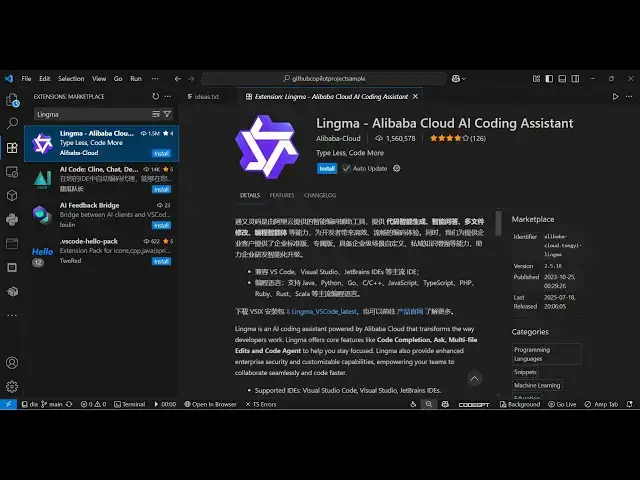
So you can even go to extensions and uh
1:14
right here you can simply type your lima
1:18
I think. Yeah. So this is the extension.
1:21
It's used almost uh 1 million installs.
1:24
So it's a simple VS code extension. You
1:26
just need to activate this. So once you
1:28
activate this extension, you will get
1:30
suggestions
1:32
and it's developed by Alava Cloud. Here
1:34
you will see that it's an official
1:36
extension. So once you activate this on
1:39
the right hand side of the screen, you
1:42
will see this option appearing.
1:45
So just wait for the extension to
1:47
install.
1:55
So unfortunately for my country, India
1:58
is not available right here. So I think
2:01
I can't create a free trial account
2:03
here.
2:04
But uh just select your own country
2:06
right here. Sign up right here. Enter
2:08
password right here and simply click on
2:10
sign up and then it will give you 7day
2:13
free trial and you can experience this
2:16
product. So once you activate this
2:18
extension you will see this will come
2:20
right here in the sidebar section. So
2:23
just activate this extension.
2:26
So once you activate this it will ask
2:29
this will be the chat window and right
2:31
here you will
2:35
you can basically
2:39
need to login right here
2:43
and then you can actually ask any sort
2:45
of question. You can even attach files
2:47
as well.
2:49
So right here it will prompt you to
2:52
login right here. So
2:58
you can basically sign in with the
3:00
Google account as well. So once the sign
3:03
up is complete
3:06
again you need to select the country.
3:16
So once you create the account you will
3:18
get the free trial and then you can ask
3:20
any sort of question right here. So this
3:22
is a very good tool guys uh Lingma which
3:25
is used Alibaba cloud AI coding
3:27
assistant similar to chat GPT GitHub
3:30
copilot plot and cursor
3:33
and also check out my website
3:35
freemediattools.com
3:37
uh which contains thousands of tools.
#Software