Up next in 10


1. Creation of project group
2. Ledger posting
3. Accounting impact
4. Project creation
5. Create hour journal
6. View voucher
7. Controls – Project statements
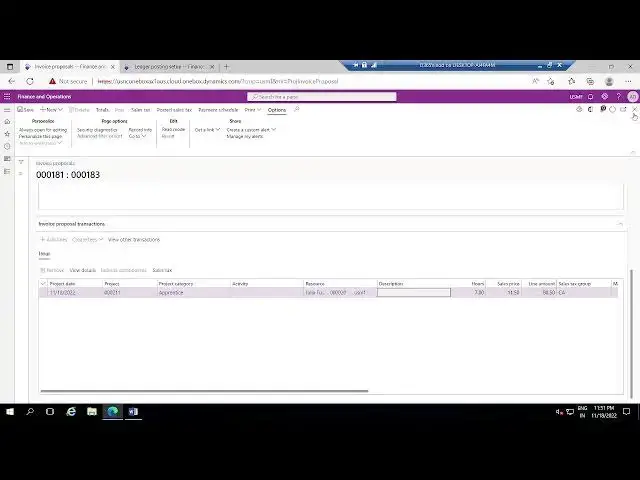
8. Invoicing
Show More Show Less View Video Transcript
0:04
foreign
0:41
foreign
1:13
okay now we are going to discuss about uh basic time and material project
1:21
concept like it's just a basic
1:39
so in this
1:49
in this we are go planning to do this
1:56
creation of project group
2:05
and second part is like uh we are doing in
2:12
USM at right postings
2:20
and boom thing
2:26
impact
2:31
project creation
2:36
means time and material project creation create our Journal
2:53
future and
3:02
will see the project 8 minutes
3:17
invoice
3:43
so these are the things we are going to perform in this uh episode
3:50
so first of all I'm going to use submap company legal entity
3:58
and in the project management accounting the project management accounting
4:06
uh we'll go and create the project free project group
4:12
foreign
4:56
groups
5:01
thank you
5:31
foreign
5:57
I'm creating basic time and material project
6:06
here project type must be Diamond material and Ledger postings such priority is a
6:15
category I have given and like these all uh other fields I'm not changing
6:23
anything I am taking uh as per this standard thing
6:32
so let's save this we'll discuss these
6:37
fields maybe in a future episodes
6:44
so time and material basic I already given with the same name so
6:49
that's its way that's why it's uh throwing an error
6:56
message so I'm saving it as Diamond material one as a project group
7:04
and uh so once the project group is created
7:11
Next Step as per our agenda it's Ledger setup
7:18
so let's just set up in Ledger posting profiles
7:27
laser posting setup in this Ledger posting setup we need to
7:35
um I have the main accounts for cost
7:41
as well as payroll allocation to book the hover Journal so I am booking this
7:48
particular uh cost
7:55
table and
8:15
so
8:29
category I'm picking as appreciate
8:36
Apprentice sorry as an apprentice and I'm booking for
8:46
maybe you will use six zero one six zero one
8:53
five zero one this is the main account I am using for this Apprentice category
9:01
and uh next account that is required to book the our Journal is that
9:11
payroll allocation in this in this setup we need to select
9:16
the payroll allocation and need to map the main account
9:27
thank you
9:50
so let's select the payroll location
9:56
and here it's given as uh all all and
10:02
this one 600 300. so let me create new one
10:08
uh to select the table level category
10:13
I'll use some other account Maybe
10:51
maybe this one I'll use 600 350. these are the two outcomes that
10:59
I have mapped for the cost account as well as payroll allocation uh next thing
11:06
what we are going to do is that project creation go to all projects
11:36
taking new to create the new project
11:47
so I am taking the time and material project so then basic
11:55
maybe basic
12:01
DM power
12:09
I'm giving for representation purpose easy recognition purpose I'm giving like
12:15
that and select the project group that you have selected just now and it is
12:22
basic tm1 why we are getting only three groups means it is a timing material we have
12:28
three groups so project contract if you want to create the new one you can pick it out
12:35
right click view details
12:43
and take new
12:54
I'll give the same thing basic time
13:07
contract and customer account that I am giving is
13:15
funding source account maybe I select I'll select one of the
13:21
customer in this US Supreme legal entity from the drop down list
13:28
I am taking maybe this one here is zero zero one
13:38
once done click on OK
13:47
so it will zero one eight three is our project ID sorry project group sorry
13:53
project contract
14:04
foreign
14:17
map that project ID here
14:35
and project manager I'm not giving anything and just creating the project
14:44
thank you
15:34
thank you let's take one time
15:50
once the project is created and we need to change it to uh in process
15:57
stage otherwise it won't allow any entries to post
16:02
so once it is changed to in process will go and create
16:09
the hover Journal
16:19
let me click on this Howard Journal
16:40
hmm
16:45
okay new
17:21
foreign
17:33
ties as we created setup for
17:40
Apprentice category so I'm picking up from this year
17:48
so that we can recognize which account it is booking so
17:56
taking seven hours and
18:04
posting the whole version
18:39
foreign
19:18
let's go and check the wheelchair
19:23
from posted transactions we can check it out
19:34
from the main step hosted transactions for this project
19:50
so sale price it is 80 rupees 80.5 amount in transaction around 70.
20:01
so what is the account expect car rental expenses 5 0 1 5 0 1 is
20:11
project cost account and credit is payroll allocation Accord
20:18
which we mapped in the uh Ledger posting setups
20:24
if you want to check it again go to
20:30
asmf company project management Ledger posting setup
20:39
there we can cross check which accounts is picked whether it's pink correctly or
20:45
not we have given the table level of apprentice project cost of six uh this
20:53
particular account uh 60150 on account and for payroll we have
21:00
picked category apprentice and six digit six double zero three five zero we have provided there based on
21:07
that setup that our Journal has been posted and debate debate the cost
21:13
account project cost account to the payroll uh
21:19
payroll allocation account
21:46
foreign
21:52
so laser postings later
22:01
so for cost for Apprentice 601501
22:08
601501 is the debit account okay and payroll
22:14
allocation will be the credit account for payroll allocation for Apprentice
22:22
600350 is the main account we mapped so that is credited so this is the way uh
22:30
our Journal will post and what is the uh uh voucher impact
22:38
and let's go and see that project statement
22:45
how it looks after posting the hover Journal
22:50
control tab you can view the project statements
23:01
if you scroll it down
23:06
this is a revenue thing go to profit and loss account
23:21
and view WIP and consumption
23:28
in ways our rate these are the project statements we have
23:36
after posting will come and see here what is happened and how it has been
23:44
changed the pnl account everything so first we'll go and do the
23:52
invoice for that our Journal uh to do invoice
23:59
go to manage tab invoice proposal
24:13
select the hover Journal that you have posted previously
24:46
foreign
25:14
foreign
25:20
the entry is supposed to be customer account will be debit why because they
25:27
are providing the services so
25:32
customer customer account will be the debate and the project invoice Revenue will be the
25:39
predict
25:52
foreign
26:29
um will be debited and the project invoice revenue account will be created
26:57
if you want to see invoice journals and check here
27:32
oh you want to see the wheelchair and it will be
27:42
sorry here
28:00
first we have book cost to the project constitute the project means somewhat
28:07
one of the posts have worked by their practice for that project and he given
28:13
services for the project so we booked project cost uh project has to pay that
28:20
amount so project cost has been debited and payroll allocation has been credited
28:27
so once the invoice done uh we are giving the invite we are once the
28:33
invoice done uh invoice is created so invoice proposal we are running that at
28:40
the time customer account customer balance will be debited and
28:47
service Revenue will be credited project invoice Revenue
29:00
so project invoice Revenue has been credited and customer balance will be
29:08
debited so this is our expectation this came from accounts payable sorry accounts
29:15
receivable Ledger postings and four zero one two hundred it's come it's
29:23
came from Project invoice Revenue project invoice Revenue
29:32
the revenue accounts if you
29:42
know four zero one two hundred for
29:58
foreign one two hundred this is the account it's
30:05
picked category group relation here so if you
30:11
check that Apprentice category what is the relation group relation then we'll
30:18
come to know which group it falls under and that's why it's book two four zero one
30:24
two hundred so this is some basic thing uh regarding
30:34
the time and material project um booking the hover journal and
30:40
invoicing the original once the cast is booked and the new uh
30:46
project invoice Revenue has been booked and customer customers uh
30:53
balance also it's so that's
30:59
in this video we will discuss uh basic uh fixer price project in next
#Business Operations
#Business Plans & Presentations
#Management
#Corporate Events
#Billing & Invoicing
#Tax Preparation & Planning