live_tv
Livestream Starting Soon
00
Hours
:
00
Minutes
:
00
Seconds
Up next in 10



Nest Alarm System - https://nest.com/alarm-system/overview/
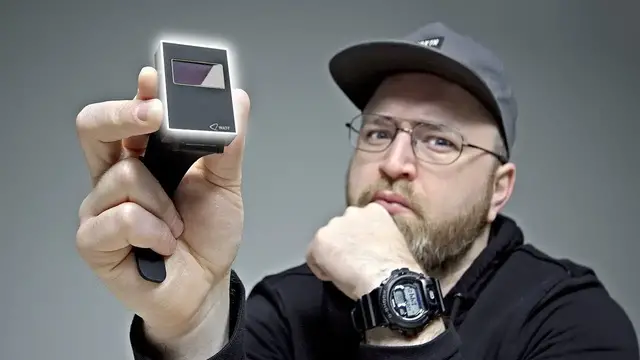
The Lix Watt watch is a power bank that you wear on your wrist. It features an 1800mAh battery. Oh ya, it also tells time! This watch could be a nice smartphone companion for those who travel frequently but you'll have to put up with the boxy design. Would you use this to charge up your iPhone or Android device on-the-go?
_________________________________________
WATCH SOME MORE VIDEOS...
Which Smartphone Do They ACTUALLY Use? --- MKBHD, Austin Evans, Linus + More
https://youtu.be/Hi2tjMLVpdQ?list=PL7u4lWXQ3wfI_7PgX0C-VTiwLeu0S4v34
The Best Headphones That Money Can Buy...
https://youtu.be/sRVRN2DlDp4?list=PL7u4lWXQ3wfI_7PgX0C-VTiwLeu0S4v34
The DIY Jacket Upgrade, Thank Me Later
https://youtu.be/DCK-h-xXk3k?list=PL7u4lWXQ3wfI_7PgX0C-VTiwLeu0S4v34
Unboxing The World's Smallest Phone
https://youtu.be/SSzyGCjH88o?list=PL7u4lWXQ3wfI_7PgX0C-VTiwLeu0S4v34
The Most RIDICULOUS MacBook Pro
Show More Show Less View Video Transcript
0:00
Hehehehe
0:02
So this is kinda interesting I mean I've never seen something quite like this before
0:06
I know at first glance right now you're looking at this You're like, uh It looks like some kind of old school watch actually
0:12
With this little display on it And the boxy design I believe it's the first watch that is also a power bank for your smartphone
0:20
It's called the Watt Actually the company here, they manufacture one of those 3D printing pens
0:27
I did a video on it a while back Power bank in a watch. Is this the future
0:32
There it is. That was a simple unboxing experience. Like I said
0:36
it's got a kind of old school look to it. It reminds me of like those calculator
0:39
watches that were super boxy from Casio. That's even boxier. Look at that thing. It also says on the back
0:45
designed in Belgium, made in China, gorilla glass, an aluminum body, and an
0:51
1800 mAh battery. So to put that in perspective, that's a similar
0:55
battery capacity to like an iPhone or something like that. Also in the box we have a little user manual here. A flat micro USB cable
1:05
to charge this up and then a couple of other universal adapters here. This is like the tube
1:10
style AC lightning for the iPhone. Also type C. Okay, so that's the one I use. All right, let's see
1:15
what they say here. Quick charge. Discharge rate of two amps. That's decent. I should mention the
1:21
strap looks to be interchangeable by pulling on these pins here. Let's see if this has any power
1:26
out of the box here. Oh, it does. Cool. On video, you're gonna see this display
1:30
as sort of refreshing. In real life you don see that It just a static image to be clear It a really tight fit in there I feel like I should mention that See how the connector is not exactly lined up with the cutout
1:43
There's a little finesse necessary here to get this in there. You gotta kind of angle it
1:48
I mean, it will go in eventually, but I can't imagine that that is what the finished product will be like
1:53
Apparently, they're shipping mid-February. I guess I'm one of the first people who has this
1:57
So once you get it in there, now we'll connect the Pixel 2 XL. Oh, wow
2:02
Instantly. You see that right up there? We are now charging. I mean, that's pretty simple
2:06
Although, somehow, my battery life on here went to zero right away. It could be since it just shipped, it needs like a full charge up
2:13
But nonetheless, it is currently charging the Pixel 2 XL right from the watch
2:17
Now, it is kind of strange. Again, I'm not sure how much of a prototype this particular unit is
2:23
But the only way to identify the two ends of the cable and the direction it has to go in is this white sticker
2:28
Is there going to be some other kind of indicator on the cable? Hopefully licks can address that. Alright, so that's what it looks like when you're charging something from the watch like a smartphone
2:37
If we plug in a power source to the watch then let's check out what happens We see a charge meter here sitting at 25% so you will know when it's fully charged now
2:46
I might as well try it on Well that that is a that's a look. I mean it's not crazy
2:53
You know what it kind of reminds me of like one of those dick Tracy watches back. You know you know who dick Tracy is
3:01
He's a detective with a bunch of gadgets and he had a watch with a microphone and a speaker
3:10
on it that he could talk into This is pre phone guys This was so cool I not so sold on it just yet Maybe in future versions of this particular device it could kind of be rounded off a little bit more
3:21
on these edges, just slightly less boxy. And listen, if you are constantly running out of battery
3:27
it is kind of amazing to have 1,800 mAh sitting there on your wrist
3:32
I think overall, it's a cool idea, cool concept. It seems kind of beta right now
3:37
If you look at my G-Shock here, the volume of it is similar, But this one is just super comfy because of the way that they've engineered the wristband and so on
3:45
Maybe this is an idea for Casio. They're all about these crazy rugged utilitarian watches
3:49
Put a battery in there, small one, charge up your devices. I don't know guys, you still gotta carry the cable around
3:55
This is a tough one for me to figure out. Maybe one day it's all wireless and maybe you just, I don't know, what do you do
4:00
You put your phone, it's all, it's a little crazy. For me, I think I'll be heading back to the trusty old G-Shock and probably still carrying a battery bank
4:08
Because I got to keep it real with you guys. And that's the truth of the matter. Jack, on the other hand, I can't speak for him
4:15
Or can I? This episode of Unbox Therapy has been brought to you by Nest
4:23
Now you know these guys because you've seen their crazy popular thermostat
4:28
I recently installed one here at the office. Thing is unbelievable. It learns
4:32
It knows what you like. But today it's all about the Nest Secure, the new product
4:36
this is an alarm system in a box. We have the Nest Guard main unit
4:41
two Nest Detect sensors, and two Nest Tags. The Guard is a simple keypad with a built motion sensor and a loud alarm The Detect knows when a door or window opens or when someone enters a room and the tag is so that you can arm and disarm the entire system without the need for a code
5:00
You can just tap on your key chain and boom, you've disarmed it or armed it on your way out
5:05
That's what it looks like, nice and simple. And of course, a keypad on the top
5:10
Look at that little guy right there. Wireless setup. Stick this to the door and boom
5:14
you have a door and motion sensor. And then this little guy goes on your keychain
5:19
You can see the QR code for easy setup. This will now show up in my Nest products
5:24
I have the cameras, the thermostat, and now the guard. So there's three different settings
5:29
You can have the alarm off completely. You can have it set to home and guarding
5:33
It knows you're inside the house, so the motion detection is off, but the window or door sensors are on or fully armed so that everything is active
5:42
I can see that the alarm is currently off and the motion detection is off
5:46
I can turn it on. It gives me one minute to exit the space. I'm going to get out of the way and then come back and trigger the motion
5:52
We'll see this thing go off. I see everything that happened there
6:02
Alarm went off and so on and the time associated with it. This is cool. You can do a cellular backup
6:07
For some reason, there's an issue with the Wi-Fi. Integrates real nice with the other Nest products
6:12
So if you have Nest cameras and Nest thermostat, this thing plugs right in
6:15
It's all in the same app and you end up getting more out of each of those devices when they're combined
6:21
Thanks again to Nest for sponsoring this episode. If you guys want more information on the Nest Secure or other Nest products, you can click the link down in the description
#Computers & Electronics
#Gadgets & Portable Electronics