Up next in 10



Samsung Galaxy S26 Ultra - https://howl.link/my7meonzxuxpv
Samsung Galaxy S26 / S26+ - https://howl.link/tvmdsoj2a3m49
Samsung Galaxy Buds4 / Pro - https://howl.link/le9yib0jj7nzz
Latercase: https://latercase.com/s26u
MagLock Ring: https://latercase.com/products/maglock-ring
FOLLOW ME IN THESE PLACES FOR UPDATES
Twitter - http://twitter.com/unboxtherapy
Instagram - http://instagram.com/unboxtherapy
TikTok - http://tiktok.com/@unboxtherapyofficial
Show More Show Less View Video Transcript
0:00
Wow, there's even a maximum setting, which is what, even crazier
0:04
Got the new Galaxy devices. S26, S26+, S26 Ultra, and of course I have way too many of them
0:13
which is lovely because I like to see all the offerings, or at least most of the offerings
0:17
because there are going to be some exclusive colors that I do not have. Silver, Shadow, and Pink, Gold, Samsung.com exclusives
0:24
but I do have Cobalt, Violet, Sky Blue, and Black, and Will tells me there's some kind of mystery about the white version
0:34
It's not really listed, but we have it here. So it must be real. We have the latest chip, Snapdragon 8 Elite Gen 5
0:41
up to 1 terabyte of storage on the Ultra, up to 16 gigs of RAM if you get the 1 terabyte variant
0:47
and you want to spend a boatload of cash on having the absolute flagship. So, oh, the other thing is bumped up on the standard S26
0:54
It starts at 256 storage available in a 512. Batteries get bigger as you go
1:01
which is of course what you would expect. So 4,300 milliamp hours, 4,900 milliamp hours
1:08
and 5,000 milliamp hours on the Ultra variant. Also, obviously we step up to the Ultra
1:15
and we're getting our pen action, which this is more of a Mo feature
1:19
any kind of pen action. You see that? Beautiful, nicely integrated. Wow, look at that
1:24
I can pinky eject. You didn't expect that ejection action. Why do you have a problem with that
1:29
Says more about you than me. And very nicely integrated. Like, look at the shape
1:34
You see the way the curvature works into the actual nub of the pen click
1:41
You know, I'm a fan of clicks. Look at this. You know I'm a fan of clicks
1:45
All clicks. Every click. I don't want the world to be done with clicks. Because, you know, everything is a tap
1:51
And everything is touch-based. I don't want to be done with clicks. I want to have some things that still click. Actually, that's interesting
1:58
It still goes in the wrong way You can actually put it in the wrong way and it will still stay in the silo
2:02
So you can't really screw stuff up too badly. Okay, so yeah, that's another thing you get exclusively with the ultra
2:07
You'll skip faster charging with the ultra So this guy will charge at 60 watts max fast charging 3.0
2:14
45 watts over here on the plus and 25 watt fast charging on the s26 wireless charging also gets faster
2:21
15 watts to 20 watts to 25 watts, and they all feature wireless power share, which is a nice
2:28
little thing to have. Display sizes, of course, have to scale up as well. So 6.3, 6.7, 6.9
2:35
Resolution gets its jump when you go from the standard to the plus model, but then it stays the
2:40
same for the ultra. Cameras also get a big boost. We go up to this 50 megapixel. Look at that unit
2:47
We're talking about aperture. It a unit right there Look at that lens beautiful We get the 50 megapixel F2 Tele 1 and the 10 megapixel F2 Tele 2
3:00
Ultrasonic fingerprints across the board. They all support DeX. When it comes to scale
3:05
we go from 167 grams all the way up to 214. This is obviously a smaller phone, all right
3:12
That seems pretty self-evident. This one is very comfy. Little guy is comfy
3:17
It's not quite to the extent of the Edge situation, but it is not far off
3:23
You know what I mean? Like, we can see here, Edge versus S26
3:27
Pretty damn close. Well, it's light. It's light as well. It's very light. Will's actually got the later case on there, and then it gives it a little more..
3:34
I mean, it's still super thin. And look at him. You got the magnetic wallet. It's a nice setup you got, Will
3:39
There are some phones that are actually that thick to begin with. You get your palm around there
3:43
You wrap your palm around there. So I got later cases for the new devices, of course
3:49
We've also got magnets onto the case. And all of a sudden, you're locked in on all your variety of accessories that work better with a lock-on spot, like in your car and whatnot
4:02
With these modern, slim, and slick devices, you want to keep it modern, slim, and slick with your case as well
4:11
And that's where the later case comes in. You guys already know. Beautiful texture
4:15
It doesn't slide out of your pocket anymore, but stays nice and slim in your pocket
4:20
You could be like Will. You could even slap a wallet on there, and it's still not too fat
4:24
A couple of different color options for you that I can display here. Another one of my favorites is actually going to be this coffee color
4:30
You can order these right now because we got to be there at the launch of the new Samsung devices
4:36
So regardless of which device is interesting to you, there will be later case support in a variety of color options
4:42
So I believe this device here has been pre-set up. This color is Cobalt
4:48
It's probably maybe the coolest because it has a little color shift to it where it goes a little bit purple back over to blue
4:54
Very flat design language. Screen to body ratio, very nice. Slim, symmetrical
5:00
Remember when the chin used to be an issue? Gone are those days
5:04
My goodness. Is another thing to consider, especially with bigger phones and sometimes you have big camera modules
5:09
so they can be a bit tippy, but I think this is okay. Let me boost this brightness
5:14
We know how Samsung does it with the brightness. They will let you burn your eyeballs if you want to
5:19
Look at that. Now I'm going to just burn Will's camera over there. Look at that
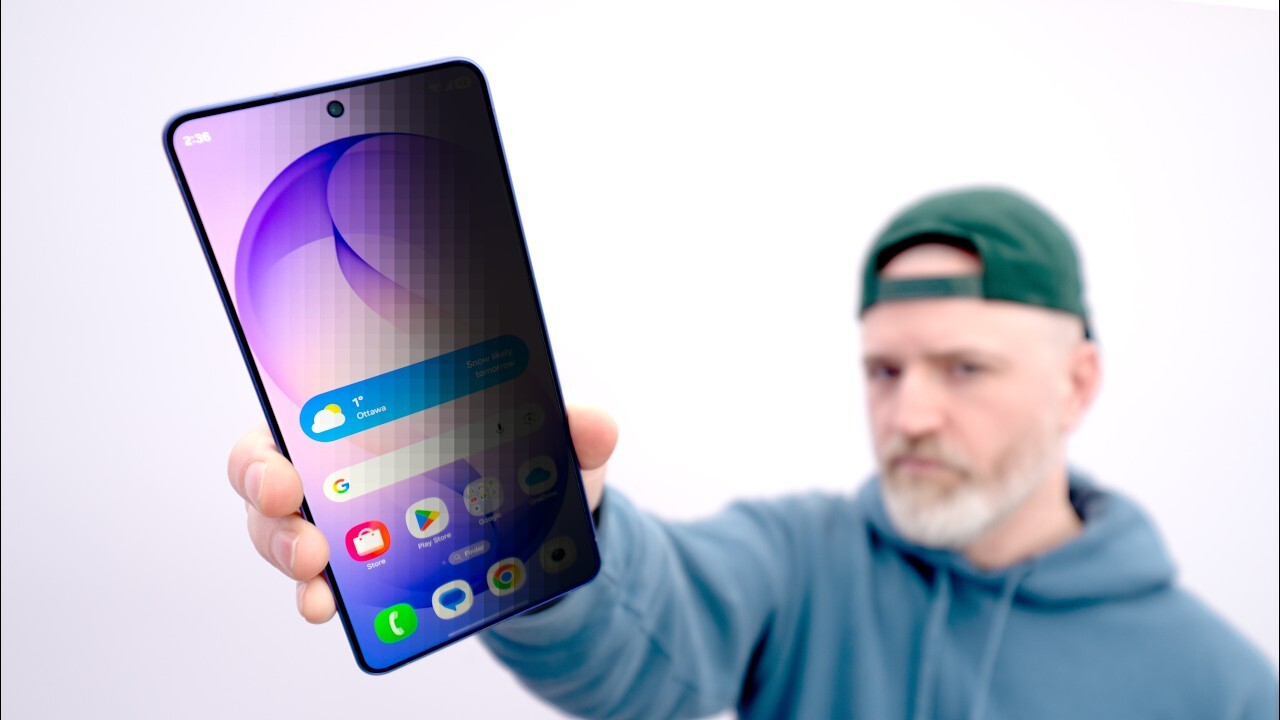
5:23
This is the new thing. Limit screen visibility from side angles to protect your privacy
5:28
Check that out. Whoa. Yes. This is like you've seen those 3M screen protectors or other privacy screen protectors
5:37
that aim to like kill off access viewing. And this does it
5:41
But from here I can't read. See where I'm at? From here I can I probably can read from here honestly depending again on screen brightness but I can really read from here So that tremendous privacy Will you on the flight you know you going to Italy you going to Japan all
5:59
your world travels on the flight or public transit. You take the train or something
6:03
People are just peeking at you or whatever. I'm going to turn it on. Wow. It is, it is a, okay, this is interesting
6:11
If you choose privacy display, it will toggle off the extra brightness option
6:16
It's one or the other. So you got to give up a little bit of max brightness for privacy
6:21
Think it's okay because most of the privacy scenarios are going to be inside with coverage
6:26
You're not going to need outdoor brightness. Because if people are, you know, when you're outside, there's more space
6:31
Maybe not at an outdoor music festival because that's another place you went, which was Coachella
6:37
Remember that? Like, I know it's a while ago now, but you actually did do that. Will was young like five years ago
6:43
And then now he's 65 years old. Cash back and Costco memberships
6:49
And it's unbelievable, right? You're gone. Boom. Now I'm going to turn it off and you'll see
6:55
Now you can see the display. That's just me dialing off. It's there
7:00
What a demo. What a demo. Wow. There's even a maximum setting, which is what
7:07
Even crazier? Oh, my goodness. that is nuts that is only directly in front of it on maximum mode way to go samsung i like tech
7:17
like it can be cool you can give me novel like that's a thing that's a real problem that you're
7:22
aiming to solve it's like a real thing hey guys ever had this problem here we solved it that ain't
7:28
no spec pump that's a new thing that your phone just don't your phones don't currently do unless
7:33
you slap a protector on there which ruins your display the rest of the time oh conditions for
7:38
turning on. So this is what we're looking for. You can choose which apps you want to use the privacy
7:42
display with. Love it. Okay. Pin pattern password. Turn on privacy display when you enter a pin
7:47
pattern or password for your lock screen. Obviously smart, man. In this world that we're living in
7:54
right now, I just had this camera on the phone. Do you or do you not currently have $60,000 in
7:59
crypto? I know your name, don't I? Apply the privacy display to notification pop-ups from all apps
8:06
while keeping the rest of the screen visible. Just the notification section
8:11
only available to the person directly in front. Well, if you're an Uber driver
8:14
you got this thing facing you, this guy's reading. Very cool, love it
8:19
Okay, that's great. Who doesn't want the feature? Who's mad about it? Nobody
8:23
Now that we're all booted up, let's go ahead and boot into our camera. That's really what I wanna see here
8:28
So let's go through some camera versatility here, starting with 0.6, which is so wide that Will got himself in there
8:36
Souverine. 30x what are we doing Let check the results That you that what you see wow 30x usable which of course here we
8:53
cropping 100 obviously at this point we're losing resolution oh baby now we're getting going when
9:03
you examine the money you know what i mean the great seal really novus ordo seclorum
9:11
What does it mean Mo? Obviously not pig Latin. Wow. Yeah, man
9:16
I mean, it's ridiculous. Even the ultra wide has stepped its game up now
9:20
Well into the usable territory. Ridiculous. Wow. You know what I mean, Will
9:26
This is one of those moments where, I mean, obviously the Samsung saturation hits and it's just like vibrancy
9:32
Dude, the skin tone is like perfect. Dude. Yeah, that's actually... The skin tone is right there
9:40
Let me get a little video going too. I realized we didn't do that yet. 4K60
9:45
It's your turn, right? Because he did the photo. So you can do the video, I guess
9:50
The autofocus test. It actually brought up the little macro icon. Wow
9:57
Close focusing distance. I'm going to turn on. Hold on. Hold on. I'm turning on the macro
10:02
What? Close focusing, baby. Okay, I'm going to turn off the macro
10:07
and it allows me to switch between it live as well so now take the bill away
10:11
bam autofocus is there we're not macro anymore we we're gonna move up on mo here get into his
10:20
space he moves i'm gonna hit him with a 2x now still gotcha three where are you going back to
10:29
two there he goes tracking. Can you still see me? It's like big dark
10:36
Okay so we got good news with the camera so far. When you're in the flagship category that seems to be the thing to examine in a big differentiator
10:45
Obviously you're getting top tier chips, you're getting top tier performance that's normal
10:49
But then it's like okay how are the cameras gonna compare to some of the other devices that are
10:52
available and here we have obviously tremendous camera versatility. Turn a little bit look at that
10:58
Probably the coolest thing on this model is this zero turn aspect
11:02
It can just turn on a dime and very gently. Turn on a dime
11:06
Turn on a dime, guys. Oh, yeah, I want to play some music, too. Let me do a little bit of music
#Computers & Electronics
#Consumer Electronics
#Gadgets & Portable Electronics