live_tv
Livestream Starting Soon
00
Hours
:
00
Minutes
:
00
Seconds
Up next in 10



Check out the new Impressive Huawei Product lineup here:
Huawei Mate X7: https://consumer.huawei.com/sa-en/phones/mate-x7/
Huawei Freeclip 2: https://consumer.huawei.com/sa-en/headphones/freeclip2/
Huawei Wifi Mesh X3 Pro: https://consumer.huawei.com/en/routers/x3-pro/
#huawei #matex7 #freeclip #meshx3pro #smartphone #router @huawei
FOLLOW ME IN THESE PLACES FOR UPDATES
Twitter - http://twitter.com/unboxtherapy
Instagram - http://instagram.com/unboxtherapy
TikTok - http://tiktok.com/@unboxtherapyofficial
Show More Show Less View Video Transcript
0:00
So we got all the latest products here from Huawei and obviously the focal point is the Mate X7
0:08
this ultra thin folding device, flagship device, but I was also captivated by these other releases
0:15
So we have the new headphones in a nondescript box because this is not retail yet and then we
0:21
have the Wi-Fi mesh system, the X3 Pro Suite, which I've never seen anything like this. You might be
0:27
looking at that and thinking that's a marketing image, that's actually what the thing looks like
0:30
They took something that we're so used to seeing in one formula, a slab or a box, and they made it
0:36
a piece of art. So anyway, we're going to start by opening this up and taking a look at this glow
0:41
Then we'll do the headphones, and then we'll get to the Mate X7, which is obviously the focal point
0:46
of this video. Okay, so here is the main unit. Then obviously we have our second node and some
0:54
accessories here whoa that is cool 2.5 ge1 2.5 ge2 and then power and just look at it it looks
1:08
like a beautiful lamp and then the fact that you don't have to hide it because it's not extremely
1:12
ugly might improve your performance because you put it in a more prominent spot so you see the
1:17
mountain peak in the center of course we've got to plug this in to see the glow and then you've
1:20
also got your extender. Now I presume you could add more of these if you wanted and it maintains
1:26
a similar aesthetic. More of a plateau than a mountaintop but I believe the glow is going to
1:31
be similar. Our gigabit ethernet and our power port as well. You've got a nice rubberized footing
1:37
so it sits in place and some relatively subtle Huawei branding in gold because I think these
1:43
kind of have a golden glow to them when they power up. This is nice for cable management. A big area
1:48
for the cables to exit, but still allowing the device to sit flat
1:53
Power's on. Oh, there we go. Nice. We should probably hit the lights to appreciate the glow here
2:03
You know what it reminds me of? It kind of reminds me of one of those salt lamps
2:08
Have you seen those before? Oh, it's getting brighter. Interesting. So yeah, hit the lights
2:16
Look at the mood. Are you kidding? What a mood. It's wild that we have these devices around us
2:24
for as long as we have and nobody says, you know what? Ours is not just gonna be a slab
2:28
We are going to make one as a sort of standalone, beautiful thing
2:34
If you're in a bedroom or something and you need to turn the lamp portion off
2:37
I believe you can tap it. Intensity one, intensity two, back to off
2:44
If you wanna be boring and just have it in a default setting and just say
2:48
I don't care about my range extender or my mesh wifi setup
2:53
Like I'm not trying to flex and I, or I don't like the ambience then okay, just turn it off
2:59
But it is cool to have that added touch. And it has that retro look with that glow
3:03
We have so many LEDs in our space now that are cold and surgical
3:07
And when you get those off at night and you set the ambience and all of a sudden you got those warm lights
3:12
Kind of like a lava lamp. Yeah, it's breathing. Changing color now
3:20
More icy. Yeah, that's kinda cool. So this one now is somewhat animated
3:26
and it's sort of flowing through. Look, man, I don't know. I don know it kinda cool That my opinion it kinda cool I never saw a wifi setup up I never saw a mesh set up like this so it novel and it catches my attention
3:40
And then you get the performance to boot with the wifi seven. Look at these things, they're beautiful
3:44
Alright, so next up we have some headphones and they've also been ambitious here
3:48
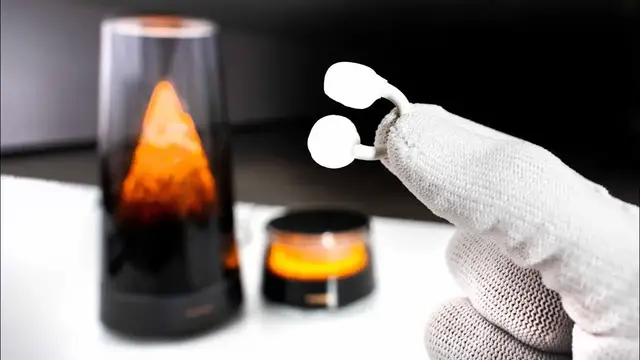
These things are called the FreeClip 2. Very different kind of shape for wireless earbuds
3:55
Now the case is familiar, although it has a different texture on it. It isn't smooth or glossy instead
4:00
More textured surface, maybe. Oh yeah, definitely enhancing grip. And these are things that slide out
4:06
Let me tell you, my kids lose these things. They had to practically disassemble an entire seat
4:11
on an Air Canada flight in order to try to find, because it slides out of the pocket
4:17
So I'm thinking this is not gonna slide out of the pocket as easily because they put that texture on there
4:22
So that might actually have some function and it might not just be about looks
4:25
Type C on the bottom. But those, look at those. Those are the buds
4:29
Are you seeing what I'm seeing? Because I'm using a Huawei tablet here
4:33
it immediately brought up the connection interface. Look at this. I'm actually not going to pair with the tablet
4:38
because I'm actually going to pair with the Mate X7 once I get this unboxed
4:42
But look at these things. What is even going on with that
4:47
Wow, it's like an earring. This is a totally different experience. You kind of have an open ear experience
4:53
so you can still interact with your surroundings and hear what's going on around you while still having audio
4:59
and you basically don't even, you hardly feel that thing on there. I mean, maybe because it's not so deep in the ear c
5:05
They call it an airy sea bridge design. It's funny, this portion on the back is called the comfort beam
5:13
to ensure a secure fit. See how it fits behind? So the majority of the weight is actually behind the ear
5:18
not on this portion of the ear, where it normally would be. So that's what it is
5:23
That's how it goes and how it works. again kind of like the wi-fi 7 system a much different look and a different approach so
5:31
obviously i want to test these out i think it makes sense to pair them to the mate x7 i'll take
5:35
them off for a moment get the mate x7 out of the box and then we'll try them and see what they sound
5:39
like okay so now we've got the mate x7 the latest folding flagship super thin high specs let's see
5:48
what they're doing yeah extremely thin you know competitive with all those other flagships that
5:55
are on the market but a huge imaging system whoa what kind of camera setup do they have on here
6:02
we will find out shortly also in the box there's a sim tool we've got a case they've included a case
6:08
with a kickstand by the looks of it a hinge protector that will go on the side this has a
6:12
leather-like texture. Oh, and it rotates. The kickstand also rotates. A power brick has been included
6:19
A beast of a power brick, 66 watt recharge. This is a cool thing Huawei does
6:24
They give you the Type-C connector and the Type-A connector mashed together
6:28
almost in one port. And then there's a Type-C cable in there as well. Whoa
6:34
Okay, so the finish on the back here is unique. It almost kind of looks like white camo
6:40
with a shimmer to it and it feels great. It feels, it has texture and somehow it's smooth
6:47
yet still tactile. Like you can feel that there's a texture on there
6:50
Now they have some special terminology for this finish. Metallic thread integration into this texture
6:57
900 warp threads, 1,700 weft threads. Like I'm supposed to know what that means
7:03
because it's some kind of 1,600 year old craftsmanship technique that I would definitely be aware of And because it has those metallic threads I presume if you had sunlight it might shimmer even more so it is crazy how slim this feels on the side i mean
7:16
it is as slim as you can get it these things are taking up the entirety of the width at this point
7:22
look at that your sim tray is down on the bottom and when we go to our folded orientation it is
7:27
still plenty slim we open it back up satisfying little listen it's a spring but it's not overly
7:35
aggressive. It kind of just drops into place. Here's what it looks like unfolded. I can probably
7:42
get more brightness out of it. Software update. We are downloading an update and while doing so
7:49
let's talk a little bit more about the specs. So the folded thickness is only 9.5 millimeters
7:55
They're calling it a quad curved design because everything is curved all the way around. There's
8:00
no single squared off edge. Even these edges are kind of curved. The unfolded thickness is 4.5 mil
8:07
obviously not where the camera is, and the weight is 235 grams. And the frame is a composite
8:13
aluminum body frame. I realize at this point we haven't tried the case on yet, and this is fine
8:18
with me. Just cover up the back. I never put the front portions on anyways, and it gets a little
8:23
bit thicker, but you get full protection now. We're getting the kickstand as well, so it's the right
8:28
angle and you get the big screen. I think you're just going to have this case on there. I think it's a good idea. The display on the outside is 6.49 inches and it's 20.4 by 9. So it is still
8:39
relatively narrow so you can get across. When it's unfolded it's 8 inches and the aspect ratio
8:44
8 by 7.3 so almost square. So here we have our slab phone comparison for thickness and it's hard
8:50
to believe because it folds up but that's what you get when you have such a thin device in its
8:54
unfolded state when you sandwich the two of them together you still end up with kind of like
8:58
flagship category thickness obviously the difference here is this massive camera setup
9:03
which is not really what you're seeing on the folding devices they're having some degree of
9:08
bump but that is aggressive and i'm sure there's good reason for it let's go ahead and find out
9:13
what the camera specs are so you've got a 50 megapixel ultra lighting hdr camera this is a one
9:19
over 1.28 inch sensor. So a big sensor, F1.49 to F4. And it has a 10 size adjustable physical aperture
9:28
out of control. We're talking about aperture blades. We're not talking about software
9:32
We're not talking about something happening after the fact or inside of processing
9:36
We're talking about legitimate photography-like aperture that you would have on a much bigger camera
9:41
inside of a folding phone. That's pretty impressive. 40 megapixel ultra wide F2.2
9:45
50 megapixel telephoto macro camera. And that's an F2.2. It's a 3.5 times telephoto, a 7 times optical zoom
9:52
So there's our, that's our 10X, which is, that could be your wallpaper
9:57
Right, Mo? That could be your wallpaper right there. It's incredible. I feel like, can you properly see the detail on that
10:03
There's something as well just about previewing your images on such a large display
10:07
It's just a great display. Which camera am I using right now? That one or that one
10:12
Rear camera for better results. Yeah, I'm looking at the rear camera. That would create the most incredible selfie ever
10:17
Like, look at this. So this is One X. I mean, unreal quality over there
10:22
I don't know if you're really able to appreciate it, are you? That's insane for a selfie
10:27
Smooth transition, check it out. So it's not like an ugly reboot
10:30
I just close it and it just slides in with animation. Did you see that? Nice
10:36
Okay, so 4K60 of Mo. This is the main camera. He testing the autofocus Oh and probably low light right You wanna get into some low light This is a little low light test I guess a little stabilization too because you following me He getting lower light
10:53
And now this is like pretty dark. It's very dark. It does not look dark on the frame at all
10:58
And it's like holding up detail pretty well. You see my gray beards
11:03
Absolutely. Yeah. And it's much darker. I mean, for people that can't appreciate how dark it is, look how bright that is when I turn
11:09
it is way darker and wow all right you can see you have settings for iso and here's aperture
11:17
right here it's at f2 but we can go anywhere from f1.5 to f4 and now what you're going to see is
11:22
that the background the far background has a pleasing blur to it now if i increase that all
11:28
the way up to f4 now you can see that the background has changed so the lamp jack standing
11:34
in the back look at how jack the focus just falls off but it does so gradually unlike some of the
11:40
software-based versions of this if you want more things in focus or you're shooting i don't know
11:45
a landscape or potentially architecture or something like that you might want to shoot at f4
11:49
but f4 is going to be tough in low light situations where you need the maximum available light that's
11:53
when you want to open that aperture up and that's where you're going to get that shallower depth of field which you also might want to use artistically you're shooting i don't know a flower or something
12:01
or a portrait, then you might want that focus fall off to create that kind of smooth ambience
12:06
or to direct somebody's attention to a certain part of the image
12:11
Okay, now, what about multimedia? I'm always curious about how the speakers are set up on these devices because you have
12:17
an opportunity for more stereo spread. Sounds good. yeah so legit stereo spread it's interesting one of them is high one of them is low so the whole
12:35
thing is supported by these two gas struts which support the weight then there's a channel along
12:40
back that allows you to mount face amountable components like monitors and in our case a mac
12:46
mini and don't think for a second i forgot about the earbuds because i do want to hear how those
12:51
sound so let's pair them to the device now that we have it set up the other thing i just realized mo
12:56
is never again will you need to worry about left and right these are universal there's no left and
13:01
right just pull one out put it on connected baby and oh wow can you talk mo testing testing one two
13:12
three wow it's crazy like i hear shut off i have it pretty loud but like i didn't expect that are
13:20
Are you suggesting there's noise canceling? Yeah. Oh wow, was it open here
13:25
That's insane. When I'm not playing the video, then there's like nothing there
13:29
But when I'm playing the video, it's not just the volume. It's also, you're not as loud as you, here try them
13:37
Yeah, just like that. You're right, there isn't any pressure. I really thought these would be pinching together
13:42
but they're not. It's, they kind of just like find a hook in a sense
13:47
It's like an earring kind of. Yeah. Oh, it goes pretty loud
13:51
Oh, there's no way I could hear anything you're saying. Say something? No, yeah, I don't think so. Yeah, there's no way
13:56
This is at full volume, though. Say something? Say something. Okay, now I can hear you
14:00
But I see what you're saying. I don't know if it's just the competing volume or if there is some sort of algorithm
14:05
Maybe some clogging and minimizing. I don't know. But pretty cool
#Computers & Electronics
#Audio Equipment
#Mobile Phones
#Gadgets & Portable Electronics