0:00
Alright, so it's no secret I've been using the Galaxy S10
0:03
Made a video recently kinda recapping my experiences. People are there hitting me up. I'm getting all kinds of questions, suggestions and so on
0:11
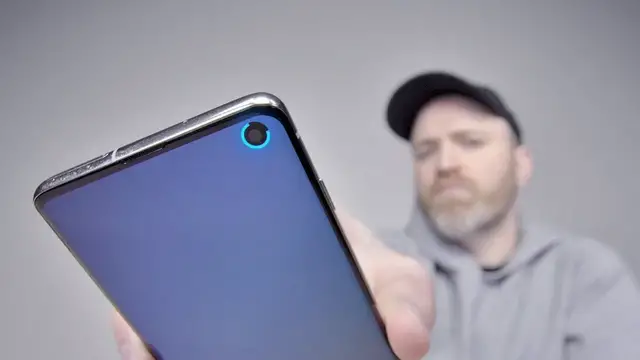
It's just a hot phone. People seem to like it so far. One of the things that showed up in my inbox, the app that can do something very special with the hole punch
0:21
It's a unique aspect of this particular device, the S10, S10 Plus
0:25
So you saw all these wallpapers come out specific to take advantage of the hole punch
0:30
But there's something more useful than any of those wallpapers that people have been hitting me up about in my inbox
0:36
And it's an app It's an app that takes that hole punch and turns it into a battery indicator
0:42
Energy ring battery indicator for Galaxy S10, S10e So this will not work with the Plus
0:48
It's specific to the circular cutout which I personally think is the better looking cutout
0:53
So far so good. I mean they got some reviews on the app. Let's just install it. Let's check it out real quick
0:58
So you do have to enable it in here That fine allow permission And I don know if you guys can pick that up It not super thick right now You can see if I slide this all the way over it gets a lot bigger But as you can tell it representative of the percentage of battery life remaining
1:13
And it's very visual. Like you can spot it quickly and easily
1:18
Let's give Kirk a quick look at it. You know you're in this sort of three-quarter territory with a quick glance
1:24
As opposed to your typical battery indicator, which you kind of got to squint at a little bit
1:29
Anyhow, I would probably use it somewhere around 15 for the thickness
1:34
I think that is a slightly better look in my opinion. You can change the ring direction as well
1:40
Clockwise, bi-directional, anti-clockwise. You can auto-hide on full screen apps. The charging animation, oh my goodness
1:47
Linear, no animation, acceleration, deceleration. Oh, cool! Look at that. You see it spinning around
1:56
So you're on the homepage or whatever. It's spinning around. Let me just go back real quick
2:00
because there are some other animations available. Linear, acceleration. Oh you see that one there okay It slightly different Deceleration slow boom slow boom okay Anticipation go don go go
2:19
Speed breaker, I hate almost all of them, I just want linear, but it's still nice to have linear
2:25
You just, to know to have the confidence, oh okay, I'm charging, sweet
2:29
It's a nice little functionality, does not interrupt your camera functionality at all
2:34
You know you're charging, you pull it out, It's static, it's back to whatever percentage you have, you plug it in, you know right away you're charging
2:42
Wonderful, okay. Nice little functionality there. Then, to take it a step further, there's a color configuration
2:48
So you think you're just glancing at the amount of charge based on how much of the circle is filled
2:52
but there's also color coding. From 100 to 76 is going to be green, 75 to 51 blue, 50 to 26 yellow, and 25 to 1 will be in red
3:02
Again, this idea of just being able to glance at it and quickly understand which battery territory you're in
3:08
First step, you're just gonna recognize the color, and then the second is how much of the ring is filled up in total
3:13
This is a cool little thing I think it a good idea I starting to understand why so many people sent it to me This hole punch has been for some reason it inspired all kinds of people in the smartphone space
3:24
Whether it's a wallpaper or an entire app. I guess the aesthetic of it was just appealing to people. They wanted to do things with it
3:31
This is by far the most useful functionality I've seen so far
3:35
There is that LED that's in there. Typically only shows up during face unlock or I guess maybe when you're using the front facing camera
3:43
Now you can put it to use on the daily in a way that can actually impact the way you use your device
3:48
and let you know sooner than later that you're getting low on battery or also let you know that you're charging in case for whatever you're plugging into a faulty setup
3:57
and you're not getting a charge, you would know. Now it looks like the app itself is ad supported so it's free
4:04
I mean you just get it and you gotta look at like an Amazon ad every so often
4:07
It's really not terrible. Thank you for the tip for those of you that sent it in
4:11
And I think it's a nice little improvement on a design element within this particular device
4:17
I think it's pretty cool