Up next in 10

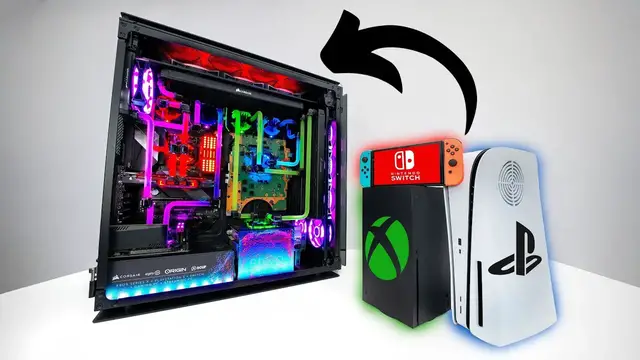
Every Game Console in ONE — (PS5, XBOX, Nintendo Switch and Gaming PC) — ORIGIN BIG O V3
Jun 30, 2025


THE ULTIMATE GAMING JUGGERNAUT ORIGIN PC BIG O V3 featuring PS5, Xbox Series X, Nintendo Switch and an RTX 3090 gaming PC in ONE UNIT. Thanks to Secretlab for Sponsoring this video.Check out the Secretlab TITAN Evo 2022, designed for pro-grade ergonomic support and all-day comfort: https://secretlab.co/unboxtherapy-titanevo
Learn more about ORIGIN PC’s BIG O + enter to win a free ORIGIN PC + PS5: https://bit.ly/3IBDmIm
FOLLOW ME IN THESE PLACES FOR UPDATES
Twitter - http://twitter.com/unboxtherapy
Facebook - http://facebook.com/lewis.hilsenteger
Instagram - http://instagram.com/unboxtherapy
Show More Show Less View Video Transcript
0:00
This is going to be a task. In front of me, I have the Origin Big O. I've done a video on this
0:07
product, this experiment, this achievement, but it was time for a new one because of course we
0:13
have new consoles and we've also got new gaming PCs with new GPUs. So we had to do it all over
0:19
again and inside this crate is the latest generation of the Big O. Inside this crate
0:25
is a gaming PC, a PlayStation 5, and an Xbox Series X built into one single unit
0:34
It is considered to be by many the holy grail of gaming devices
0:40
It has to ship in an absolutely aggressive, enormous container from across the world
0:49
I mean, no one really knows where this comes from. Could be Timbuktu, for all we know. I don't
1:53
All right, so here's what I'm noticing right now. There's at least three monitors in there
1:58
Gaming monitors. I see a 165 hertz refresh rate. I see many other items for the ultimate setup
2:04
I see wave panels. I know there's a pewter in there somewhere too. And I know it's got a PlayStation 5 and an Xbox Series X in it as well
2:12
Let's start pulling some things out though. four four 32 inch qhd 165 hertz 32 inch gaming monitors is there a switch in here as well
2:55
i missed that part this is taking things to another level completely i was expecting
3:01
just a big O, not an entire setup, which is going to be so much cooler and so much more elaborate
3:10
We have all the accessories you might want for a setup like this. RGB mechanical keyboard
3:17
we have a RGB mouse pad, the key light air, the wave panels from Elgato, and of course
3:21
the Corsair Xenion 32-inch monitors times four, but still the main attraction, the main piece, the main agenda
3:34
the main course, the main frame, the big O
3:45
Corsair, Elgato Origin, Scuff Oh yeah It's Unbox Therapy
3:54
That is a big sheet of glass I see water cooling
4:05
I see GPUs I see a capture card 4K60 Pro that graphic has been perforated into the side panel
4:21
It's kind of like the Big Bang, how everything started. The cosmos and such
4:26
Except it's the big O, the big origin. Origin. Big Bang. Origin
4:41
How did we get here? Thank you
5:45
This is a special moment
5:56
This is a one-of-a-kind device, and that doesn't happen all that often here on Unbox Therapy
6:02
like a one-of-one. We get a lot of cool new products, but they're mass-produced
6:06
This is not mass-produced. This is craftsmanship Tweaking and engineering to make everything work because getting this number of systems to coexist inside of one chassis is not an easy thing to do Complications with networking
6:21
power supply, cooling, everything in there creates heat. This is the big O in all of its glory
6:29
My goodness gracious. Different color liquid cooling that represents each system inside of
6:36
here. Of course, green, Xbox Series X. Blue, PlayStation 5. Clear, the streaming PC. Red
6:42
the gaming PC. I was trying to map it out. I was like, where's the Xbox? Because of how tiny
6:47
they were able to integrate the components by splitting them, separating them, figuring out a
6:52
way to stack them. This is the Xbox down here. PlayStation 5, you can see the main board there
6:57
And one of my favorite things about the console integration is the way they dealt with networking
7:01
You have an integrated switch in here, so one single Ethernet cable feeds the consoles
7:07
Of course, we can't forget the gaming PC, which features an RTX 3090
7:13
capable of playing whatever game you might want to throw at it in 2022
7:17
and also liquid cooled, because of course it is, because you want things to stay chilly
7:22
Now, it's got this custom graphic on top of it as well, which ties the whole thing together
7:27
We've also got it on this plate on top of the power supply
7:30
and then we've got it over here, big O V3. That's right, this is the third version
7:35
the third iteration, and it also happens to be my favorite because it's the cleanest, most integrated
7:42
that I've seen up until this point. Now, why would you want a streaming PC
7:46
Well, you have a four monitor setup here. So you have the stability of a completely separate PC
7:51
to send your gaming feed into via the Elgato 4K60 Pro capture card
7:57
That capture card capable of recording from your entire variety of consoles and the gaming PC itself
8:03
And then on the front of the device, your Nintendo Switch. There's been all types of solutions for how to integrate the Switch into a setup like this
8:11
It's quite a bit different from the other consoles. You can pull it out and play from the couch
8:15
So they were able to integrate a dock into this front chamber here
8:22
All of a sudden, the HDMI output becomes available on the monitors inside the setup
8:27
You can simply reach in, lift the switch out, and then you've got a completely portable setup that you can take with you
8:35
And it's always charged because it lives in the dock inside of the Big O
8:40
They've also done this custom pass-through for this red LED light on the front
8:46
Now, this is the other area where you're going to spot it, Big O V3. And this has a texture to it
8:51
all these little dots and nodes representative of the big O, representative of origin
9:00
high performance PCs, and it looks kind of like an eye. And you've also got the colors getting
9:06
pulled through on here as well, where you have the blue for the PlayStation and the red for the
9:12
gaming PC, and obviously the green for the Xbox Series X. And then there's a tiny little purple
9:16
gradient in there as well for me this is the most integrated solution that they've done so far it
9:23
lives up to the idea of being the holy grail of gaming kind of a dream machine of sorts all the
9:29
variety of gaming options and gaming devices in one place in one chassis and in some cases improved
9:35
in the sense that now everything is liquid cooled and everything can be played from one seat and
9:44
you've only got to arrange one piece of hardware at least one footprint
9:49
now in the back of the pc we have our power switch for the streaming pc as well as our
10:16
I.O. for the gaming PC below that, including a hardline Ethernet port that feeds all of those
10:21
consoles via integrated Switch. You have an HDMI out for the Switch, a dedicated HDMI out for the
10:26
Xbox, and also for the PlayStation 5. Now, there's a power port in that location as well, which is
10:31
going to feed the Ethernet hub, USB hub, and the 4K Switch panel. The streaming PC PSU is down at
10:38
the very bottom of the unit, and the gaming PC PSU is in that location as well. Our USBs for the PS5
10:45
are up there. Our USBs for the Xbox are up there. Headphone and mic port for the gaming PC. USB 3.1
10:51
for the gaming PC and the streaming PC and of course the power button and the reset for the
10:57
gaming PC as well. Now you might be wondering do I have to run all of these systems at the same time
11:04
You don't. You can run the gaming PC individually. You might not be playing everything at once and
11:10
you might not want to create any kind of extra heat or power consumption. No the gaming PC is
11:14
still standalone it's going to operate on its own you just boot up these other devices as you see fit
11:19
the same thing goes for the streaming pc actually the streaming pc controls the liquid cooling for
11:24
the consoles so it's feeding the playstation 5 xbox series x and itself okay so here's another
11:31
important aspect we have this little remote it's a 4x1 selector and this is going to determine
11:37
which source you're feeding into your streaming software so if you want to stream xbox you'll
11:43
select that input if you want to stream from your nintendo switch you'll select that input
11:47
playstation 5 etc so it's a quick little way to move between those sources even though we have
11:52
independent htmi outputs feeding our monitors this will determine what's going into your streaming
11:58
software so let's do a spec check real quick the chassis first of all that this is built into and
12:03
this is one of the amazing parts for me this is a chassis you can buy and do your own config in
12:07
It's a 1000D, it's a huge case, but many people already choose this case
12:13
just to build out their gaming PCs, have a lot of space to work, to do some type of water cooling and so forth
12:19
But you can see how large it is because in this implementation they were able to fit in all this extra hardware as well Now Corsair IQ system controls all of the RGB lighting and configuration
12:32
The chip that's being liquid cooled here is an AMD Ryzen 9 5950X
12:38
That's a 16 core chip at 3.4 gigahertz, boosting up to 4.9 gigahertz
12:44
The motherboard that everything is connected to, the ROG Crosshair 8 Hero Wi-Fi
12:51
128 gigs of corsair dominator platinum the gpu is hydro x cooled that's an nvidia 24 gb geforce
12:59
rtx 3090 the os drive 2 terabyte mp600 core gen 4 storage 4 terabyte mp600 core gen 4 and the
13:08
power supply ax 1600i titanium from corsair oh how about this the game consoles actually have extra
13:17
storage added to them as well getting back to this idea of not just plopping them in there but
13:22
actually improving their capabilities and cooling the playstation 5 has a 1tb primary drive and then
13:29
a 1tb corsair mp600 secondary drive i apologize for bumping you now let's talk about the spec on
13:38
the streaming pc because it's no slouch either ryzen 7 pro 5750 g16 core 3.8 gigahertz with a
13:45
a 4.6 gigahertz boost, that tiny little motherboard, B550 ROG Strix Gaming, 32 gigs of Corsair Dominator Platinum
13:54
HydroX Cooling. Of course, it's got the Elgato Game Capture 4K60 Pro MK2
14:00
And you've also got very fast storage, the 1TB MP600 Core Gen 4 from Corsair
14:05
and then storage on the 4 terabyte MP600 Core Gen 4. And the streaming PC is powered up
14:11
by a 750 watt SFX series power supply, also from Corsair. Here you can see the triple setup
14:18
This is Willie Do, by the way, I feel the need to introduce. And he's showing off his specs, his damage done
14:25
Of course, playing Overwatch, bit of an Overwatch guy. He currently has all the systems running
14:30
even though he doesn't need to, just because we can. On the left monitor in this setup
14:35
this is where you're gonna play your PlayStation 5. You can use, of course, the typical PlayStation controller
14:40
or I don't know, you could use this custom Big O controller
14:44
from Scuff. What a collaboration on this particular build. So you can see the design work here
14:51
with the Big O kind of dots, the cosmic energy coming through to this Scuff controller
14:57
Now, if you don't know about Scuff, it's all about configuration and customization
15:01
So we have all these extra buttons so your thumbs can stay on the thumbsticks
15:06
We have other modifications made to the controller And they didn't simply include a scuff controller for the PlayStation 5, but also for the gaming PC
15:16
Blue for the PlayStation 5, red scuff controller for the PC, as you can tell
15:22
Same design work coming through and all your variety of other custom scuff modifications
15:28
Switches, buttons, map it as you please. And then moving all the way across to the Xbox Series X, same thing here
15:36
You know it's got to be green. So the custom theme, it just travels through all the variety of components, including the controllers that correspond with each of the systems
15:46
Now, this display is, as you can tell, dedicated to Xbox Series X
15:51
And then we have a separate mouse and keyboard for the streaming PC that's up above
15:55
You can see the webcam currently showcasing Willy Do. He could very easily go to live streaming right now in a moment's notice as he sees fit
16:05
by switching inputs, he can change which device is going to be sending its signal alongside his webcam feed
16:13
to his streaming software. Now, since this is an entirely capable streaming setup
16:19
we have Elgato's streaming mic, Elgato's streaming webcam. We've even got some lights
16:25
and these are Wi-Fi configurable lights, Key Light Air from Elgato. It's all purpose built for the capability of streaming
16:32
And even the stream deck, which Willie Do already loves, we use it over there on the Lou Later set
16:38
And you can see the way we have custom configured keys for all types of things you would want to launch quickly while attempting to do a live stream
16:46
And then, of course, you got to sit somewhere when you're playing the ultimate setup, the Origin Big O V3
16:54
That's why we've got a chair from Secret Labs keeping Will cozy with a magnetic removable headrest
17:01
it's memory foam as well quite lovely actually a lot of people don't realize the benefit of a
17:10
gaming chair having the correct armrest height many of them are configurable but it has to be
17:17
configurable enough to line up perfectly with your mouse hand and your tabletop height as you can see
17:23
here far less fatigue check out his ergonomic angles and not all gaming chairs are made equal
17:30
the Titan Evo was developed with an ergonomics advisory board and then made in Secret Lab's exclusive high-end manufacturing facility
17:40
So we've been using the Titan Evo in the studio for a really long time, but check out this special edition, which we're going to be using now
17:47
That's the official licensed DC Dark Knight version of the Titan Evo 2022
17:54
Pick it up in whatever size is optimal for your body type
17:59
Get in there, get your configurations going on the armrests for optimal gaming and relaxation
18:05
You can recline it for a little bit of Netflix. This is Unbox Therapy's chair of choice, Secret Lab
18:12
Now, obviously you're gonna need some pretty solid inputs. And of course the RGB capable mouse mat slash keyboard mat
18:19
This thing is enormous. Well, I just realized it's got two USB ports on it. So you can use that to charge up peripherals
18:25
devices, your phone, whatever. That's the K100, mechanical keyboard from Corsair. RGB, obviously
18:32
And it even has some nice little knobs and wheels. I like this little adjustment here for volume very quick Would you say soft wrist rest going on very soft very soft those are his words very soft supple would you say supple he nodded the saber rgb pro very
18:52
responsive go ahead show him some responsiveness lovely all the dpi it's top of the range stuff
18:58
from corsair now the other thing i want to mention i was sitting looking at the setup i noticed that
19:02
there's a lot of desk space. I was like, wait a sec. Then I realized that they finally figured it out
19:07
as far as monitors are concerned. Get a really wide but shallow base
19:13
Like don't have this thing coming out too far. Have it pushed back because then it gives you more configurability in front of it
19:18
and opportunity to put peripherals there, whether it's microphones, a stream deck, keyboard, mouse
19:23
Now, the other thing I should mention about these monitors is they do have fully adjustable stands
19:28
So you can see if for whatever reason you wanted to elevate one
19:32
You can see how smoothly this will move up and down for you. Quite a decent amount of rotation on that
19:40
There's also cable management that we're totally not using at the moment. Like, not even close
19:45
But there's good cable management, I promise. You just flip this out and run the cables right there
19:51
In the B-roll, it'll be run properly. Even the lights are adjustable depending on your setup, right
19:59
So you can see little markers on here so you can remember the optimal height
20:02
and so that you can match up the two of them if you have two of these key lights
20:06
and more adjustability up here too so you can get the best kind of lighting
20:11
The last thing to mention and probably a burning question is what if I just wanna use my PC
20:17
to power like a triple monitor setup because I'm not using the consoles at a particular moment
20:24
Well, thankfully that 3090 has plenty of power to output to a triple monitor setup
20:31
So in this case, we just change the inputs on the monitor as seen here
20:35
So we have three display ports out of the 3090 feeding these monitors
20:40
So if I switch to the display port inputs, then it just populates like this
20:44
We use the center monitor as our main display. And then just like that, we can have all the benefits and extra real estate
20:51
So we could be getting work done. We could be editing video. We could just simply be monitoring social media
20:56
while watching YouTube videos or playing games on the center monitor or the left monitor
21:02
or whatever configuration you might want to have. This is going to operate like a typical triple monitor
21:07
And then the top monitor remains reserved for your separate streaming PC
21:12
But the nice thing about doing one up and three down is that it creates space for your other accessories
21:18
including your lights and your camera. Not to mention, it's cool. Yee-haw
21:26
This is what it's all about right here. Any gaming anytime multi-gaming anytime. Have a couple pals
21:33
over. Hand them a controller. Give them a monitor. Share why don't you. I could be over here. Moe
21:41
could be over here. Kirk could be over here. Kirk could be over here. Moe could be over here. I could
21:47
be over here. Oh I want to play a little bit of Overwatch. How would I pick up the Xbox controller
21:55
here because I'm going to play. It's inverted, Kirk. That's the problem with letting your
21:59
friends play. It's inverted. Oh my God. I cannot adjust my mind to the inversion
22:07
Up is down and down is up. I can't do it. I'm getting a phone call
22:17
so halo overwatch oh how about the reason that you would have a playstation 5 one of the big
22:27
reasons because you would want to play gran turismo wouldn't you do that too honestly we cut
22:33
for a second in the moment that the cameras were down that actually happened mo was just playing
22:38
over here and you could do this whatever orientation you want right you didn't have to
22:42
have these things tilted. You could have them all flat. Have your pals over. Get your potato chips
22:47
out. A little bbq. You could talk about love. Not a cloud in the sky. And then, last but not least
22:55
what about that Nintendo Switch? Oh baby. Is this Mortal Kombat? Mortal Mombat? It's crazy guys
23:02
The holy grail is yours. You don't need to do anything else. You just stay put. You understand
23:07
Order food. Everything is here. There's nothing out there. It's gone. There's no need
23:11
oh i'm in the game did it get more realistic i feel like i used to be flying around a little
23:17
bit more oh i'm gonna i'm gonna lose now back forward forward forward i i don't i can't be
23:23
looking at a move list button mash annoying you're dead you're dead you're oh maybe you're not dead
23:30
i used to love button mashing and discovering some move i didn't deserve and then act like i
23:35
knew what i was doing whoa whoa whoa let's just win this real quick on it on the move fake
23:41
What? Brutality. Not fatality. Brutality. Okay, listen. Ladies and gentlemen. Ladies and gentlemen
23:47
It doesn't get any better. This is it, guys. This is what it's about
23:52
The big O. One of a kind. A seat. That is one of one
23:58
In the world. There are those that will get to sit here
24:03
And those that won't. I was supposed to stop there. This is a tutorial. Gran Turismo
24:08
Overwatch. Mortal Kombat on the Switch. halo in a four monitor setup working simultaneously in one tower liquid cooled ridiculous spec sheet
24:20
the ability to run a triple monitor setup plus the streaming pc so it's ready to go right off the bat
24:26
my goodness this is the one they've done it again origin corsair scuff elgato everybody who put this
24:36
together or is a part of it deserves tremendous credit and deserves to have the names on it
24:42
this is a one-of-a-kind unboxing experience and thank you for that it's 2022 it's the big old v3
#Arts & Entertainment
#Computers & Electronics
#Computer Hardware
#Computer & Video Games