live_tv
Livestream Starting Soon
00
Hours
:
00
Minutes
:
00
Seconds
Up next in 10



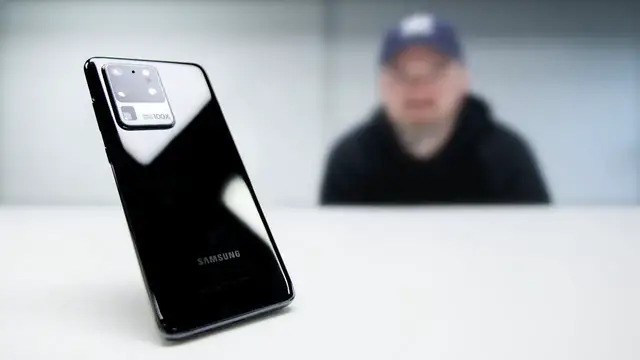
Samsung Galaxy S20 Ultra - Here are 5 things I like about it.
Latercase for Samsung Galaxy S20 Series
https://latercase.com/collections/samsung-thin-cases
FOLLOW ME IN THESE PLACES FOR UPDATES
Twitter - http://twitter.com/unboxtherapy
Facebook - http://facebook.com/lewis.hilsenteger
Instagram - http://instagram.com/unboxtherapy
Show More Show Less View Video Transcript
0:00
So I wanted to talk a little bit about a hot new device, a hot new phone released by Samsung
0:06
the S20 Ultra. And the reason I want to talk about it is because I've been using it. I switched over
0:11
to this phone. I was using an iPhone for a while. I was using a Pixel phone before that. Well, you
0:16
know, that's kind of how it goes around here. That's the job. You try a lot of different phones, you figure them out. You figure out the things that you like, you figure out the things that
0:23
you don't. So I thought it would be cool at this moment, given some initial exposure to this device
0:28
to lay it out for you to give you five reasons you might want to get this phone or at least five
0:35
observations five things i like about this particular device they're not exclusive to
0:41
the ultra some of the factors would also apply to the other devices the s20 s20 plus not exactly
0:48
but like will's using the s20 the regular s20 the number one thing that i like about this phone
0:55
having used it now for, I don't know, maybe three days, is the display
1:02
Now, I don't know if that's surprising to you or not. You probably imagined that would be the case
1:08
Maybe you thought I was going to say camera. The display, I put it at number one just because of how big it is
1:15
I guess I feel like if you were out there as a smartphone buyer in 2020
1:21
you got a budget to support this particular phone. Believe me, it is a budget. Full disclaimer. Everything I say here applies to a very expensive phone, but you already know that since you clicked on it
1:33
If you want the biggest, baddest display, this is probably it in 2020
1:38
At this scale, it's the biggest display Samsung has put on a device, and that includes the Note series, which typically had the biggest displays
1:49
So it's got a massive display with very little obstruction from any type of cutout
1:53
Of course, we have the single front-facing camera symmetrically in the middle with a small hole punch
2:00
It has ultra-high brightness. And believe me, I'm a bit of a brightness aficionado
2:07
I'm always looking for the brightest screens in daylight. Outside, I pay attention. I'm curious
2:14
This one is one of the brightest I've ever used. You add to that 120Hz refresh
2:21
and I've explained this to you in the past with other high refresh rate devices
2:26
This has a tremendous impact on how snappy the phone feels when you're interacting with it
2:33
how fast it feels, and it won't completely show up to you on camera
2:38
but once you get this in hand, it's going to be hard for you to go back to a regular 60 hertz phone
2:43
And since the last phone I was using before this one was an iPhone 11 Pro Max
2:49
which is a 60 hertz device the gap the jump was significant and it's like man look what i was
2:56
missing it's not just speed it's also sort of a smoothness that comes along with that 120 hertz
3:02
now keep in mind it does use battery and that has been one of the criticisms of this particular
3:07
device even though it has it's a big footprint it has an enormous battery in it at 120 hertz
3:13
if you're watching a lot of video you're moving around a lot you're playing games something like this you can drain it it is possible so just keep that in mind if you want better battery life you
3:22
can toggle back the 120 hertz but you know me it's like max brightness 120 hertz i want to experience
3:29
the ultra in ultra format if you care about the display mate stuff they took a look at this screen
3:36
and basically ranked it up at the top tier so you put together the resolution the size the 120 hertz
3:44
refresh Samsung history and delivery of OLED displays the tiny little hole punch You just add it all up the high brightness and i think you probably have the most compelling display if we strictly talking displays maybe on any smartphone right now
4:00
this all depends on whether whether or not you're in the market for the biggest baddest display
4:05
because it is a huge phone so i could see some people maybe with a smaller hand or you just don't
4:09
want to have a beast in your pocket you just say to yourself i can't handle it i'm not going to do
4:14
it or maybe you don't have the budget for it so i hear you when it comes to that as well will is one
4:18
of these people. He decided to go for the S20 standard edition. He's been customizing it. He
4:24
absolutely loves it. All right. Number two, this is a weird one and it does apply to every single
4:30
new S20 or well, the latest Samsung stuff in general. One UI, the new one UI. This is crazy
4:37
I can't imagine myself saying this in fact, because you guys have heard me on here before
4:42
I've been a huge proponent of the stock Android experience, the Pixel Android experience
4:48
the Android experience, the way that Google intended it. This is one of those rare circumstances where I feel like Samsung has actually made an improvement
4:57
and that improvement applies specifically to this Ultra model because of how big it is
5:03
So Samsung thought a lot about one-handed usage, and as you can see
5:08
I can drag from this point in the screen and get my drop down
5:12
If I go up to the settings area here, I can grab from anywhere and bring it down into a more reachable location
5:20
Now this is my left hand, so the grip is a bit more abnormal, but this is especially important on a really big phone
5:27
that there's thought that went into, how are you going to use this thing with one hand
5:31
and are there software improvements we can make that are going to make your life a bit easier
5:35
Now this same thing follows through to Samsung apps and settings. So the default would be sort of like this
5:40
But what if I have to reach connections in one hand? Like, check it out
5:44
Right now I can reach it. But the default would stick it at the top, making it further away from me
5:49
This matters on a device that's this massive. The whole thing is pretty clean
5:56
There's a dark mode baked in. It's snappy. It's not a heavy skin
6:00
So it's kind of crazy. I'm sitting here using One UI instead of an alternate browser in 2020
6:07
that should go to show you from a guy who's been on the vanilla experience and talking about it for
6:11
so long that's meaningful now keep in mind that particular point applies to any of the latest
6:18
Samsung devices and not just the ultra model and it's kind of surprising I put it at number two but
6:23
I just I don't know I feel like it deserves to be talked about it's a differentiating factor that
6:27
Samsung has if you were cross shopping this against something that was a non-Samsung flagship
6:32
device all right the next one this stood out to me right away considering the last samsung device
6:38
that i used would have been back in the s10 days they got rid of the dedicated bixby button which
6:44
to me was an annoyance on the previous models now i know eventually you could map these things
6:50
those buttons to do alternate things but i just hated the idea of having this feature
6:56
forced upon me when, you know, I'm a Google Assistant guy. I like to use Google Assistant
7:03
Bixby was never a replacement to Google Assistant for me. So I didn't want this button reminding me
7:07
that Samsung was wishing and hoping that I would be using Bixby
7:20
I feel like he's back into chasing his tail now that he's wearing the thing
7:24
so yeah I was one of those guys I was trying to disable and remap the Bixby button and it was okay
7:30
that was a decent substitute but it just felt unnecessary and it was
7:36
just hard for me to get it out of my psychology that
7:39
this button represented Bixby exclusively and sometimes I would press it accidentally and in the initial way that you would disable it you could still launch it by double tapping It was just I just wanted to be rid of it And they did that on this device
7:54
which is, it means that Samsung's listening to the customer base. And I think that's always a good thing
8:00
So now instead, if you head over to the power settings into the side key settings
8:07
you can actually do whatever you want, even with the power switch. So if you still want the Bixby situation
8:13
You just do it from the power button. It can either be a double press or a press and hold if you happen to be a Bixby user
8:20
So that's better implementation. Gives you more control. It's within the one UI
8:25
So I just think Samsung made the right move there. This is my fourth
8:30
And keep in mind, I'm trying to keep it to things that are not obvious. These five characteristics that I think will make you want to pay attention to this particular device
8:39
Obviously, it's very powerful. It has all this RAM. It has the latest chip from Qualcomm
8:44
Of course, it has all those things going for it, but I was trying to keep it more
8:47
into things you might not think about or things that I experienced and noticed
8:51
having the device in hand. So this next one actually has to do
8:55
sort of with the display again and the flatness of it. Samsung has been through a variety of different curvatures
9:03
to the edge of the display, dating back to the device that actually had the name Edge in it
9:08
that was a very aggressive edge that they had and they've been playing around toying around with
9:14
different versions of it leading up to this one I think they have finally nailed the right edge
9:20
in 2020 if you could say that now I know other manufacturers are going bananas with the
9:26
waterfalls and so forth but from a person who's used them all up until this point there hasn't
9:31
been the perfect implementation you would get these unintentional presses on the side sometimes
9:36
you would lack a place to grip. They look great. They look very science fiction with the waterfall
9:41
display, but from a practicality, from a usage perspective, there's still no substitute for a
9:47
confident grip. So this particular curvature still diminishes the appearance of a bezel
9:54
but it keeps it flat enough that there's no unintentional presses. And if you pair a case
10:00
with the device like I have here, it's even less likely that you're going to touch where you don't
10:05
want to because now you have this nice substantial section that you can grip onto as you can see
10:10
right here now of course this is a thin case so it doesn't obstruct the original grip too much it's
10:17
not a massive impact but it just gives you a little bit more to hold on to and gives you less
10:22
likelihood of interacting with the edge at all i think they have nailed the curvature for now
10:28
All right, now, I can't talk about the S20 Ultra without talking about the camera
10:34
It's a very important component here. It's massive. It's standout. It's the first thing you see with this device
10:41
If I pull this out of my pocket, people are going to talk about this camera. They're going to know right away what this phone is because of the camera
10:47
Now, the camera has been a bit controversial. So it might seem odd to you that I'm saying it's one of the top five reasons to consider this phone
10:53
uh controversial in the sense that there's been some issues samsung saying oh there's going to be
11:00
some improvements on a camera we're going to have some next software there's been some issues with
11:03
autofocus been some issues with image processing so these are things you could address with software
11:08
but there's also this argument that you you shouldn't have to ask for that it should be out
11:13
the gate out the box maximum performance but samsung gives you access to a full-out pro mode
11:22
on here which can eliminate a lot of that post-processing. The reason I put it at number five is because of camera versatility
11:30
which I think is where this particular device shines. Where out of the box Samsung gives you more control over how the camera operates compared to other manufacturers There just so much that you can modify within the camera app The same thing applies to the video mode which goes all the way up to 8K Plus there
11:49
still no real perfect substitute for optical zoom. It performs better than the other zooms
11:57
particularly the digital zoom that the Pixel tries to do, at least up to around 10X, certainly at 8X
12:04
you're going to get more sharpness less software guesswork this is an area where the hardware is
12:09
still outperforming even the best software in the world at trying to figure out what a zoomed image
12:15
should look like the wide angle camera i've been using it outdoors i've been impressed with it
12:21
posted a couple pictures from it so the selfie camera is also very good so that's why i decided
12:28
to title it camera versatility it's a mixture of the available settings the various video formats
12:34
stuff in there that you may never use, but that you have access to if you want to dive into it
12:39
in an ultra model phone. As far as the autofocus stuff and the image processing stuff
12:45
we're going to have to wait and see how Samsung addresses it. If upcoming software can improve it, it probably can
12:52
But just keep in mind that it may progress or change over time
12:57
My last one is an honorable mention, and it also applies to all the various Samsung devices
13:02
And if you caught the most recent video, then you're already aware of it
13:06
And that is Samsung DeX, which allows you to plug this horsepower into a laptop or desktop
13:14
style environment with a keyboard and a display. And I haven't experimented with it before
13:20
And it actually turns out to be a totally usable thing. It's surprisingly powerful and fluid
13:26
and I can see a lot of people in the future transitioning to a workflow like that
13:33
Other manufacturers haven't progressed in this space very much. Huawei has their thing
13:38
Then you have Samsung with DeX and then pretty much no one else is there yet
13:42
or they're currently working on it. So it's a nice advantage if you're going to invest in a very expensive flagship device
13:48
to know that you could have the option of plugging this into a dock
13:52
getting a keyboard and mouse and monitor experience, or a laptop-style experience if you need to do more work, type a document, and so forth
14:02
And again, advantage for Samsung. So that's five points plus one extra, the honorable mention, with DeX
14:09
Will, is there anything you want to add? You've been using the S20. What is your favorite, one favorite thing, one reason why a person should get an S20 series device
14:22
The 120 refresh rate. Oh, okay. I think that makes such a big difference
14:26
The display. Yeah. I mean, like, it's so smooth. Yeah. There's no lag whatsoever for this
14:32
So, yeah, I appreciate something like that. You're going to feel like you've kind of progressed into the next era of smartphone displays
14:42
Maybe even more so than resolution. Maybe even more so than the advancement to OLED
14:50
the refresh has just had a really weird impact on how you perceive the snappiness of your phone
14:56
the responsiveness. Because of the touch input, the way we interact with phones
15:01
that instant following of your finger, it gives the device more life. It feels more responsive to
15:09
you. This all sounds very extreme and very personal and intimate. And that's because it is
15:16
So that's five reasons and an honorable mention for me that you might want to get the Samsung Galaxy S20 Ultra
15:24
And that's one reason from Will to get an S20 series in general
15:29
It's a moment. You're going to have a moment
#Computers & Electronics