Up next in 10


Linux - Special variables
Show More Show Less View Video Transcript
0:00
so into our previous video already we
0:02
have seen how we can use different kind
0:04
of variables into Linux now what if I
0:08
want to see what are the predefined
0:09
variables we have into the Linux
0:12
operating systems as we know the shell
0:15
variables are also called as your
0:16
special variables so some of the
0:18
variables are by default defined into
0:20
the limits are this now if I want to
0:23
insert or get a variable details of an
0:27
argument created into a particular file
0:29
or a program I can use certain variables
0:31
where dollar 0 can be used to check the
0:35
script file name now if I have run a
0:37
script I want to check what are the name
0:39
what is the name of my current script
0:41
file I can declare dollar 0 then we have
0:47
dollar n now if suppose I want to check
0:50
this second instruction or the second
0:52
call or command given into my script
0:54
file I can give dollar and two that
0:57
means it will run only the second
0:59
command of my script file
1:01
same way we have dollar hash now it will
1:04
check for all the supplied instruction
1:07
into a script fir the third way fourth
1:10
we have that is dollar and aspirin now
1:13
it will check for the double quoted
1:15
arguments into a single individual file
1:19
itself so it will check for directly
1:22
dollar one dollar total number of
1:24
arguments you generally have in spite of
1:27
dollar astrick I can also use dollar at
1:30
the rate sign now it will individually
1:32
run for tick double quoted instructions
1:35
we generally have so it can again be
1:38
equivalent to all the particular
1:40
instructions which are ragged but it
1:42
will run it individually the next we
1:45
have that is dollar and question mom so
1:48
dollar question mark runs the exit
1:50
status of the last or the previous
1:53
script which we have run so what was the
1:55
output of the script we can check it
1:57
over here the next we have that is
1:59
taller and daughter this will check for
2:01
this script and we'll also check what is
2:04
the process which we had exactly into
2:06
that particular script which we have run
2:08
the next we have that is dollar and
2:11
exclamation the dollar and it's number
2:13
we'll check for the background command
2:15
which we are using for running those
2:17
scripts where the background commands
2:19
are those particular thing with our
2:22
script is dependent on so this are the
2:24
by default script provided by the Linux
2:27
command line it's tough and you can
2:29
describe use the scripts anywhere into
2:31
the program so that you can reduce your
2:33
complete programming scores and the
2:36
efforts you are going to add it into it
2:38
so let's see how we can use this
2:40
particular scripts into aberrant
2:42
commands and check for the output so
2:45
here we'll be creating a special or
2:48
variable file that is your message file
2:51
but I'll be adding these special
2:52
variables so for that I'll be creating a
2:55
file with name as variables that is a
2:58
special variable as far dot SH and we
3:05
are going to add a line called as echo
3:11
the name or we can also define it
3:17
directly you know I want to create a
3:20
file and then I want to list the name of
3:22
the file while I run the shell script so
3:26
for that I can define the echo friend
3:30
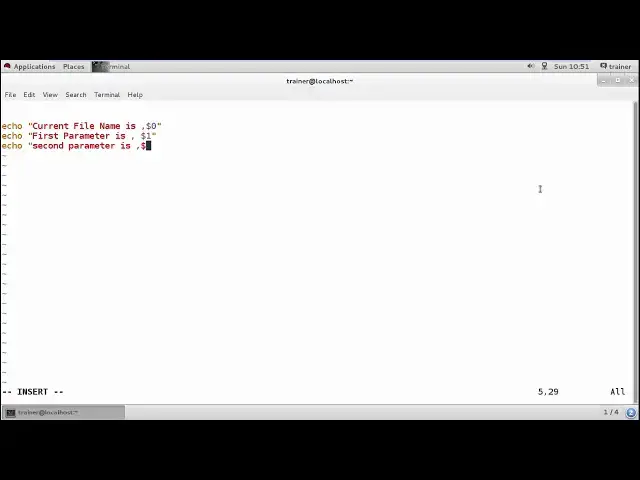
come on and I'm going to print current
3:33
file name first so my current nya file
3:37
name if I want to display I can use a
3:40
special variable as a dollar zero and
3:46
then I can also print the first
3:48
parameter
3:51
of a particular variable with
3:58
I just used as I know this in spite of
4:02
using my dollar that's very cool
4:05
this first parameter is so if I add
4:09
multiple values into the file so the
4:14
first word will be treated as the first
4:16
parameter and the second word will be
4:18
killed as the second parameter
4:27
so for that I'll define two same way if
4:31
I want to define for the third parameter
4:32
and go for
4:39
barometer is and then dollar three right
4:45
if we want to print all the parameters
4:47
I'll be using
4:52
by using the quartet parameters
5:00
you
5:02
or sign a trait we can use
5:07
and also we can use
5:10
the coated parameters
5:18
you
5:20
here you can use this and district
5:27
can also count the number of
5:34
you can count by giving dollar and hash
5:45
okay I want to just say to fall and we
5:49
can check here I running default I guess
5:52
s who are got SH so join me nothing
5:58
because I haven't added anything used so
6:01
to add this we have to add our variable
6:03
over here now for example I'm just going
6:06
to define if were trainer so it is going
6:11
to run the file it is running the
6:13
current name then displaying the value
6:16
of your first parameter but not in turn
6:18
second because we haven't added any
6:21
rewards here the count of parameter is
6:23
one same way if I want to define all the
6:27
parameters I can also use
6:36
you can find the second parameter is
6:39
again this plate here right and the
6:42
count of where our parameters are to
6:47
same way you can also use a soir
6:50
I got a such technical trainer
7:01
quite so you can find here the third
7:05
parameters are displayed and we have
7:06
third parameter
7:15
we can define forwards now we'll see if
7:19
we have more than four three parameter
7:20
what will happen
7:28
you
7:31
empty only we are able to three the
7:35
three parameters right here just showing
7:38
you all the coated parameters and the
7:40
count of parameter is so this is the way
7:44
how we can add the special parameters
7:45
and by using the special variables we
7:48
can get the entries what we require so
7:51
for example on the top of the page every
7:53
time you want your filename to be
7:55
displayed you can use this one can check
7:57
for the parameters or the count of
7:58
parameters you have used into the
8:01
complete file you can also get the count
8:04
of it so this is what we have seen using
8:06
a special variables so into next video I
8:08
am coming up with array of freebie
8:11
values we can add into the variables
8:13
into the next video
#Programming
#Programming
#Software
#Computer Science
#Scripting Languages