Up next in 10


Linux - Continuous statement
Show More Show Less View Video Transcript
0:00
so into our previous video practically
0:02
we have seen how we can use the break
0:04
statement into our existing loop so our
0:06
break statement has ended out the
0:09
complete loop which we have formed and
0:10
directly it made us to move on the
0:12
prompt now what if I want to not want to
0:15
entire loop to be stopped over there so
0:18
there I'll be using a continuous
0:19
statement so what their continuous
0:21
statement does the continuous statement
0:23
is just similar to your break statement
0:25
but except that it just not delete or
0:28
you know end up all the loops which you
0:30
have but in spite of that it will just
0:32
end up the current iterations or the
0:34
current loop which you are using so this
0:36
is the container statement you have now
0:39
if I want to use the continuous
0:40
statement again I do not have any pick
0:43
commands or any expressions over here
0:45
directly I need to define the continuous
0:47
after my loop so automatically it will
0:49
go on continuing the other process and
0:51
it will follow the other loop protocols
0:54
in order to see how we can use this
0:55
continuous statement into our terminal
0:58
so as we discussed like her break
1:01
statement in to thee all your video and
1:03
we have also seen the continuous
1:04
statement is but similar to your break
1:07
statement where generally we use but the
1:10
exception over here that we generally
1:12
causes you know the break of the current
1:15
iteration of the loop to exit rather
1:17
than the whole loop to exist so here we
1:20
are going to see the command into it
1:22
like you know or we are going to create
1:24
a script where we are going to create a
1:27
loop and we are going to break it and
1:29
you know into some part and we are going
1:32
to continue the loop until we are
1:34
getting you know the expected result so
1:36
for that again I'm going to use I'm
1:39
going to create a statement that's my
1:42
continuum I can say continue shell
1:46
script so here I'm going to add the
1:50
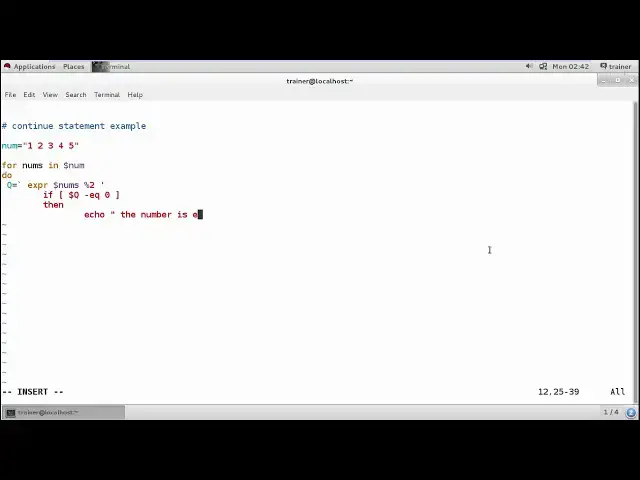
continue statement example
1:57
and I'm going to start with a variable
2:00
which I'm going to add into thee numbers
2:03
I'm going to define some lists of
2:04
numbers into this by just defining it
2:08
entity codes that one two three four
2:12
five six seven and eight or you can
2:16
define tell fight noises so I can define
2:19
till five and then I'm going to do is
2:22
I'm going to use the for loop and I'm
2:24
going to define the number the number is
2:29
again the variable I'm going to define
2:31
where I want that numbers from the the
2:34
again variable we have added that is num
2:37
right so the numbers which I'm going to
2:40
add into the num we are going to do
2:43
configuration where I'm going to add a
2:45
queue of the numbers where I'm going to
2:47
check for which number is even into this
2:49
queue and which number is odd so there
2:52
again I'll use the expression that is
2:56
the
3:02
that's 40 we can define whether this
3:05
particular number which I have added so
3:13
I'll define numbs this particular
3:17
variable contains that will be divided
3:19
by 2 if it is divided by 2 then it will
3:22
be a even number if it is not divided by
3:25
2 it will be an odd number so let us
3:27
check into this I'm going to define a
3:30
condition if dollar Q it is an even
3:35
number right is equal to 0 means if we
3:41
divide it and D you know
3:43
the remainder is again 0 so I should
3:46
quote it then then I should define it in
3:57
the number is even right and if not so
4:06
we will continue it if not we will
4:09
continue to check for the other number
4:12
and then again it will start with the
4:18
loop and it will fill create and echo
4:19
command the number will be the old
4:22
number right - so the rest number of
4:24
will be D our number
4:31
so I can also write it this is an odd
4:36
number
4:39
so once we have done with that again
4:42
what I'll do I'll end this for loop by
4:47
giving the come on done done with that
4:49
save it can run it
4:59
so this is the mistake I agent relief to
5:02
it most of the time chefs we need to
5:11
you
5:14
so I just save this and run this
5:18
continue not as such the NC it is
5:21
showing you this is an odd number this
5:23
is an even number this is an odd number
5:24
this is an even number for fine numbers
5:27
if I add more numbers into this so it
5:31
will go on continuing for this numbers
5:33
as well it will check for whether these
5:35
numbers are even or odd so starting with
5:38
your one it does showing you that it is
5:41
an even number six seven eight nine and
5:47
ten and check continue dot as such so we
5:53
can see in ten times already you have
5:55
this numbers are added as even an odd so
6:00
it will go on finding thee on and in a
6:02
number sequence really what you have
6:03
defined into the list so this is what we
6:05
have seen about the continue statement
6:08
so we have seen what the break statement
6:10
and the continue statement over here and
6:13
then into next station we are going to
6:16
see like what these substitutions are
6:18
like how we can add the commands into
6:20
this shell and we can run the show for
6:22
that watch the next video
#Programming
#Programming
#Computer Science
#Scripting Languages
#Computer Education