Up next in 10


Linux - Boolean operators
Show More Show Less View Video Transcript
0:00
now here in this video we are going to
0:01
see how we can use this boolean
0:03
operators already we have discussed
0:06
about your different kind of variables
0:08
different kind of operators like your
0:10
arithmetic & relational operators now
0:12
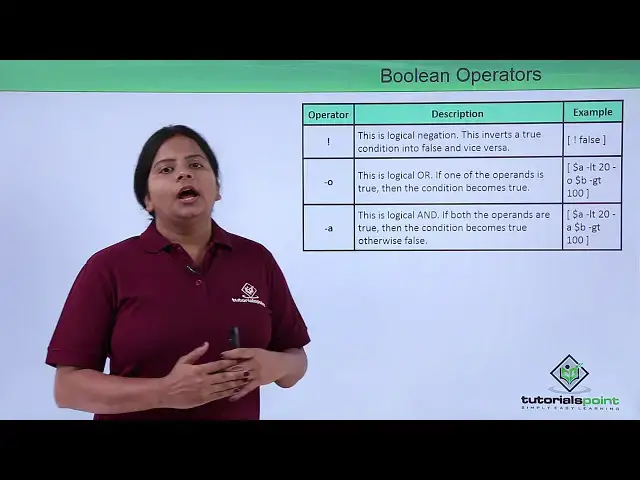
here I'm going to talk about the boolean
0:14
operators they are talking about boolean
0:16
operators again we have already seen it
0:19
uses your or or and operators now again
0:22
we can also use exclamation sign for not
0:25
now if the course I want to check if any
0:27
particular value is false or true I can
0:30
give just a not command so which is
0:32
called as an inversion now if suppose
0:34
there is a true value I want to make it
0:36
false so what I'll do I'll make it
0:38
exclamation 4 so automatically it will
0:40
reverse or invert the value what exactly
0:43
you have same way - oh it can be used to
0:46
for our values like either it can be a
0:49
greater or it can be a smaller means any
0:51
way any way any one condition will only
0:54
get true both won't get crew at a time
0:56
so I can go for Oh so here you can see
0:59
your a is the value of your B value is
1:03
less than equals is 20 to 20 and same
1:06
baby value is greater than equals to 100
1:09
so it has the order in between that is
1:12
Oh in between so either this can be true
1:14
or this can be true so anybody any of
1:17
the value can be true or anybody of the
1:19
value can be false so any condition can
1:22
true get to work
1:23
false but here if I give - a - a means
1:26
and so if this both the values which I
1:30
have added like - dorri your variable a
1:33
is less than or 20 and if it is greater
1:38
than hundred then only the variable or
1:41
the output which you have that will be
1:43
true so it cannot accept any one value
1:45
if one is false other is true the
1:48
complete value will be first the
1:49
complete output will be false means you
1:52
are not satisfying the condition what we
1:54
have added here right so this particular
1:56
type of operators we can use where I am
1:59
going to compare my two different
2:01
variables either by using the or or by
2:04
using the and operators so let us check
2:06
a small program using the soft raters
2:08
into ourselves so here I'm going to use
2:11
the boolean operators
2:13
so I've used a file with the same break
2:17
because the air again will require a
2:19
condition so I've just defined a
2:21
condition that we have values 1 2 & 3 so
2:27
this is the value list I have for B and
2:30
0 to 5 we are defining that a the value
2:33
between a and B if it is 0 to 5 so it
2:37
should break on t2 itself so I've just
2:40
defined the boolean operator into that
2:41
you can see this if a is equal to 2 and
2:46
your B is equal to 0 so the value should
2:51
break over there itself so the add the H
2:54
value here we can check we have already
2:56
defined the a's value so if you go on
2:59
calculating unless you are getting the
3:01
range between 0 to 2 that is a equal to
3:04
1 or equal to 2 so I'll just run it you
3:09
can see 0 plus 1 right 0 and this is
3:15
your fight so it's just this particular
3:18
value either it is equal to 2 and this
3:20
again equals to 0 then only it is going
3:23
to add D value so it is like we are at a
3:26
deep break statement so that it's it's
3:28
actually stopped somewhere otherwise
3:30
this is an uncontrollable loop we have
3:32
but this is how we generally use and and
3:35
condition in between your two different
3:38
you know conditions which you define so
3:41
here there's a men's your and operator
3:44
same way we can also use the and
3:47
operator into a function where generally
3:51
I have used the if as such you can see
3:54
this is the end operator I have defined
3:56
like the value which I want it should be
3:58
between your 10 and 5 so a bad d and
4:02
operator so if the operator we have set
4:05
is either in between these two values it
4:09
will give me a proper output so I can
4:12
check here
4:18
so I'll just define this is Ange and now
4:23
I'm going to add the value is between
4:25
not ten to five but it should give me
4:27
the value that it is between five to ten
4:31
so I've just set a statement that the
4:34
value should be between greater than
4:37
five the B should be greater than five
4:38
Anna should be less than ten so I've
4:43
just you find it
4:51
you
4:54
and here Akina I'm going to define and
4:57
the spaces matter here like if you have
4:59
provided a wrong space again it will
5:02
give you an error so here I have just
5:05
defined as values like if a is less than
5:08
10 and B is greater than 5 then the
5:13
value will be between PI to 10 let us
5:16
check
5:20
hi if not as such I'm going to run here
5:22
the first value I'm going to give that
5:25
is 2 and the second value is 4 so it is
5:28
showing me the value is not between 5 to
5:31
10 so that means it is checking for both
5:34
the values right so this should be
5:36
greater than 5 and this one should be
5:38
greater than less than 5 so this is let
5:41
mince 1 should be greater than Y you
5:43
another should be less than 10 this is
5:44
what exactly we have seen over here like
5:47
how we can use this operators and
5:49
operators and you're all operators you
5:51
can use into some of the functions so
5:54
that you can forget the proper output so
5:57
into next video I am coming up with the
6:00
other operators which we generally use
6:01
that is called as your string operators
6:04
so let us check into the net sweetie
#Programming
#Programming
#Software
#Scripting Languages