Up next in 10


Linux - Adding users to group
Show More Show Less View Video Transcript
0:00
so till now we have created users and
0:02
groups we have modified the users and
0:04
groups entries we have seen how we can
0:06
set the password age but now I'm going
0:09
to show you how we can add a user to a
0:11
group as we know the user when it's
0:14
created automatically it gets a owner
0:16
group now if I want to add some members
0:19
into the group how we are going to do
0:20
that that's what we are going to see
0:22
here very first thing whenever we create
0:25
or whenever we create the user and if I
0:27
want to add the user into my groups we
0:29
can add multiple in users into a same
0:32
group or we can add user into multiple
0:35
groups as well so to assign the common
0:37
permission to multiple users you can add
0:40
the user into the same or different
0:42
groups the groups can be our owner group
0:44
or it can also be a supplementary group
0:47
same way the users which we are going to
0:50
add into the crib so for that we need to
0:53
modify the file called as /dt sea slug
0:56
group where it stores all your owners
0:58
per group as well as the supplementary
1:00
group just we need to move into the file
1:02
and modify the entries so how we are
1:04
going to modify the entries and how we
1:06
are going to add the user into group
1:08
into the file / ethics in slash group
1:10
that we are going to say into the
1:12
terminal so here we are going to see how
1:15
we can add the users into a particular
1:16
group so already we have seen
1:19
deformations we have refined the
1:21
permission from the owner or group and
1:23
others but we haven't seen it
1:25
practically whether it works or not so
1:27
here what we are going to do is I'm
1:29
logged in through the root and root has
1:31
created a directory into the slash
1:35
itself I'm going to create a directory
1:37
with name demo or root share I can say
1:44
okay so let us check for deformation
1:47
your root share has so first let us move
1:50
into the slash and I'm going to check
1:53
for the formation of root shell
2:00
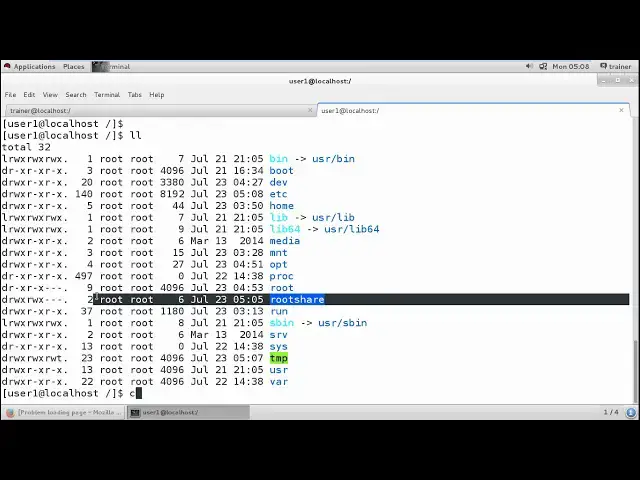
so we have multiple files here
2:03
let us check correctly other and we have
2:08
the route share the default formation is
2:11
read read and execute for the owner read
2:15
and execute for the crop and returning
2:18
secured for the others so I'm just going
2:21
to change the formation seven seven zero
2:24
for route share so now we can check this
2:32
is route share directory has deformation
2:35
seven seven zero now
2:39
no this is my user 1 this user 1 tries
2:43
to move into the /root share so I just
2:48
showing you permission denied /root
2:52
share so sure again there is no such
2:58
file or directory ok that is 2 twice I
3:01
have written sure you can see permission
3:03
is denied means even though you will be
3:06
able to see this rectory if I want to
3:08
directly more one mount point I can I'll
3:11
be able to see this root directory as I
3:14
am not added as a member of this group
3:17
that is a routes group I won't be able
3:19
to get access to it even I won't be able
3:21
to move into this directory
3:26
correct neither one that I should be
3:28
able to move into this rectory I have to
3:31
be a member of the roots crop so how
3:34
will will be doing it what we will be
3:36
doing is through the route you can move
3:38
into the EDC group into the group we are
3:43
going to add the username over here
3:46
user one so this is the group member of
3:49
user that is their super user with now
3:52
now cane if this user looks for the
3:57
permission he knows that he is in a
3:59
group member of your root so now if it
4:03
tries to move into the root share it
4:07
evolve a just need to exert it out and
4:09
dog in a cane switch user user one and
4:14
the password the user again this moves
4:18
are moved into these slash and the King
4:21
who'd share he's able to Mohan he is
4:27
able to create the directory as well
4:28
because I have refined the permission to
4:31
it as read write and execute means full
4:35
control permission now if I want to
4:37
change the formation I want to change it
4:40
to seven five zero four root share and
4:48
check your I'll just exit out of this
4:50
user again I'll get Logan switch user
4:54
user of one and I like to find the
4:56
password again this user tries to move
4:59
into CD root share he will be able to
5:02
because he has the read permission right
5:05
here they will just list all the data
5:06
but if s trying to create any data any
5:10
particular file or directory he won't be
5:13
able to even though the last data was
5:15
created by him because we have change
5:17
the permission we have set the
5:19
permission of this particular root share
5:21
to read write and execute for the club
5:24
so if I want to add enough different
5:27
number of users like if I want to add
5:29
the trainer as well into this group
5:30
because trainer is still others over
5:32
here if I check now I have logged in
5:35
through the trainer our trainer gain
5:37
wants to move into the
5:39
would share he won't be able to
5:42
permission denied if the route warns
5:45
that even the trainer should be able to
5:47
get access to this particular data what
5:49
he can do is
5:52
he can again move into the VI / it is a
5:56
/
5:59
group and art the other user trainer in
6:04
front of attacking
6:06
so while you are modifying the file
6:08
ensure that you are not affecting the
6:11
current file a very carefully you need
6:13
to add your users and the user should be
6:15
separated by the comma
6:17
so you can add a number of users but all
6:18
the users should be separated by comma
6:21
save it now again the trainer tries to
6:25
look at log and CD I'm sorry root
6:30
share yeah I need to exit out of it and
6:36
again I'm going to get loggin let us CD
6:46
CD root share ok so I have to get log
6:53
out because they critique Africa console
6:55
I have locked him so what I'll do I'll
6:58
just show you from the different
6:59
terminal from the tty - I am getting
7:03
logged in through the trainer pass the
7:06
password and now again I'm moving into
7:08
the city slash and CD root sure he's
7:15
again able to get access to the data
7:17
but again as it has the permission only
7:19
read/write/execute he won't be able to
7:21
create anything so this is what the
7:23
permissions generally we have set by
7:26
using the users and group members so we
7:29
have certainty group members permission
7:31
and now here we have seen how we can add
7:33
the users into a particular group not
7:35
only for the users but the trainer can
7:37
also add the particular user into his
7:40
group like you can again move into the
7:42
group again you can search for your user
7:45
account that is your trainer no Trillian
7:47
wants to add the user 1 to his group he
7:49
can so trainer trip already contains
7:52
trainer into it along with that
7:58
Whitcombe I'll just add your user 1 and
8:01
save it out so this is how generally we
8:04
have the we have set like how we can add
8:06
the permissions and we have seen how we
8:08
can add the users into a particular
8:10
group into the next video we are going
8:13
to check for like how we can create and
8:17
you know change the owners and groups of
8:20
a particular directory and a file we
8:22
have created so let us move to the next
8:25
video
#Programming
#File Sharing & Hosting