live_tv
Livestream Starting Soon
00
Hours
:
00
Minutes
:
00
Seconds
Up next in 10



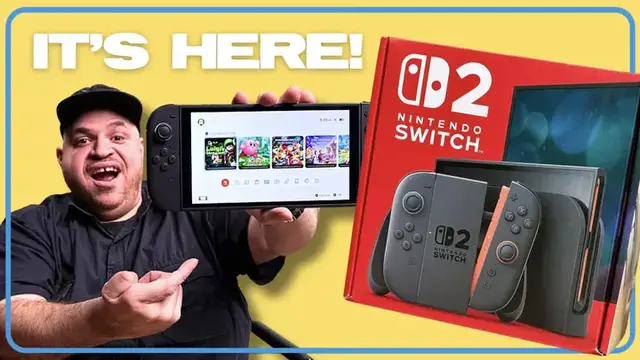
Unbox the brand-new Nintendo Switch 2 with Tony and see exactly what comes in the box in terms of Joy-Cons and other accessories. He'll walk through the full Switch 2 setup process, including tips for transferring data from your original Switch or Switch OLED, or setting up a new console from scratch. From the updated hardware design to that surprise screen protector warning, here’s everything you need to know before you power it on. Whether you're upgrading or buying your first Nintendo console, this is your complete Switch 2 setup guide.
Show More Show Less View Video Transcript
0:00
Hey, that is beautiful, isn't it
0:04
Hey guys, check this out. We got the Switch 2 in, and in this video
0:07
we'll unbox it, show you what's in the box, and get it set up. I'm guessing at least some of you have already ordered
0:12
or even gotten yours, but if you haven't yet, check out the link in the description to see if it's back in stock
0:17
Otherwise, let's get into it. All right, so here's everything you get in the box
0:29
We'll start with the boring stuff. We've got the AC adapter, USB-C cable, and the HDMI cable
0:35
Right here in the middle, we've got the Nintendo Switch 2 dock. Remember, the big upgrades are the improved cooling fans and support for 4K HDR output
0:43
Then we've got the Joy-Con controllers, which are a lot bigger than before, feel more substantial
0:48
plus they have a seat button for game chat. Then we have the Joy-Con grip for the controllers, pretty familiar to anyone who already has a Switch
0:57
Then we have the two Joy-Con straps. Then we have the console itself
1:01
That 7.9 inch 1080p display, 120 hertz refresh rate, new kickstand, better speakers, and dual USB-C inputs
1:08
All right, guys, we gotta get the Joy-Cons on, and it is so much easier this time
1:12
Just magnetically pops on. Huge difference from before, and that's a very satisfying sign as well
1:19
Ooh, accessories. All right, before moving on, got something very important to tell you
1:24
So Nintendo's worried that some of you may act like fools with your new switch so I got to share this quick PSA whatever you do do not
1:30
peel off the screen protector to be honest I don't see it but there's
1:35
actually a protective field built into the screen to reduce glare and prevent
1:39
the glass from breaking if you do like to rock with an additional screen protector there are already a bunch out there like this one from Belkin which is
1:46
an anti-reflective glass screen protector for 25 bucks which is a pretty good deal you can check out that link in description below there's also a blue
1:53
light version if that's your thing. You can do the whole setup on the switch but we're going to kill
1:58
two birds with one stone and show you how to set up your switch to dock for your monitor or tv
2:02
The first thing that you want to do is actually connect it to the actual monitor. Side note this
2:08
is the new Alienware 27 OLED monitor which is a really nice monitor so yeah The HDMI cable downhill All right so let open this up a little bit different than with the the original Switch but still pretty easy just pop this off and you have access to USB Ethernet and HDMI
2:30
So let's get that in. Of course we gotta actually plug it in
2:34
so we have power. And let's snap it back together. Alright, so we got the HDMI plugged in
2:43
plug squared away, Let's get this thing into the dock and get the magic happening
2:49
There it is. So this is what you're gonna see when you open up the Switch 2
2:54
You gotta press the A button to confirm. Don't press B, which is naturally where
2:58
the X button is on a PlayStation. You wanna press A. This thing always trips me up
3:02
when I'm messing around with Nintendo consoles. All right, so we're in the Americas
3:10
Except, I never understood why they tell you that. like if you don't accept you can't play like what I've set up the internet
3:17
all right to be honest that's probably the hardest part here we go so this is what I like about
3:32
Nintendo they just like make it so easy they just flat out tell you how to do everything
3:36
Nintendo makes things pretty intuitive but this is really good stuff to know in case you haven't
3:41
play the Nintendo console in forever or you know if you're just new in general
3:46
Now we got to do updates because this is a modern system and you can't escape that
3:53
Oh it's finally started two minutes left. Glad we got that at least
3:59
And we're done. Now I'm guessing that a lot of people who are getting the Switch 2 are upgrading from
4:07
the old OG Switch whether it's the original original or the OLED like I have here
4:11
Nintendo made it super easy with the system transfer feature. We're gonna need our internet connection
4:16
our user profile, and we're gonna follow the on-screen prompts on the new Switch to complete the transfer
4:21
which will restore your settings and save data and get this looking exactly how you had it
4:25
on your old Switch. All right, so let us start the system transfer
4:30
Signing to your Nintendo account, so we'll do that. Okay, so. I got it
4:35
Yep all right Kate gonna sign in and we gonna get the magic happening Hi guys Say hi to Kate
4:46
Ooh, fancy. Right on your phone. It's again, very easy. That's what I like about Nintendo
4:51
So once you do that, you get a verification code on your account. Fingers crossed
4:58
That should be fine. Hey, let's go. This looks pretty close to me
5:06
So let's go. I mean, they're done. I mean, that's about as close as you get, dude
5:25
All right, so I'm gonna hit done. All right, so we're ready to go. Just keep in mind, you're gonna need the original
5:29
Ace Adopters for both consoles for this to work. Okay, so let's continue on the Switch 2
5:36
So we actually don't have a lot to transfer, so it may not take too long
5:41
but if you have a lot of stuff, transferring could take a while. So just keep that in mind
5:45
Remember you're setting up a new console. Patience is required. Now we're setting up
5:58
Almost there. I really like how clean this all is. All right, system transfer complete
6:04
That was literally five minutes. Amazing. Whoa, there we go. We are done
6:11
So even though transferring from another system is pretty easy, you may not want to do that. You may want a fresh start
6:16
It's super easy. You'll just need to follow the on-screen prompts, get connected to Wi-Fi again
6:21
and make a Nintendo account if you don't have one already. It's free, but you will want to add a payment method
6:26
for buying digital games and using Nintendo Switch Online, which has old games and is getting GameCube games
6:34
that is beautiful isn't it okay so as you can see here um not all that different from the original switch
6:47
couple little minor tweaks here and there but if you're familiar with the original switch ui
6:54
you going to be right at home here there are some differences the main one here is the game chat button Speaking of games we have to talk about what you going to be playing first Mario Kart World is the obvious one
7:07
So I've actually played Mario Kart for about six hours. I can tell you right now, this game is so massive, so expansive
7:13
It's worth the $80. I know you're going to be like, Tony, $80 is a lot of money. Yes, but this game is going to last you for months, bro
7:20
Trust me on this. You need to get that. But this also means that getting the Mario Kart bundle, which is $4.99
7:26
actually saves you money off the game. You're actually saving $30. So you're basically getting the best game
7:32
on the Nintendo Switch 2 at the moment. The game is going to last for a while and you're saving money
7:37
I mean, come on, bro. It's a no-brainer. Now, Mario Kart World is dope
7:40
You definitely got to get it. But the game I'm excited for is Street Fighter VI. The reason I'm excited for it
7:45
is not only because of Street Fighter VI, but I'm very curious to see how it's going to run on Nintendo Switch
7:51
It's been a very long time since we got a Street Fighter game on the Nintendo system
7:55
based on everything we've seen it looks fantastic and has crossplay as well so you could play
7:59
against your friends on other consoles so you know if you're on nintendo switch some people
8:03
be like hey you're not that good of a fighter show them bro show them then we have the legend
8:07
of zelda switch 2 editions which make the original games look and run a lot better there's also
8:13
going to be some original content in there definitely worth it even if you're like a
8:17
first timer definitely buy it but if you already own the games you can just upgrade for ten dollars
8:21
which is a really good deal. And even though it's not out yet, the game I'm really, really excited for
8:26
is Donkey Kong Bonanza. Not Bonanza, Bonanza. It's basically like the old school Donkey Kong design-wise
8:34
that I remember when I was a kid, but in a new game, that's gonna be so much fun
8:37
And that's dropping on July 17th. All right, so whether you're upgrading or starting fresh
8:43
the Switch 2 setup is pretty painless and you're getting a serious performance bump
8:47
So if you like this video, make sure you let me know in the comments below. Hit like, subscribe to the channel
8:51
and be on the lookout for more Switch 2 coverage from us. And again, check the description for where to buy one if it's in stock
8:58
All right, guys, that's it. Once again, I was Tony Polanco. I'll see you next time, and good luck getting a Switch 2
9:03
Later. Thank you
#Computers & Electronics
#Computer & Video Games