Up next in 10



This video will show you how to transfer LUNA and UST from your Binance account to your Terra Station wallet.
Show More Show Less View Video Transcript
0:00
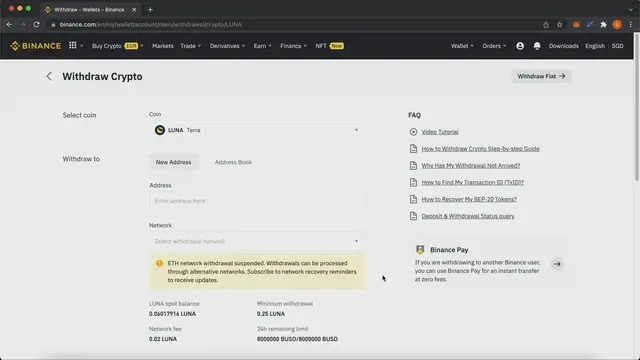
Today I will be showing you how you can transfer your tokens from Binance to the TerraStation wallet
0:07
So two of the main tokens that you can use would be LUNA as well as UST
0:13
So first I will be showing you how to withdraw LUNA. So first I will need to go to the TerraStation wallet and then over here I will copy this
0:22
Terra deposit address. So those on the Terra network will start with Terra at the start
0:29
copy and then pasting it over here so down here they ask you to ensure that
0:37
you have a memo to be added in however for Terra Station wallets there's no
0:43
memo and there's only the contract address so over here all you need to do
0:48
is to leave it blank so for Luna you'll be able to send it either via the Terra
0:54
network as well as the ethereum erc20 network however by then should auto detect that this is
1:00
a tera wallet address and you select it over here so after that all you need to do is to select the
1:07
amount of luna you want to send over and then confirm the withdrawal so the same can be done
1:14
if you want to send ust to the terastation wallet so all you need to do is to paste the address
1:21
Again, they'll ask you for a memo which is not required over here. And then it will auto detect that it is using the Terra network
1:29
So there are other networks such as Binance Smart Chain, Ethereum as well as SmartTik that can send UST over
1:35
But since the Terra Station Wallet only accepts Terra network deposits, you can only send it via this network
1:43
So again, you need to leave this blank and after that select the amount of UST you have to send over
1:48
and this is how you send tokens for
#Finance