live_tv
Livestream Starting Soon
00
Hours
:
00
Minutes
:
00
Seconds
Up next in 10


I have been using the Amazon fire TV stick from last few days and it's quite impressive to be able to watch my favourite TV shows on a big screen.
I loved the ad free experience on Amazon Fire TV Stick.
Show More Show Less View Video Transcript
0:00
Hey guys, what's going on? This is Asif and you are watching the review and unboxing of Fire TV stick on TechTipper channel. So let's get started
0:13
So we have got this box and I bought this stick from Amazon India at rupees 3,999. It is actually available on sale for rupees 2,999
0:28
and they usually do this kind of sales so you can get it at that price so we have the box with us
0:35
i'm opening the box i've actually already opened it but opening it for you once again to show you
0:41
what are the contents so these are the instruction manuals to let you know how to assemble and how to
0:48
set it up with your tv so we will keep it aside and see what else we have in the box so this is
0:54
the USB micro USB cable to power up the Amazon Fire stick TV
1:01
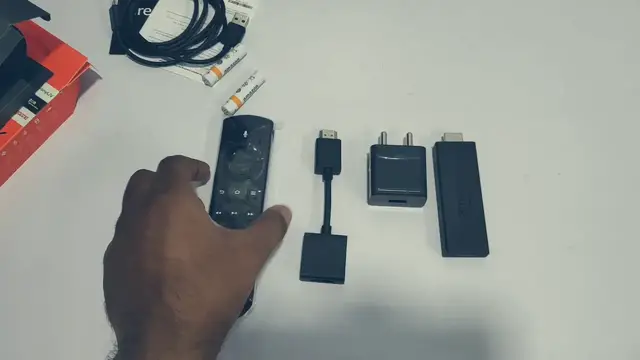
So, and we have got the extension cable as well. In case if you not able to connect your Fire TV stick with the TV directly you can use this extension cable to connect it So it is foldable and you can easily connect it and these are triple a size batteries that will go inside this remote it a bluetooth
1:24
enabled remote and it is of 5.5 inch of size i've actually compared it with my smartphone so it was
1:34
just of that size and we have got the wall adapter so we will plug in the micro sb cable
1:42
into the wall adapter and power it in case the tv is not powering it sufficiently if your tv does
1:52
not supply sufficient power to the amazon stick even if there is a usb slot so you can use this
1:59
power wall adapter to power it up so this is the amazon fire stick TV and it
2:06
looks quite minimalistic there is nothing else in the box and you can use
2:12
this stick to convert any TV any flat TV that has got HDMI slot you can connect
2:20
this to the HDMI slot and turn your normal TV into a smart TV so consider
2:28
this usabistic as a CPU with an operating system which is specifically designed for tvs and you can connect it with a monitor or tv and you can control it with the bluetooth remote and now let see how
2:43
we have to connect this amazon fire stick tv to our tvs so like i said that if you are not able to
2:52
get this connected behind your tv you can use the extension cable like this so that it is actually
3:00
foldable and it's very nice design so you can actually manage to connect it behind your tv
3:08
and then turn on the hdmi mode on your tv and wait for the instructions it actually takes somewhere
3:15
from one minute to ten minutes for the amazon firestick tv to get configured so it gets easily
3:23
configured and then you can pair your remote with it and then connect the amazon firestick tv to the
3:32
wi-fi the home wi-fi network so that you have the internet connection because you need to have
3:39
internet connection if you want to use it obviously so you will have to set it
3:44
up connect it here to your Wi enter the password install the apps going to the App Store To install the apps you will need to log into your Amazon account
3:56
And if you do not have an Amazon account, you can create it right away on the screen itself
4:01
And once you have installed the apps, the apps will be visible on the home screen
4:07
You can install apps like Netflix, NDTV, Hotstar, and there are many other apps available for the TV
4:14
so all of it will be visible on the home screen and there is actually a voice command button
4:20
the bluetooth remote is also voice enabled so you can search for the content that you want to watch
4:26
though it is actually only available it only works with the amazon prime video so you need to have
4:33
the amazon prime video subscription and once you have it it is quite impressive and i've been using
4:40
it from last few days and it's quite well it works on a 2 mbps connection and i have no problems
4:46
so this is it this is the review of the amazon fire stick i hope you like it and you can read
4:53
the detailed review on the tech deeper channel i will leave the link in the description so this is
4:58
it i will see you in the next one
#TV & Video
#Online Video
#Consumer Electronics
#TV & Video Equipment
#Media Streaming Devices