0:00
In today's video, we're going to talk
0:01
about how easily people can be tracked
0:03
online, often without even realizing it.
0:05
It's Policy Point again, and this video
0:07
will reveal how cybersecurity
0:08
professionals, OSINT analysts, private
0:11
investigators, and even government
0:12
agencies can track digital footprints
0:14
using publicly available techniques. One
0:17
of the main goals of this video is to
0:18
show how such methods can be used
0:20
legally and ethically, for example,
0:22
[music] to investigate scammers,
0:23
identify cybercriminal activity, or
0:25
strengthen security awareness. Now,
0:27
here's the interesting part. These
0:28
techniques [music] are actually very
0:30
simple to understand, yet extremely
0:32
powerful when used correctly. [music] If
0:34
you're an OSINT researcher,
0:35
cybersecurity professional, or private
0:37
investigator, understanding how tools
0:39
like this work is absolutely essential
0:40
[music] in today's digital world. But
0:42
before we begin, I need to make
0:44
something very clear. This video is
0:46
created strictly for educational and
0:48
awareness purposes only. Policy Point do
0:50
[music] not support, encourage, or
0:52
promote any form of illegal activity,
0:54
unauthorized tracking, invasion of
0:56
privacy, or misuse of technology. Any
0:59
tools or techniques demonstrated in this
1:01
video should only be used in legal
1:02
environments, such as cybersecurity
1:04
research, ethical investigations,
1:06
penetration testing with permission, or
1:08
educational learning. Misusing these
1:10
techniques against [music] individuals
1:12
without consent may violate privacy laws
1:14
and can lead to serious legal
1:15
consequences. Always use your knowledge
1:17
responsibly. Before I continue, I want
1:20
to introduce you to the community of
1:21
hackers because there's so much I can't
1:23
share on YouTube, [music] whether it's
1:24
because of platform rules or because
1:26
some skills need deeper hands-on
1:28
explanations. Many of my videos got
1:30
deleted, and that's why I created a
1:32
Policy Point learning community for you,
1:34
a place where I can share everything.
1:36
When you join, you're not just getting
1:37
another [music] course, you're getting
1:38
access to complete ethical hacking
1:40
guides, the tools and techniques I wish
1:42
someone had handed me when I was
1:43
starting out. And here's the kicker,
1:45
this is the stuff I don't teach on here.
1:47
No watered-down content, no clickbait,
1:50
just raw, [music] actionable knowledge.
1:51
On top of that, you'll join an exclusive
1:53
community on Discord. I I the link in
1:55
the comment section below, but it's not
1:57
for everyone. The link is only available
1:59
for those who are serious about the
2:00
journey. Now, let's get started. [music]
2:02
The tool we're going to use for this
2:03
demonstration is called Hound. Hound is
2:05
an open-source OSINT tool designed to
2:07
collect information such as device
2:09
[music] details and approximate location
2:11
data through user interaction, typically
2:14
via a generated link. It is widely used
2:16
for security research, awareness
2:18
training, and investigative purposes.
2:20
[music] To access the tool, open your
2:21
browser and search for Hound GitHub,
2:23
then press enter. From the search
2:25
results, click on [music] the official
2:31
Scroll down and you'll see the project
2:33
files, a preview of how the interface
2:35
looks, and a brief explanation of the
2:36
tool. One of the best things about this
2:38
tool is its compatibility. It supports
2:40
[music] most Linux distributions, and it
2:42
can even run on Android devices using
2:44
Termux. [music] That flexibility makes
2:46
it very accessible for researchers and
2:48
learners. Now, let's move on to
2:49
installation. I'll switch over to my
2:51
Linux virtual machine to avoid any setup
2:53
issues. Next, I'll copy the installation
2:55
commands directly from GitHub, paste
2:57
them into the terminal, and press enter.
2:59
The installation process will begin.
3:01
This may take a few minutes depending on
3:03
your internet speed, and done. The
3:05
installation was successful. Now, we can
3:07
see the tool interface is pretty clean
3:09
and straightforward. When we launch it,
3:10
the tool asks [music] whether we want to
3:12
use Cloudflare or run it on localhost.
3:14
Using localhost limits access [music] to
3:16
only devices on your local network, so
3:18
the recommended option is Cloudflare,
3:20
which allows access from outside your
3:22
network. So, I'll type Y to enable
3:24
Cloudflare and press enter. Now, the
3:26
setup process begins. The PHP server and
3:28
Cloudflare tunnel are being configured.
3:30
If this is your first time, it may take
3:32
a few seconds. [music] And there we go.
3:33
The tracking link has been successfully
3:35
generated. Typically, in a legal
3:37
investigation or controlled test [music]
3:39
environment, a researcher may send this
3:41
link to a target. For example, during a
3:42
phishing awareness test or cybersecurity
3:45
simulation. For this demonstration, I'll
3:47
simply open the link in my browser. As
3:49
you can see, the page looks like a
3:50
normal interface similar to a chatbot.
3:52
It displays a welcome message like, "Hi,
3:54
welcome to location GPT-4. Turn on
3:57
location to find people near you because
3:59
it looks legitimate." Many users might
4:01
grant location permission without
4:02
thinking twice. Once permission is
4:04
granted, the page continues to function
4:06
normally, which reduces suspicion.
4:08
Meanwhile, [music] in the background,
4:10
the terminal starts collecting relevant
4:11
information, including device details
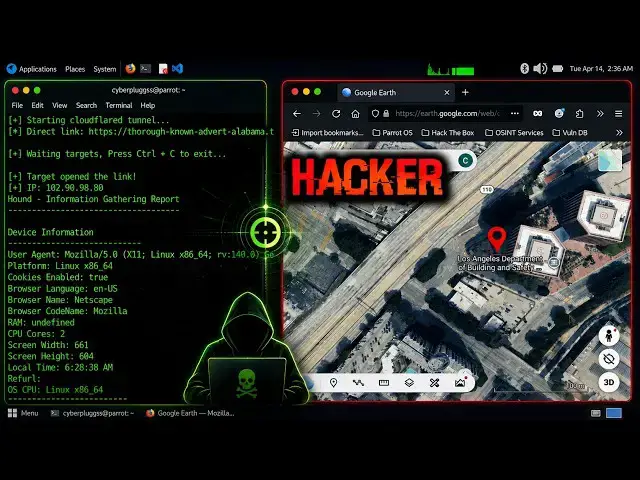
4:14
and location data. You can see the
4:15
device details right here, including the
4:17
GPS information, which is what the video
4:20
is all about. Now, let's look at the
4:22
results. [music] The tool generates two
4:23
links, one for Google Maps, one for
4:25
Google Earth. Both provide similar
4:27
information but in different visual
4:29
formats. First, let's check the first
4:31
one, which is for Google Maps. Let's
4:32
open the link and see the captured
4:34
information. When we open the Google
4:36
Maps link, we can see the approximate
4:37
location of the target. It includes
4:39
nearby areas, city-level details, and
4:42
geographic coordinates. In this case,
4:44
the data points to a location around Los
4:46
Angeles, California, [music]
4:47
along with its coordinates. Now, let's
4:49
check the Google Earth version.
5:02
Here, the visualization is more detailed
5:04
and immersive. It provides a clearer
5:06
geographic view, allowing investigators
5:08
to better understand the surrounding
5:10
environment and terrain. [music] Both
5:11
options are useful depending on the type
5:13
of analysis being performed.
5:16
Overall, Hound is a powerful
5:17
demonstration of how social engineering
5:19
[music] combined with OSINT techniques
5:21
can reveal sensitive information.
5:23
However, tools like this should only be
5:25
used in ethical scenarios, such as
5:27
cybersecurity awareness training,
5:29
penetration testing with permission,
5:31
[music] investigating scams or
5:33
fraudulent activity, academic or
5:35
research purposes. How to protect
5:37
yourself. Now, let's talk about
5:38
protection because that's the most
5:40
important part. Based on how this tool
5:42
works, here are simple ways to stay
5:43
safe. [music] Never click unknown or
5:45
suspicious links. Avoid granting
5:47
location permissions to untrusted
5:49
websites. Always verify the authenticity
5:51
of websites before interacting. Disable
5:53
location access for your browser when
5:55
not needed. Use updated browsers and
5:57
security tools. [music] Being cautious
5:59
online can prevent most of these
6:00
attacks. Final disclaimer before we end
6:03
this video, I want to emphasize again,
6:05
everything shown here is strictly for
6:06
educational and ethical [music] purposes
6:08
only. This content is intended to help
6:11
OSINT analysts, cybersecurity
6:13
professionals, and investigators
6:14
understand how [music] such techniques
6:16
work so they can defend against them,
6:18
not misuse them. This is not a hacking
6:20
tutorial and it is not intended to harm,
6:23
exploit, or invade anyone's privacy.
6:26
Knowledge is power and with power comes
6:27
[music] responsibility. If you found
6:29
this video helpful, make sure to like,
6:31
subscribe, and turn on notifications so
6:33
[music] you don't miss future content
6:35
like this. Thanks for watching and I'll
6:36
catch you in the next one.