0:00
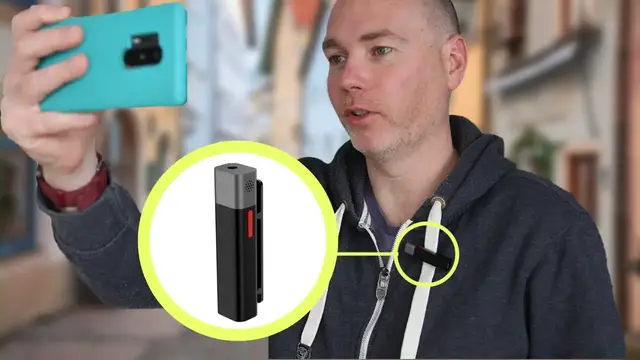
Hello, welcome to my channel. This week we're going to take a look at this little Sabine Tech Smart Mic Plus
0:06
If you saw my review of the Osmo Mobile 3, you'll know I mentioned I've been trialling these out
0:11
I got these on Kickstarter, so they may look a little bit different to the final version
0:17
but they're now available to the general public on Amazon, and I will put a link in the description below
0:23
If you enjoy your gadget reviews, clear, concise, short and to the point, then make sure to hit the subscribe button and share this video with someone
0:29
who you think might benefit from this little microphone. So I ordered a dual
0:33
pack from Kickstarter. It came in this extra wide box and basically I have
0:39
double everything. I have double mics, two of these mics. You have a headphone
0:43
jack on the top, little red button on the side, a clip so you can attach it to
0:49
your clothing. I also got a box of various bits, some of which are gonna be
0:55
doubled up because I've kept everything in one. So there's a little external
0:59
adapter with a dead cat. There's the little external mic without the dead cat
1:04
along with a connector to use this with a DSLR camera. There's the second dead cat
1:12
Little spongy top, charging cable and a little bag. A little travel bag in case
1:21
want to put things in this to carry around. Okay so here's a quick test so I'm
1:28
just in my study I got some music on in the background recording this without the
1:33
microphone so you're gonna get a bit of background noise, can you hear my vocals
1:37
very well this is on a OnePlus 6 I now going to pop the microphone on and swap to the app the Smart Mic Plus app and see if this can cope with this background music So now I got the microphone on it just attached here I still got the same track on it playing at the same volume
1:56
I haven't really changed anything apart from swapping to the microphone and putting the microphone's app on
2:02
You'll probably find the app doesn't do a very good job of stabilising this, so it might be a little bit shakier
2:07
but what do you think to the sound quality? Can you hear my voice okay? Is
2:11
it picking up my voice over the music or is it still quite difficult to hear both
2:17
Which is better? Let me know in the comments below. So when you finish doing
2:21
your recording as I've just done you might want to listen back to that to make sure you've got it in one take and that's where the little headphone comes
2:27
in. Simply pop that into the top of the smart mic. When you press playback on the
2:35
app you can now hear what you've just recorded. Another cool feature of the app
2:40
is once you've recorded the footage you can press to have subtitles automatically
2:44
applied so it will listen to what you have said and it will convert that into
2:49
text to put onto your video. I've got the microphone on it's just attached here
2:55
I've still got the same track on. So this is me filming without the microphones
3:00
there's powers going past, birds tweeting, lots of background noise, I'm filming on a
3:04
OnePlus 6 and one thing I like about the OnePlus 6 is it has excellent image
3:10
stabilization but unfortunately it can't use the Bluetooth microphones and with the inbuilt camera app so I'm gonna have to switch to the smart mic camera app
3:21
which unfortunately can use the external microphones can use the OnePlus 6 excellent image stabilization This footage is quite shaky because it not making use of the mobile image stabilization So if you going to get these mics and use with a mobile phone
3:39
you might want to consider something like the DJI Mobile 3, which I'll put this mobile onto now
3:47
So now we should have nice smooth footage and nice crisp audio by combining the smart mic with the DJI Mobile 3
3:54
so I've got the stabilisation on the go there's a car coming past in a second so
4:01
how's the microphone holding up while I keep talking as the car goes past can you hear me
4:05
I don't just use these with my mobile I also use them with other cameras and to do so you
4:11
can pair two of these units together it can be a bit fiddly to use the receiver with the camera
4:16
you'll need a little adapter that can be a little bit tricky to plug into cameras itself so I normally
4:23
we plug that into the smart mic and then that just goes into the microphone input
4:28
on my camera. This is the camera with a Rode microphone on top just to give you a
4:35
sample so if I start moving backwards your microphone should eventually get quieter and you'll probably not be able to hear me
4:43
Okay so now I've got the microphone on and I'm just going to step back it's got a
4:48
range of about 15 meters and my voice should stay nice and clear even though
4:53
I'm going back and further away make sure I don't trip over you should still be
4:57
able to hear me nice and clearly. There should also be a reduction in the
5:00
background sound so there's traffic in the background occasionally there's a plane that goes overhead it doesn't feel particularly windy but if you need to
5:08
you can also make use of the little dead cat so if I plug that in there now that should It like almost like a little microphone and if there is a bit of wind a bit of wind getting up now I should still be able to move around and
5:23
pop that on there it's quite big and it's pretty obvious that you've got something on but
5:28
if it means better audio quality getting the position just right can be tricky let's try that
5:34
there so now the wind is getting up a bit it's um it's blown quite badly now I'm really cold
5:41
but hopefully you should still be able to hear me nice and clearly, even though there's wind blowing in the background and moving around
5:48
you should still be able to hear me even though I'm quite far away from the camera. And what was the camera's microphone is now next to me at all times
5:55
So overall, I've been pretty pleased with how this microphone's turned out
6:00
I find it very simple to use. It's much less clutter than having to use a microphone with cables
6:07
and it's great I can use it with both mobile phones and with my DSLR camera
6:13
Of course I need two for that. The pairing process isn't too bad on mobiles
6:17
but using it with another one can be a little bit fiddly. It's got a lot of very interesting features
6:22
but of course the main problem for me is on Android at least
6:27
this microphone can only be used with the microphones app and not the DJI app or the OnePlus's inbuilt camera app
6:36
which has fantastic inbuilt stabilisation. So I'd really like to see them either be able to tap into the image stabilisation
6:42
that OnePlus has on the phone, or, and this may not be their problem, this may be other people's problems
6:49
I'd love to see Android a bit more open about being able to use external microphones
6:53
If you haven't already, please click subscribe on my channel, share this video with someone you think would benefit
6:58
I'll put a link to this in the description below. Thanks for watching, I'll see you on my next video