0:00
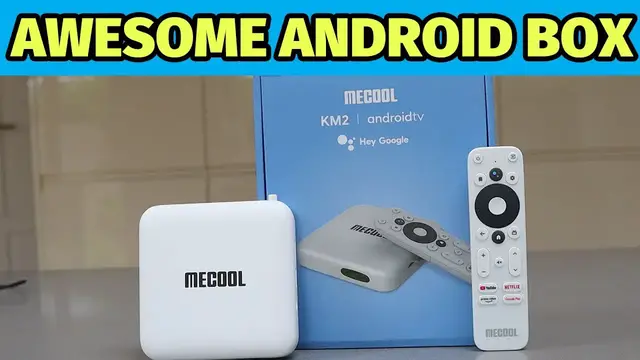
Hello this is a quick look at the KM2 kindly sent to me for review by Mecool
0:04
When you open the box you get the getting started instructions, the little box
0:09
which interestingly is white rather than black, the power cable, HDMI cable and a
0:14
very cool remote control. This is powered by some AAA batteries which are not
0:19
included. The box itself is a nice looking piece of kit, it's got a couple
0:24
of USB ports on the side as well as an SD card slot and there's various ports
0:29
around the back to get you hooked up to your network and your AV equipment. The remote's really
0:33
cool it's got a Google Assistant button as well as shortcuts to the main streaming services that
0:38
you might want to use. The box has some great hardware in it here's the stats for those of you
0:44
that like to geek out about this kind of stuff and it's very lightweight and compact. I would say this
0:49
could be a great replacement instead of getting something like a Fire Stick and it's got Chromecast
0:54
built in and has a menu that's quite similar to the Fire system if you've ever used the Amazon
0:59
on fire stuff. So you've got all the main streaming services and you can scroll down and see all the
1:04
various recommendations. It pulls them in from YouTube, Google Play, and you can install more apps
1:10
Searching for new apps and content is dead easy. Simply press the assistant button and you could ask
1:15
tell me about the matrix and then it will go away and search for information about the film or app
1:21
whatever it is you after The remote works really well Love the quick buttons to get to Netflix and all the other streaming services and they all work flawlessly All I needed to do was sign into my
1:32
account and off I went. If you'd like some other streaming services that aren't there by default
1:36
such as Disney Plus, just head over to the App Store and you'll find a huge range there
1:42
including a good range of games. If you decide to install one that needs a controller, it will
1:46
prompt you to have a gamepad to hand. I've been using a USB gamepad and I have to say this box
1:51
performs really well. The games run silky smooth which makes this both a streaming device and a
1:58
nice little console. There's some good free games as well as ones that you can purchase
2:02
And that got me wondering, being an Android box, I know that Steam on the PC has an Android app so
2:08
could it perhaps stream my games from my computer? And yes it can but only if I connect it via the
2:16
network connection rather than Wi-Fi that's now opened up a huge range of extra games I just leave
2:22
my PC on and it can stream it over my home network via the wired connection and I have to say they
2:28
they work really well so it means I can play these games on my big TV rather than on my computer
2:34
monitor this is a really solid Android box it's a good alternative to things like the Amazon Fire
2:40
range it's got a lot of great features and I really like the remote with the shortcut buttons
2:46
that's similar to my TV and just makes using it much simpler. Don't forget to hit the subscribe
2:50
button and if you're interested in Android boxes check out this one that's also a projector